23 May
|
23
min read

200-hour wait & a backlog crisis: scaling customer support for lean ops

Support Ops & Teams
Growth & Metrics
Delivery Manager Everhelp
Hlib
Delivery Manager

TL; DR

Support backlogs are systematic failures. They happen when ticket volume scales and hiring doesn’t keep pace. Adding more headcount without fixing the underlying process also just makes the problem more expensive. This causes agent burnout and deflated CSAT, also diverging core teams from business development to support queues. However, there’s a fix. With right-sized external coverage, AI-assisted triage that deflects up to 60% of incoming volume, and demand-matched forecasting, support teams can eliminate backlog and transition to a manageable, predictable workload. Our greatest example is the case of Mili, a SaaS app that went from a 207-hour FRT and a single overwhelmed agent to 4-minute responses and 85% CSAT.

Support backlog is the single most widespread problem across every industry. To this day, businesses believe that it’s a purely staffing issue. Yet, if we look at customer support as a system, rather than purely as a function, it becomes clear that it’s a more systemic problem.

And somewhere between an increasing volume of queries and the need for near-instant excellent customer service, the backlog is born.

What would your solution be? Hiring more agents seems like an obvious response. However, it’s a highly insufficient strategy in the long run as it inflates support costs without solving the backlog issue. We’ve found an anecdote on Reddit that perfectly illustrates this struggle:
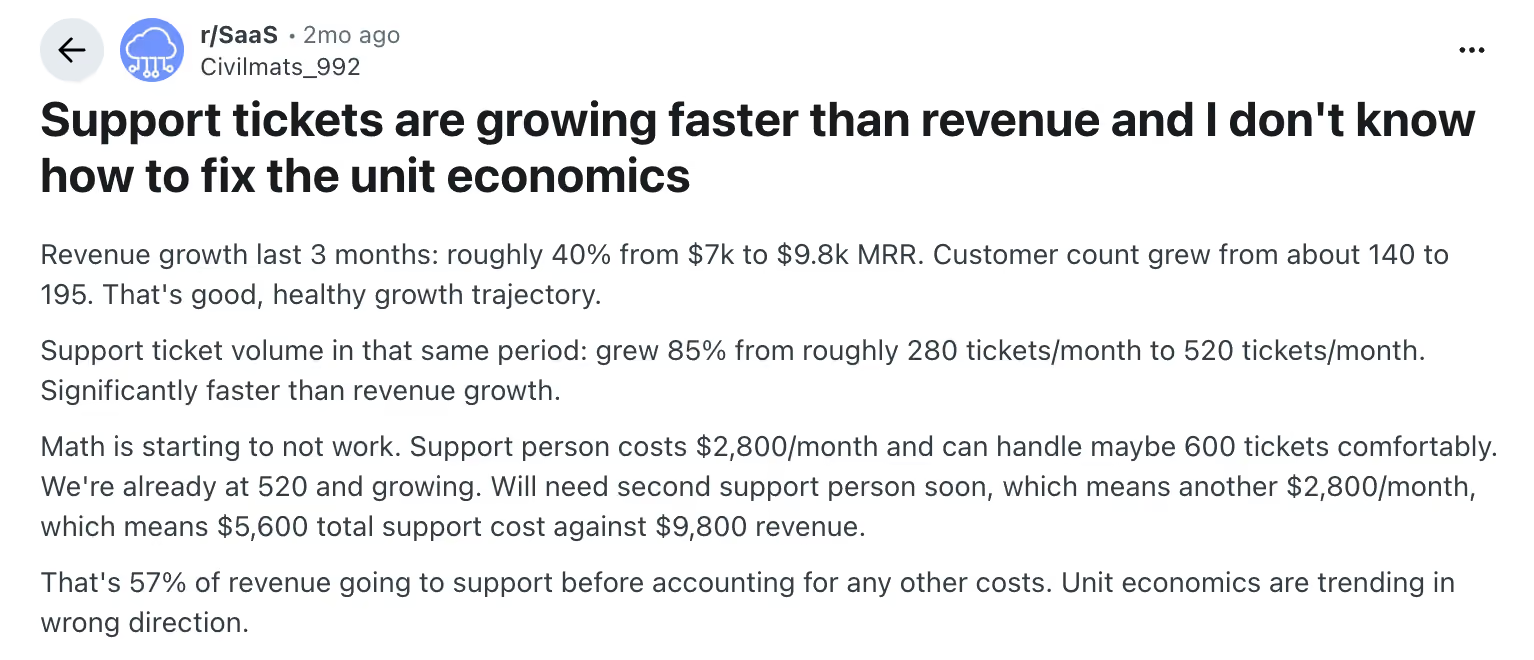
reddit thread about support tickets growth without revenue

Modern problems require modern solutions, and today we will talk about how businesses can get rid of the ticket backlog and improve their digital CX just by scaling customer support more smartly. 

The "Success Trap": When Growth Becomes a Nightmare

Though business growth is the goal, it can also quickly turn into a pressing issue. The processes and informal workarounds that built a business in its early stages often become the biggest constraints as the company expands its customer base. And support operations are usually the first to show it.

The core tension is structural: 

What makes it worse is how invisible the damage is during an active growth phase. Revenue looks healthy, the user base is expanding, and dashboards are green. Meanwhile:

  • Agents are rushed into ticket handling before they're properly trained
  • Response times slip
  • And customers receive inconsistent, error-prone support. 

The human factor

Despite the current trend for AI, support is still mostly a human function. And, based on the trends we have previously discussed, it seems like it will stay that way for a while.

So, when ticket volume doubles or triples within weeks of a growth spike, your team is likely to feel stretched too thin, leading to higher error rates and lower morale. The quickest recipe for a high agent turnover. 

Hiring more people feels like the logical response, right? Well, now consider that replacing a single support agent costs between $5,000 and $10,000 in recruiting and ramp-up costs, and multiply that by your team’s churn. 

Adding headcount without fixing underlying processes only intensifies coordination issues and management overhead on top of an already broken system. 

{{cta}}

What Our Research Taught Us About "Support Debt"

Having partnered with over 100 clients, we’ve noticed that this “support debt” (aka insufficient coverage of customer service) places much greater strain on businesses than just low CSATs and poor reviews. And that’s what drives them to try scaling customer support teams with an outsourcing partner like us. 

However, if the process is not well organized, it creates additional problems. 

Note: When companies first outsource support, they're typically told agents will start operating within two to four weeks. However, handling tickets and being proficient aren’t the same. A proficient agent understands the product deeply enough to handle edge cases, maintain brand voice, and recognize escalation signals, which requires much more time and training.  

This wouldn’t be such a big issue if agents stayed long enough after they are onboarded. Yet reports show that annual attrition in BPO environments typically ranges from 30% to 45%, with high-pressure operations reaching 60%. But what exactly drives the agents away? 

We’ve gone through the depths of the Reddit discussions and lone industry case studies, and outlined 3 core problem patterns. 

1. The "all hands" death spiral

When support volume outpaces the team, the queue gets covered the only way it can be: everyone steps in. Developers take on onboarding questions and troubleshoot issues, while operations managers work the chat queue. This does help resolve more tickets, but at a cost of delayed product cycles and stalled business development.
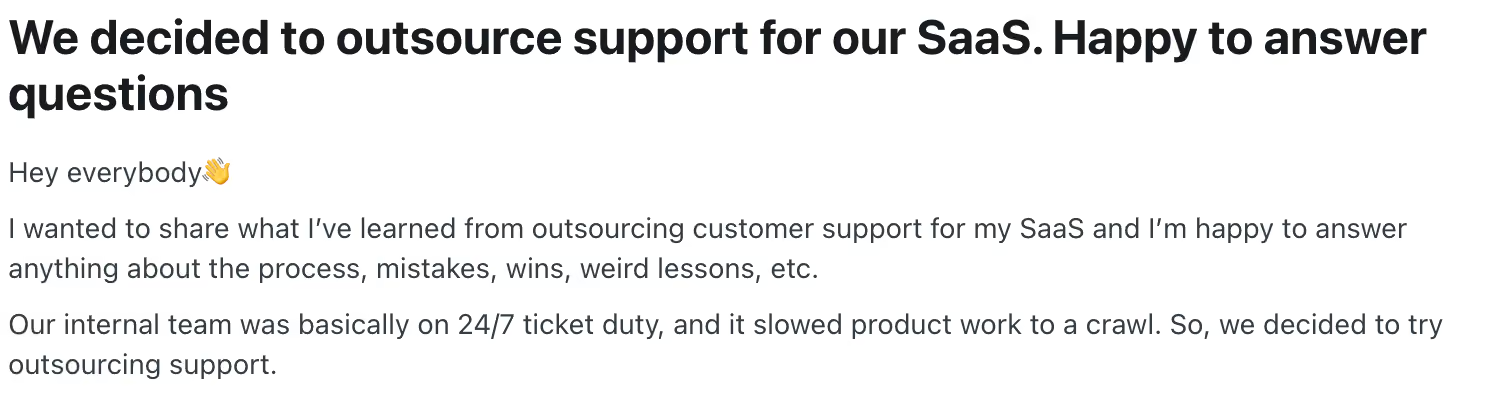
Source: https://www.reddit.com/r/SaaS/comments/1qj9jgm/we_decided_to_outsource_support_for_our_saas/

The comment you see has appeared, in various forms, across multiple Reddit threads on the topic. So the situation is not an edge case, as many startups try to absorb the support volume by themselves first. However, it just prolongs the issue and delays product development.

2. The mental drain of "wearing too many hats."

This leads us up to another difficulty – context-switching at volume. Our research found that forcing a core team to handle support "frees up zero headspace" for innovation. Because if you make a product manager swich between roadmap work and offering personalized customer support to the audience, they not only lose working hours, but also the mental depth required to do either job well.

Research on task-switching consistently shows that each interruption makes us lose focus, with returning to the same depth of engagement taking around 23 minutes. Our brain basically turns into a laptop with 15 Google Chrome tabs open. 

3. The "Monday morning backlog" is real

Finally, our research found a recurring theme on Reddit of support teams struggling with “Monday morning backlog.” The issue is that customers submit tickets overnight and on weekends, which, without a dedicated 24/7 team, are only processed on Monday morning.
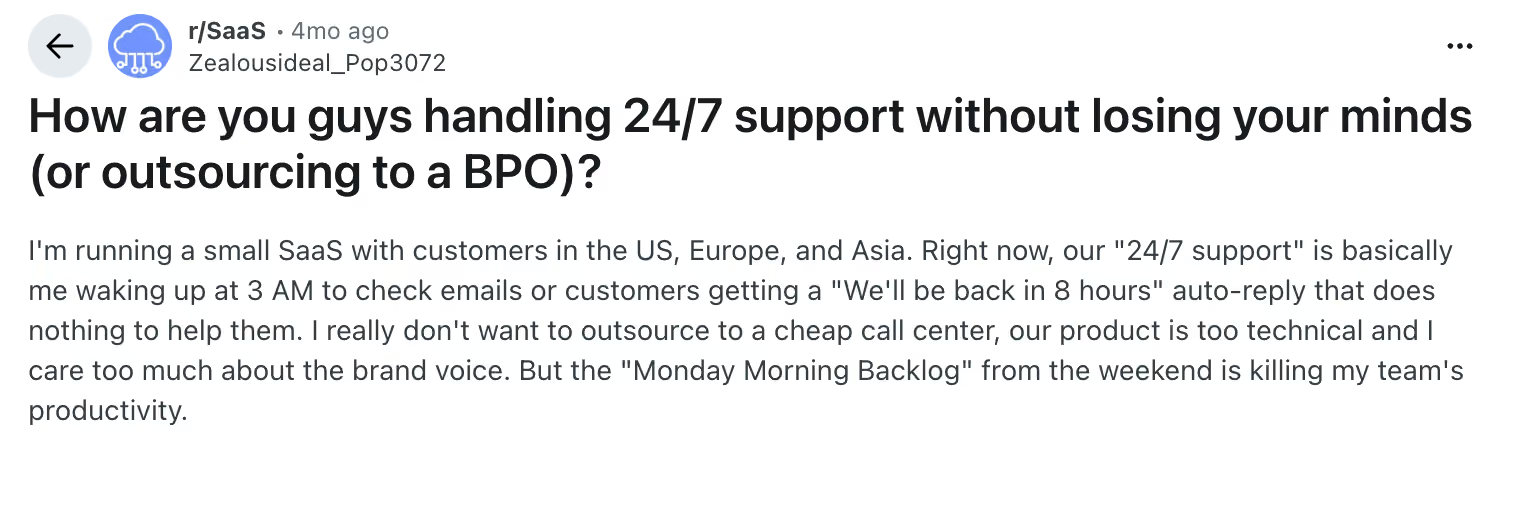
Source: https://www.reddit.com/r/SaaS/comments/1qobbpv/how_are_you_guys_handling_247_support_without/

As a result, the queries compound into a queue that will take half the day to work through. And that’s another reason for the team to scale up through outsourcing.

Learn more about building a strong support system and agent retention from our SaaS customer support guide.
How Mili broke the backlog cycle

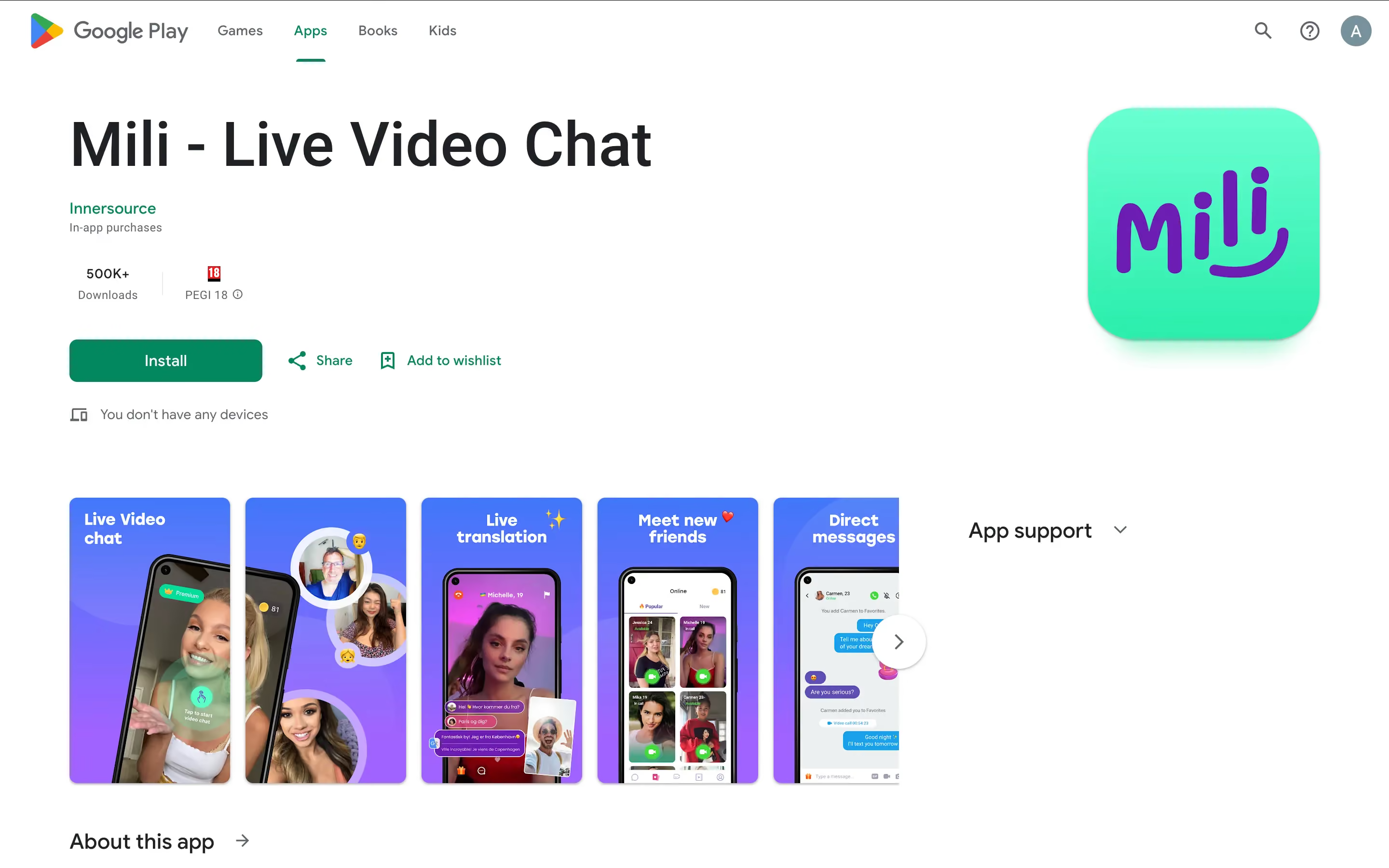
Mili - Live video chat app SaaS

One of the great examples of how scaling with an external team can help with support backlog (of any sort) is our client, Mili

About the client: Mili is a large video chat app with over 500K downloads and a global community of 1M+ open-minded people who want to genuinely connect with strangers online. It offers such functions as live streaming, interest-based matching, and an internal rating system so users know who they can talk to safely.

Step 1. Moving from "reactive" to "proactive" support

When Mili just came in, their support team had only 1 agent handling 215 monthly customer requests with an FRT of 207 hours. So here’s what we did:

  • Established a strong recruitment and SaaS customer support onboarding process to ensure agents can handle up to 2.5K requests without a backlog.
    Implemented in-depth performance tracking alongside customer service analytics, allowing the team to consistently improve and address customer queries more effectively
  • Finally, we introduced regular reporting on performance trends, which allowed the client’s team to catch and address issues before customers complain. 

Step 2. Killing the "weekend anxiety" once and for all

One thing to clarify here is that our client’s backlog wasn't due to an ignored weekend volume. It was the predictable outcome of a single agent covering a global, always-on app with no overnight or weekend infrastructure.

That’s why we:

  • Brought in a shared team of six agents
  • Organized the support coverage model around Mili's actual usage patterns based on the results of support trends’ analytics.

Taking all these steps allowed us to reduce the first-response time to just 4 minutes, which, in turn, has boosted customer satisfaction metrics. 

Step 3. Giving the product team their "brain power" back

As we have assembled a team of support representatives for Mili, their in-house professionals can finally return to their operations. Moreover we:

  • Strengthened their escalation pathways so that complex or unresolved issues were routed directly to the relevant team.
  • As a result, the average reply time went down from 205 hours to just 5 minutes.

Step 4. Restoring trust (and the CSAT score)

Our final measure was to set up a feedback loop to collect, analyze, and integrate user feedback directly into the product. Why? Because we believe you should never underestimate the voice of the customer. 

This effort allows the business to make targeted changes to product development that match the audience's direct needs. And in Mili’s case, by introducing the customer feedback collection system and implementing the necessary changes, they have improved their CSAT from 58.2% to 85%. 

{{cta}}

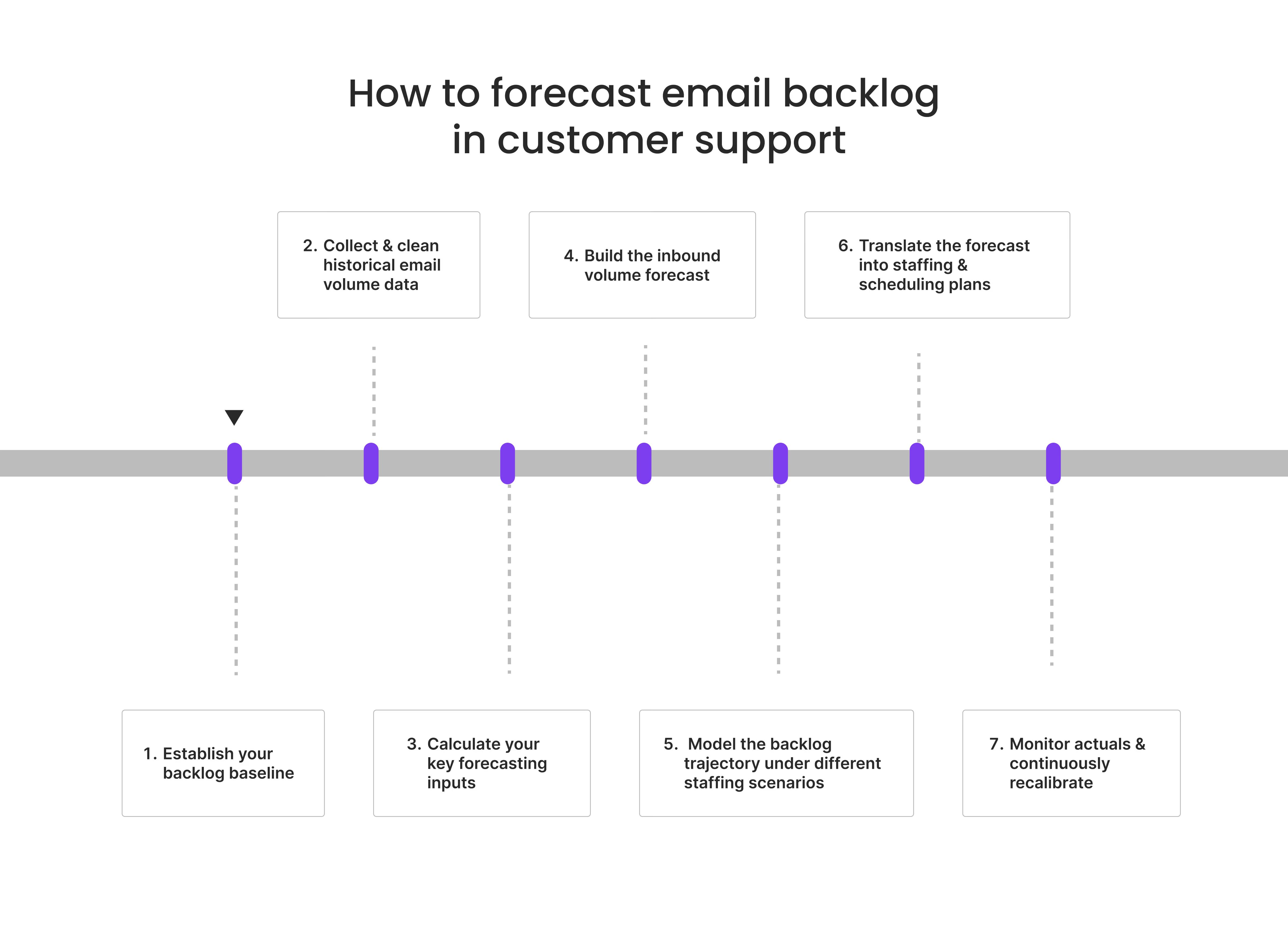
How to forecast email backlog in customer support? 

We’ve covered what can cause backlog, why agents leave when they have to deal with it, and how customer service outsourcing can help eliminate that backlog. 

What we didn’t discuss is whether your team can predict backlog at all and how. The answer is yes, so let’s dive in.
how to forecast email backlog in customer support team

We’ve covered what can cause backlog, why agents leave when they have to deal with it, and how customer service outsourcing can help eliminate that backlog. 

What we didn’t discuss is whether your team can predict backlog at all and how. The answer is yes, so let’s dive in.

Step 1. Establish your baseline

Before forecasting future backlog, you need an accurate view of your current queue. If your baseline is wrong, every downstream staffing decision will be built on sand. 

  1. Define what will be considered a backlog.

For some teams, the backlog includes all open tickets. For others, it only covers emails awaiting the first response. At a minimum, define whether the following count:

  • Tickets awaiting first response
  • Pending tickets requiring follow-up
  • Reopened cases
  • Duplicate or merged ticket rules
  • VIP or premium-priority segments

  1. Capture your ticket lifecycle data. 

Your CRM or helpdesk platform should provide this information, specifying:

  • Ticket creation timestamp
  • First response timestamp
  • Resolution timestamp
  • Current ticket status
  • SLA breach indicators
  • Customer segment or issue category

  1. Segment backlog by “age” and urgency.

A queue of 5,000 tickets sounds alarming, but raw volume alone is misleading. Because a 48-hour billing complaint from a premium account is a churn risk, but a 3-hour-old shipping inquiry may not be.

  1. Identify carry-forward patterns.

Most support teams have certain ticket processing patterns that contribute to the creation of the backlog. Commonly, the drivers include:

  • Weekend closures
  • Overnight inbound accumulation
  • Public holidays
  • Product outages
  • Seasonal demand spikes

Knowing how much volume is routinely carried forward into the next business day and why is the first step towards proper backlog forecasting. 

Step 2. Collect and clean historical email volume data

Forecasting without historical data is like planning inventory without sales history. You need context to be able to plan your support accordingly. 

  1. Pull at least 12–24 months of historical data.
    Short-term data usually omits seasonal patterns and can’t capture sudden volume spikes. That’s why it’s ideal to gather 1-2 years of support history, as it can show both recurring patterns and broader trends.

  2. Break data into daily or hourly intervals.
    Since support capacity planning is usually needed week by week, monthly averages are practically useless. What you need to look for to plan correctly are daily inbound peaks, weekly cycles, off-hour accumulation, and post-campaign (or feature launch) surges.

  3. Consider overlay business events.
    Understating your raw volume is useful, but you also need to consider your other business activities that may drive ticket surges. We are talking marketing campaigns and product releases, billing cycles, policy changes, etc.

  4. Clean the data before modeling.
    Remove or flag any auto-replies, spam, system outages, channel migration anomalies, and misclassified tickets. Dirty inputs create messy forecasts.

Step 3. Calculate your key forecasting inputs

Volume tells you about the support demand. But operational KPIs will inform the capacity you need to cover it.

  1. Start by measuring true email Average Handle Time (AHT).
    This includes the whole process from reading the query and investigating the issue to updating CRM, internal notes, and providing a follow-up.

  2. Segment data by ticket type.
    Different types of tickets need different amounts of time to process them. Order status updates can take 4 minutes, whereas troubleshooting issues might last for 30. When leaders forecast using blended averages, they often understaff complex-ticket periods.

  3. Calculate throughput.
    Throughput shows you the number of tickets resolved per productive hour/day by one agent, and basically tells you the baseline capacity of your team. The basic formula: if your team has 50 open tickets (WIP) and resolves 10 per day, the backlog burn rate is 5 days (assuming zero new inbound).

  4. Account for shrinkage.
    Agents are never available 100% of paid hours. PTO, meetings, training, breaks, system downtime, and absenteeism all directly affect effective throughput. A realistic shrinkage factor often ranges from 25–35%.

Step 4. Build the inbound volume forecast.

Now it’s time to put the collected historical data to use. 

  1. Use time-series forecasting models → most mature support organizations use methods like exponential smoothing, moving averages, and ARIMA models to generate a baseline forecast based on daily, weekly, and seasonal cycles

  2. Layer in seasonality adjustments → If your historical data shows a consistent 40% volume spike every August, a flat-trend model will produce a chronically understaffed August. So, outline your recurring demand cycles, including holiday shopping periods, product recalls, new feature launches, etc.

  3. Module demand scenarios range → Best practice is to generate three scenarios – optimistic, baseline, and conservative – as the basis for scenario planning and contingency staffing decisions.

Step 5: Model the backlog trajectory under different staffing scenarios

The core of email backlog forecasting is simulating how the queue evolves, given projected inflow and planned staffing output. The formula is simple:

Opening Backlog + Projected New Inbound − Projected Resolved Volume = Ending Backlog

Based on the result of this calculation, simulate multiple staffing scenarios. Run "what-if" models adjusting agent headcount, shift patterns, and productivity assumptions to see how the backlog grows or shrinks under each scenario. Specifically, consider the following staffing options:

  • Current staffing only
  • Overtime added
  • Temporary contractor support
  • Cross-skilled overflow teams
  • Shift redistribution

As you run these tests, you will be able to understand the staffing floor to maintain SLA compliance. The goal is to find the minimum staffing level that allows the team to:

  • handle all new inbound within SLA and 
  • burn down carry-forward backlog before it breaches its own SLA windows. 

Note: Unlike voice, email does not require Erlang-C modeling unless the target response time is less than 1 hour.

Finally, simulation outputs should tell you exactly when the current backlog will reach zero at a given staffing level. This will allow your managers to make early decisions about overtime, cross-skilling, or temporary headcount.

Step 6. Translate the forecast into staffing and scheduling plans

A backlog forecast only has operational value when it drives concrete scheduling decisions. So, based on your previous findings:

  1. Calculate required FTEs. 

The key formula here: 

Required FTE = (New Incoming Volume + Backlog Stabilization Workload) / Productive Hours per FTE.

  1. Protect dedicated email time.

One major scheduling mistake is constantly pulling email agents into live channels. Instead:

  • Assign protected backlog-clearance blocks
  • Reserve Monday surge staffing
  • Build post-holiday catch-up schedules
  • Use strategic overflow routing. 

  1. Prepare for predictable spikes.

Monday mornings, holiday re-openings, and post-launch periods rarely come as a surprise. If your business hours exclude weekends, you can be sure that Friday's close-of-business backlog will be the opening backlog on Monday. So, based on this, you should staff the first open day of the week as a heavy email shift. 

Step 7: Monitor actuals and continuously recalibrate

Forecasting is not “set it and forget it.” As your business evolves and your customer base grows, it’s important that you continuously update your support planning strategy. 

  1. Track forecast accuracy using MAPE or MAD → Mean Absolute Percentage Error (MAPE) and Mean Absolute Deviation (MAD) are standard WFM metrics for evaluating how closely forecasted volume matches actuals.

  2. Conduct intraday backlog monitoring → Real-time dashboards showing current queue depth, rate of inbound, and agent throughput allow for spotting deviations early and trigger same-day adjustments.

  3. Refresh weekly forecasts → Most WFM teams operate on a rolling forecast cycle: update the following week's staffing plan with the latest actuals every Thursday or Friday. For email backlog specifically, re-input the current open ticket count as the new opening backlog for the next planning period.

  4. Feed back exceptions into the model → When actual volume deviates significantly from forecast, document the cause and tag that period as either an anomaly or a recurring event pattern to be included in future forecasts.

Implementing AI to help reduce the ticket backlog

One of the modern-day ways to fight backlog is through AI implementation. Based on our own experience introducing Evly AI for our clients as well as industry accounts of using AI for triage and auto-resolution, we know that companies can achieve deflection rates of 40–60%. Mind you, the industry average for basic, text-based support is usually 23%.

Such high rates are driven by 3 primary mechanisms:

  • Intelligent routing, as it classifies and assigns tickets without manual sorting.
  • Automated resolution, which handles high-frequency, low-complexity requests, responds in under 30 seconds.
  • And AI agent assist, which drafts replies and surfaces relevant knowledge for tickets that do reach a human, cutting per-ticket handle time.

If 40–60% of incoming volume never reaches the queue, the backlog burn rate compresses even without any new hires. And, as a bonus, your agents can concentrate their efforts on those tickets requiring genuine judgment, empathy, or efforts to maintain app retention benchmarks.

The bottom line: building support that isn’t a growth killer

A 200-hour wait didn't break Mili's product, but it was getting there. But the good news is that the support debt described in this article is avoidable.

You can solve the backlog problem with more accurate support planning and prevent burnout with smarter staffing models. 

Your product team deserves better than spending Mondays clearing a ticket queue. So, if your backlog is already ahead of you, let's talk.

Outsourced customer service
Get rid of backlog - scale your support smarter with EverHelp
Outsourced customer service

Table of contents

To Page

Help someone else stay in the know. Hit that share button!
Read also

VP of Customer Support
Valentyna
VP of Customer Support
May 21, 2026
20
min read
CEO Everhelp
Nataliia
Chief Executive Officer
May 19, 2026
7
min read
CEO Everhelp
Nataliia
Chief Executive Officer
May 13, 2026
9
min read
VP of Customer Support
Valentyna
VP of Customer Support
May 12, 2026
16
min read
quality assurance control team lead Everhelp
Victoria
QC Team Lead
May 11, 2026
21
min read
Chief Commercial Officer Everhelp
Andrew
Chief Commercial Officer
May 5, 2026
18
min read
VP of Customer Support
Valentyna
VP of Customer Support
May 4, 2026
22
min read
Delivery Manager Everhelp
Hlib
Delivery Manager
May 1, 2026
8
min read
CEO Everhelp
Nataliia
Chief Executive Officer
Apr 29, 2026
23
min read
Olha
Support Operations Manager
Apr 20, 2026
20
min read
VP of Customer Support
Valentyna
VP of Customer Support
Apr 16, 2026
14
min read
CEO Everhelp
Nataliia
Chief Executive Officer
Apr 16, 2026
11
min read
AI Integrations Lead Everhelp
Oleksandr
AI Integrations Lead
Apr 13, 2026
26
min read
Delivery Manager Everhelp
Hlib
Delivery Manager
Apr 9, 2026
23
min read
VP of Customer Support
Valentyna
VP of Customer Support
Apr 7, 2026
23
min read
quality assurance control team lead Everhelp
Victoria
QC Team Lead
Apr 2, 2026
22
min read
Olha
Support Operations Manager
Apr 1, 2026
21
min read
Olha
Support Operations Manager
Mar 30, 2026
10
min read
Delivery Manager Everhelp
Hlib
Delivery Manager
Mar 25, 2026
10
min read
Chief Commercial Officer Everhelp
Andrew
Chief Commercial Officer
Mar 24, 2026
22
min read
VP of Customer Support
Valentyna
VP of Customer Support
Mar 19, 2026
15
min read
Chief Commercial Officer Everhelp
Andrew
Chief Commercial Officer
Mar 18, 2026
15
min read
Chief Commercial Officer Everhelp
Andrew
Chief Commercial Officer
Mar 16, 2026
7
min read
VP of Customer Support
Valentyna
VP of Customer Support
Mar 16, 2026
6
min read
Chief Commercial Officer Everhelp
Andrew
Chief Commercial Officer
Mar 16, 2026
7
min read
Delivery Manager Everhelp
Hlib
Delivery Manager
Mar 13, 2026
10
min read
VP of Customer Support
Valentyna
VP of Customer Support
Mar 11, 2026
27
min read
customer support delivery manager Daryna Everhelp
Daryna
Delivery Manager
Mar 10, 2026
12
min read
CEO Everhelp
Nataliia
Chief Executive Officer
Mar 6, 2026
15
min read
Chief Commercial Officer Everhelp
Andrew
Chief Commercial Officer
Mar 5, 2026
15
min read
AI Integrations Lead Everhelp
Oleksandr
AI Integrations Lead
Feb 12, 2026
20
min read
VP of Customer Support
Valentyna
VP of Customer Support
Feb 10, 2026
13
min read
VP of Customer Support
Valentyna
VP of Customer Support
Feb 8, 2026
30
min read
Chief Commercial Officer Everhelp
Andrew
Chief Commercial Officer
Feb 6, 2026
12
min read
AI Integrations Lead Everhelp
Oleksandr
AI Integrations Lead
Feb 5, 2026
21
min read
CEO Everhelp
Nataliia
Chief Executive Officer
Feb 2, 2026
13
min read
Delivery Manager Everhelp
Hlib
Delivery Manager
Jan 30, 2026
25
min read
VP of Customer Support
Valentyna
VP of Customer Support
Jan 28, 2026
11
min read
Olha
Support Operations Manager
Jan 23, 2026
11
min read
CEO Everhelp
Nataliia
Chief Executive Officer
Jan 22, 2026
23
min read
AI Integrations Lead Everhelp
Oleksandr
AI Integrations Lead
Jan 17, 2026
17
min read
customer support delivery manager Daryna Everhelp
Daryna
Delivery Manager
Jan 16, 2026
20
min read
VP of Customer Support
Valentyna
VP of Customer Support
Jan 14, 2026
22
min read
VP of Customer Support
Valentyna
VP of Customer Support
Jan 13, 2026
14
min read
CEO Everhelp
Nataliia
Chief Executive Officer
Jan 13, 2026
8
min read
quality assurance control team lead Everhelp
Dmytro
QC Delivery Manager
Jan 11, 2026
27
min read
VP of Customer Support
Valentyna
VP of Customer Support
Jan 5, 2026
25
min read
Chief Commercial Officer Everhelp
Andrew
Chief Commercial Officer
Jan 4, 2026
20
min read
CEO Everhelp
Nataliia
Chief Executive Officer
Jan 4, 2026
17
min read
VP of Customer Support
Valentyna
VP of Customer Support
Dec 31, 2025
15
min read
customer support delivery manager Daryna Everhelp
Daryna
Delivery Manager
Dec 30, 2025
15
min read
AI Integrations Lead Everhelp
Oleksandr
AI Integrations Lead
Dec 24, 2025
20
min read
Delivery Manager Everhelp
Hlib
Delivery Manager
Dec 23, 2025
30
min read
VP of Customer Support
Valentyna
VP of Customer Support
Dec 17, 2025
20
min read
Olha
Support Operations Manager
Dec 16, 2025
28
min read
quality assurance control team lead Everhelp
Victoria
QC Team Lead
Dec 15, 2025
14
min read
Olha
Support Operations Manager
Dec 13, 2025
26
min read
VP of Customer Support
Valentyna
VP of Customer Support
Dec 12, 2025
15
min read
Delivery Manager Everhelp
Hlib
Delivery Manager
Dec 10, 2025
15
min read
Chief Commercial Officer Everhelp
Andrew
Chief Commercial Officer
Nov 21, 2025
6
min read
CEO Everhelp
Nataliia
Chief Executive Officer
Nov 11, 2025
15
min read
Olha
Support Operations Manager
Oct 30, 2025
20
min read
Chief Commercial Officer Everhelp
Andrew
Chief Commercial Officer
Oct 25, 2025
5
min read
VP of Customer Support
Valentyna
VP of Customer Support
Sep 24, 2025
15
min read
customer support delivery manager Daryna Everhelp
Daryna
Delivery Manager
Sep 8, 2025
10
min read
customer support delivery manager Daryna Everhelp
Daryna
Delivery Manager
Aug 5, 2025
10
min read
Chief Commercial Officer Everhelp
Andrew
Chief Commercial Officer
Jun 26, 2025
11
min read
Chief Commercial Officer Everhelp
Andrew
Chief Commercial Officer
Jun 21, 2025
8
min read
VP of Customer Support
Valentyna
VP of Customer Support
Jun 17, 2025
10
min read
VP of Customer Support
Valentyna
VP of Customer Support
May 30, 2025
5
min read
VP of Customer Support
Valentyna
VP of Customer Support
May 19, 2025
13
min read
Delivery Manager Everhelp
Hlib
Delivery Manager
Apr 14, 2025
15
min read
VP of Customer Support
Valentyna
VP of Customer Support
Mar 1, 2025
11
min read
CEO Everhelp
Nataliia
Chief Executive Officer
Jan 31, 2025
9
min read
AI Integrations Lead Everhelp
Oleksandr
AI Integrations Lead
Jan 29, 2025
10
min read
VP of Customer Support
Valentyna
VP of Customer Support
Dec 20, 2024
10
min read
CEO Everhelp
Nataliia
Chief Executive Officer
Oct 16, 2024
9
min read
Chief Commercial Officer Everhelp
Andrew
Chief Commercial Officer
Aug 13, 2024
7
min read
VP of Customer Support
Valentyna
VP of Customer Support
Jun 3, 2024
8
min read
CEO Everhelp
Nataliia
Chief Executive Officer
Mar 11, 2024
10
min read
Chief Commercial Officer Everhelp
Andrew
Chief Commercial Officer
Feb 12, 2024
9
min read
VP of Customer Support
Valentyna
VP of Customer Support
Jan 22, 2024
18
min read
VP of Customer Support
Valentyna
VP of Customer Support
Jan 11, 2024
18
min read
benefits for live chat support
VP of Customer Support
Valentyna
VP of Customer Support
Jun 27, 2023
5
min read
CEO Everhelp
Nataliia
Chief Executive Officer
Oct 3, 2022
7
min read