Support Ops & Teams
Growth & Metrics
Published on
15.08.2026
Last updated on
01.09.2026
Customer feedback surveys: types, questions, and the 3% problem

Valentyna
VP of Customer Support

Valentyna
VP of Customer Support
.webp)
A customer feedback survey is a structured way to capture how customers feel about a product, a support interaction, or the overall relationship, either at a single point in time or over time. The best customer feedback survey questions are short and specific: one rating question tied to a real event (“How satisfied were you with the support you received today?”) plus one optional open-text follow-up.
Collecting an answer is the easy part. Any tool can throw a pop-up on your site. The hard work begins after a customer submits a low score. Though generic pop-up surveys average just 3.65% response according to SurveyMonkey’s 2025 platform data, most teams chase that thin slice of responses, yet do nothing structured with the scores that do come in. That’s the 3% problem, and in this piece, we will provide information and a suggested framework to address it.
A customer feedback survey is a structured request for customer sentiment. It’s usually built around one or more standardized metrics and sent at a defined point in the customer journey. As we mentioned in the beginning, some of these measure a single interaction, while others track the health of a relationship across months.
Those standardized metrics are where the terms tend to get muddled. A customer satisfaction survey often gets used as a catch-all. However, technically it points to just one methodology (CSAT among several). NPS and CES also exist and can answer different questions. We'll get into them below.
Naming the metric and sending the survey is the easy part, though. Software has turned collection into maybe 10% of the work. The other 90% is reading hundreds of open-text answers, spotting the detractor who's about to churn, and fixing the thing they complained about. Most survey programs stall right there. According to Medallia's 2026 State of Customer Experience Report, 30-40% of departments take no action after receiving customer feedback, which is why this guide devotes more time to what should happen after the score arrives than to how to collect it.
People are tired of being surveyed. Most of us get more feedback requests in a week than we'd ever bother to answer, so we tune them out. And the generic "rate your experience" email with a link is usually the first to get ignored. If you’re relying on a link buried in an inbox, you’re fighting for attention you probably won’t win.
Before you agonize over wording, know this: the channel you pick sets the ceiling on your response rate. Here’s where the numbers land on recent platform data:
Survicate’s 2025 benchmark, drawn from 4,332 surveys across 460 companies, puts the median response rate at just 9.98% overall, with:
So the “average” survey gets one response for every ten people who see it, and the pop-up gets almost none.
Unfortunately, a cleverer subject line won’t fix low response rates. But better timing and placement will. Transactional surveys, fired right after a support case, a purchase, or a chat close, consistently outperform relational surveys sent on a cold schedule. Zonka’s research shows transactional NPS running 8–12 points higher than relational NPS, with a 25–40% range depending on the channel.
The reason is simple. When you ask while the experience is still fresh, the customer knows exactly what you mean, so answering barely costs them a thought. Wait three weeks, and you're asking them to dig up a memory they've long since put away, which most people won't do. You can watch this play out across your own customer service statistics: where and when you ask usually matters more than which survey you sent.
CSAT, NPS, CES. Teams throw these around like they're interchangeable, and they're not even close. Each one asks a different question at a different point in the journey. When you launch the survey measuring the wrong metric at the wrong moment, you end up with numbers you can't actually do anything with. We go deep into the distinctions in CSAT vs NPS vs CES, but for now, here's the working comparison.
Note: industry benchmarks were aggregated across Retently, SurveyMonkey, and our own benchmarking research.
A CSAT survey asks how satisfied someone was, usually on a 1–5 or 1–100 scale. There are 2 types of such surveys:
If you're running support, the transactional version is the one you'll lean on, and you'll want it to fire the second a ticket closes. According to SurveySparrow, with a good survey, you can achieve a 20% to 30% response rate. If it’s lower, the data isn’t representative.
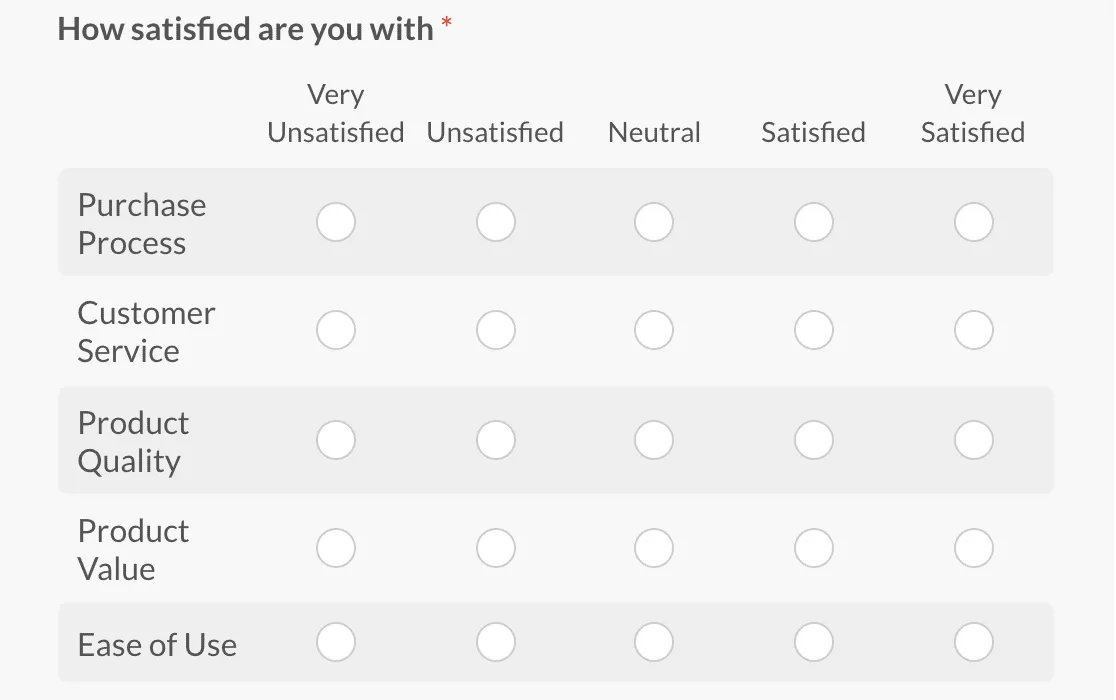
These surveys helped us establish that most industries average around 78% on CSAT, with some variation across industries. Retently's 2026 data puts:
Knowing where you land relative to others helps you avoid the low end. In most SaaS categories, going below 70% CSAT means your data is already behind your competitors’. As such, we can say that CSAT is one of those customer satisfaction metrics no support team should be working without.
Learn more about how to read those transactional scores in our AI-backed CSAT analysis.
An NPS survey asks one question: “How likely are you to recommend us to a colleague?” and is answered on a 0–10 scale. It sorts respondents into 3 categories:
The thing to remember is that NPS measures the health of the whole relationship, not just how one support chat went. That's why firing it right after a support contact is a mistake. Picture asking someone how loyal they feel to your company thirty seconds after you've sorted out their billing dispute. Whatever they type is really about that one interaction, not the time they've spent with you.
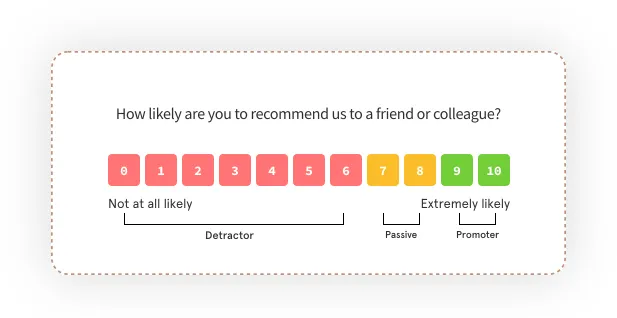
For context, the 2026 all-industry NPS average sits around 32, and B2B Software and SaaS tend to cluster a bit higher, around 36–41. Run it quarterly, keep it well clear of your support queue, and when a detractor score comes in, treat it as an early warning of customer loyalty risk.
A CES survey asks how easy it was to get something done, and it’s the strongest of the three for post-support and self-service evaluations. The evidence behind it is hard to argue with.
The Gartner (formerly CEB) research published in the 2010 Harvard Business Review article Stop Trying to Delight Your Customers found that 96% of customers with a high-effort interaction became more disloyal, compared with just 9% of those with a low-effort interaction. Effort predicts churn better than satisfaction does.
A satisfaction average can stay high even when customers are repeating themselves, switching channels, or contacting you twice. CES is what actually catches that. And a high-effort interaction is usually a fixable one. Because too often it just comes down to the customer service qualities of the agent handling it, like whether they can resolve an issue in one pass instead of bouncing the customer around.
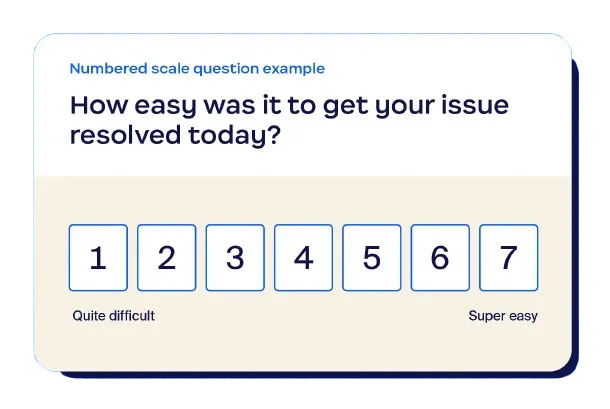
A post-purchase survey is a transactional survey at the point of sale, usually blending CSAT (“How was your experience?”) with a touch of CES (“How easy was checkout?”). There might be some differences in how the surveys are built depending on the industry.
For example, a retail customer feedback survey typically runs a CSAT star rating on the order confirmation. In contrast, a restaurant customer feedback survey usually pairs a quick CSAT with an open comment on the receipt or a table QR code. Both are just transactional CSAT/CES dressed for the industry.
Sent well, inside a confirmation flow or shortly after delivery, these programs land in the 25–40% response range in B2C.
{{cta}}
Here's the good news: you don't have to pick just one. Any support team that's been at this for a while runs all three, and the trick is giving each survey its own trigger so the same poor customer isn't pinged five times a week.
Really, it comes down to two questions:
Answer those, line each metric up with the right moment, and your wider set of customer service metrics starts telling one consistent story instead of a bunch of numbers that argue with each other.
The question to ask at every stage is simple: what does the customer have fresh in their mind right now? Match the metric to whatever's top of mind at that moment, give each one its own trigger, and you'll get actually honest (and representative) answers.
Running all three is standard, but only if each has its own trigger. Avoid stacking them at the same touchpoint, as you’ll create the fatigue we covered above.
Besides deciding when and which surveys to use, it’s also important to design these questionnaires so they are easy to follow and answer.
The best customer feedback survey questions are short, specific, and tied to something the customer just did. Most surveys include:
Here are the customer feedback survey question examples worth starting with:
Then the follow-up can be formulated in the following way:
That open-text field is where the real gold is. And, let's be honest, where the real work is too. Because it’s the comment that tells you what can be improved, and it's your quickest way to learn and understand your customer pain points. The trouble is, all that text is usually messy and unstructured, so plenty of teams gather it up and then never actually read it. And hundreds of free-text replies rotting in a spreadsheet? That's just a backlog.
When you're writing a customer service feedback survey, tie the question to the specific thing that just happened. Ask "Did we resolve your issue in one conversation?" You'll learn more from that than from a vague "how satisfied are you." The same logic carries across industries.
For example, Retail wants to know about the product and whether it showed up on time. A restaurant cares about the food and how the service feels.
The underlying shape barely changes, so creating a fresh customer feedback questionnaire for some new touchpoint isn't complicated. All you need is one rating, one comment, and then stop yourself before you tack on a third question.
Swap the wording all you like, but when you look at real customer feedback survey examples, you will notice that the high-quality ones are all built on the same handful of structures. Here are three formats you've almost certainly run into, along with where each is usually used.
The pattern is always the same: a single rating, an optional comment, sent within minutes or hours of the interaction, never days later.
You can grab our plug-and-play customer feedback survey template with ready-made CSAT, CES, and NPS questions mapped to each journey stage.
Building a survey that people finish and that gives you something to act on is not that hard. All you need to understand is that at every step you've got two goals: keep your response rate up, and make sure each answer can be sent to the right person to act on.
Here’s how to create a customer feedback survey without falling into the collect-and-forget trap. It’s the same discipline behind any well-run customer feedback system.
Work out where the customer is in their journey first, then let that decide what you measure. The metric follows the moment, never the other way around:
The mistake to avoid is deciding you want to run an NPS survey and then going looking for somewhere to put it.
One rating question they can answer in a single tap, plus one comment box they're free to skip. That's it. Nothing you do to the design will lift completion more than simply keeping the survey short.
As we’ve established, different channels produce different response rates. For transactional feedback, the best ways of communication are:
So, if the support conversation happened in chat, ask in chat while the customer is still there. The wider your mix of customer support channels, the more this matters. Of course, having an omnichannel setup makes sending the right survey to the right place far less of a headache.
Timing is everything here. Send the survey within the first few minutes after a ticket closes or an order is processed. Because by the next morning, the customer has already half-forgotten the details, and a vague memory makes for a vague answer.
Most teams skip this step. But this is your chance to turn a simple survey into an actual feedback program. So, before you send the customer feedback questionnaire, answer two questions:
If nobody is responsible for processing low scores specifically, all you'll know is that something's wrong. And what you need is for “something wrong” to be acted on. We'll get into what a real triage plan looks like next.
Almost everyone will open your survey on mobile, so check it there before launch. Run through it yourself (or ask your employees/teammates) and confirm that:
Get this wrong, and you can lose 40–60% of your responses to a clunky mobile experience.
Survey platforms are good at what they're built for: designing a clean survey, distributing it, and collecting responses in an organized way. The catch is that most stop right there, at the dashboard, leaving the actual work of analyzing the collected data to you. If you're weighing the wider category, our digital customer service tools breakdown puts survey software in context.
However, for now, let’s establish those customer feedback survey tools that make sending out questionnaires actually easier.
So, what is the best customer feedback survey tool? There isn’t one. The right pick depends on whether your priority is survey design, enterprise analytics, or fast CSAT/NPS deployment. And let’s not forget that all of these tools are designed purely for feedback collection. Acting on the results is your responsibility.
Read a more detailed breakdown about building an effective customer feedback system.
{{cta}}
Remember how in the beginning we’ve mentioned the “3% problem” (don’t scroll back, we did)? Well, the core of it is that teams pour effort into wringing responses out of the tiny slice of customers who'll bother with a pop-up, and then don’t do anything with that data. Meanwhile, the customer who rated you a 2 is still waiting to hear back, and never does.
And that’s where businesses lose revenue. Because, as customer service analytics show, 29% of consumers stop interacting with a brand after poor service; every ignored detractor is a bit more churn you signed up for without noticing. This is exactly why we at EverHelp always close the feedback loop for our clients. Here’s how it usually happens.
That handoff is the whole idea behind our human plus AI support model. The AI handles instantaneous catching and sorting, and the agent handles the part that actually requires a human — personalized customer service recovery.
Does it work? For many of our clients, we can achieve an 83% average CSAT with a 45-second first response time (and when Evly responds, just 15 seconds), and those numbers come straight out of this triage-and-recovery routine.
Pro tip: Treat feedback as an ongoing discipline instead of a monthly report, and you will be able to establish a strong voice-of-the-customer program that genuinely shapes what you build next.
The customer feedback survey best practices worth keeping are the ones that protect both your response rate and your ability to act. Here are the ones we haven’t discussed yet:
Generic, unpersonalized survey blasts underperform personalized ones across every channel tested. Thus:
Qualtrics also recommends explicitly telling respondents how their feedback will be used and who will see it, since people respond more when they feel their response will contribute to a specific purpose.
Reminders reliably lift completion, but only up to a point. After two reminders, returns diminish and repeated follow-ups start to feel like spam, actively damaging brand perception. The best option is to send a single well-timed reminder to non-responders. However, some sources recommend at most two. It’s best if you space them out three to seven days apart, using refreshed language rather than repeating the original message.
Pro tip: The reminder should go only to non-respondents, never to the full list, to avoid pestering people who already replied.
If you only read the open-text comments when you happen to find a spare hour, you'll keep missing the thing they're all telling you. Put it on a schedule instead. On a fixed review rhythm, you'd:
Do this regularly, and you will finally be able to fix the root causes of complaints and prevent them from recurring. And this is a big part of keeping your customer service standards where you want them to be.
The fatigue behind those weak benchmark numbers comes largely from people being asked too often, so put a few limits in place:
Pro tip: Set the suppression rule at the list level so nobody gets pulled into a fresh batch of surveys while they're still inside that cooldown window.
This is the practice with the strongest long-term payoff. When customers see that a previous round of feedback led to a visible change, they are measurably more likely to respond to future surveys. Multiple sources identify loop closure as one of the most durable drivers of sustained participation.
In practice, this means:
Once you've dialed in the metric, the channel, and the timing, you'll hear back from more customers than the benchmarks say you should. Now the real work starts.
People forget surveys almost immediately, but they will see and know whether you actually fixed the thing they complained about. Unaddressed feedback is how poor customer service just hardens into churn while your scores sit there looking healthy. Set things up so every unhappy response lands with someone who can act on it, and the whole program will finally show you where to take your product and your support.
{{cta}}
Help someone else stay in the know. Hit that share button!
.webp)
.webp)

.avif)
.avif)
.webp)
.webp)