Support Ops & Teams
Process Efficiency
Industry-specific
Published on
04.11.2026
Last updated on
04.11.2026
Black Friday checklist for eCommerce: Customer service & shipping prep

Victoria
QC Team Lead

Victoria
QC Team Lead

Black Friday kicks off one of the year's biggest sales periods. Just last year, U.S. shoppers spent $44.2 billion online during Cyber Week 2025, up 7.7% year over year, according to Adobe. Naturally, most stores spend months ahead preparing, so campaigns and ads are set by early November.
What gets less attention, though, is the support inbox and the fulfillment queue. And we would argue that these aspects are no less important for driving profits than any ad campaign on Meta. So this year, we wanted to encourage businesses to prepare their support operations with the same diligence as marketing and sales.
Below is our Black Friday checklist for eCommerce, covering the support and shipping side of the season from now through January (since returns matter, too). We’ve ordered each step of the preparation so you can be ready ahead of November 27th and November 30th, which are this year’s dates for Black Friday and Cyber Monday, respectively.
Here’s the short action-plan version of this checklist for Black Friday and the wider BFCM period:
Even a lean team gets caught in the same place every year. The storefront is tested, and the promotions are live, but the campaign that doubles your orders also doubles the questions that arrive after checkout. The pressure usually builds in a predictable order:
But can you really blame the consumers for asking? Narvar's 2025 State of Post-Purchase survey of 3,461 U.S. shoppers found 74% had experienced a late delivery in the past year and 86% had hit at least one delivery issue. With problems that common, a quick check on an order is not an overreaction, but a reasonable instinct.
WISMOs are quick to answer, but they are endless, so your agents spend more time on those requests instead of high-stakes cases (e.g., out-of-stock queries, damaged-parcel complaints, or stuck refunds).
And we would argue that adding more agents isn’t the fix you think it should be. Most of that volume is preventable with clearer order status and tighter coordination. And that’s exactly why both support and shipping belong in your Black Friday checklist.
Of course, this is just one part of the avoidable eCommerce support challenges businesses face right now, and the checklist below will hopefully help you prevent most of them.
The best way for you to prepare for Black Friday is to create a schedule. You already know the peak dates, so you can anchor every task to them and work backward, giving each one a real deadline.
We've found the cleanest approach is to stage the work and tighten the deadlines as the weekend nears, with support and shipping running their tasks in parallel so neither team waits on the other. The table below is our Black Friday online store preparation checklist for 2026, split between these two teams.
This eCommerce Black Friday preparation checklist assumes you’re starting around four weeks out. If you’re reading this later, do the first-stage tasks now and keep the sequence.
{{cta}}
When you look at all of the steps in a table, the process seems straightforward. As we want to keep it that way for you during implementation too, we’ve broken down seven Black Friday eCommerce tips you can start on this week.
Each one targets a specific customer question before it reaches the inbox, which keeps holiday-season customer service manageable for a lean team through the whole BFCM stretch.
Note: A good share of that load is routine and repetitive, so where you already have AI, put it to use. Let it handle the predictable status and policy questions, while your people take the cases that need judgment.
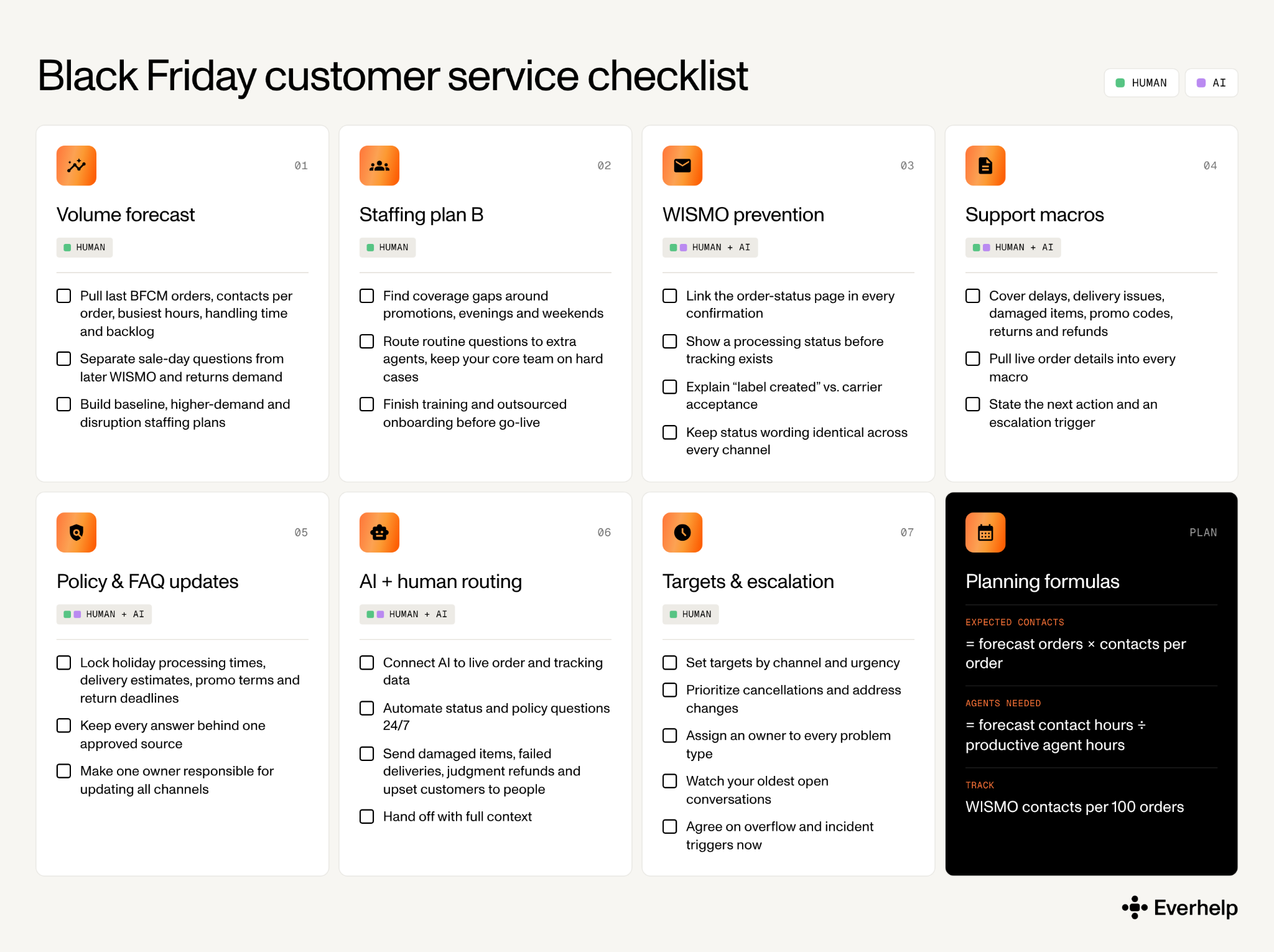
Pull last year’s data from this period on:
Separate the sale-day questions from the later WISMO and returns demand, since they peak at different times and need different coverage. If you do not have comparable BFCM history yet, use your current trend line and your best promotion estimate.
A simple planning base:
Expected contacts = forecast orders × contacts per order
Agents needed = forecast contact hours / productive agent hours
Build three versions of a staffing plan based on your calculations:
Compare your forecast workload with the productive agent hours you actually have. Look for staffing gaps around promotions, evenings, and weekends, and decide now how many agents you would need to cover them (and who it will be).
Outsourcing is not an instant fix, and the teams that get value from it plan the ramp-up ahead.
If you are weighing providers, our rundown of customer service outsourcing companies for eCommerce covers what to check before you sign.
Most "where is my order" messages never have to be sent at all. In our experience, they usually come down to one thing: the customer can't see where their order is, so they ask. Make that status visible, and the volume starts dropping on its own.
A few concrete ways to do that:
A solid customer self-service setup catches a good share of these before they ever become tickets. And to know whether your efforts are working, track how many WISMO contacts you get for every 100 orders. That rate is a more honest signal than WISMO's share of your total tickets, which can shift just because other ticket types rise or fall. When the per-order rate drops after you tighten up your status pages, the effort is paying off.
Draft the repeat answers before the weekend, while you have time to make them specific. Prepare macros for:
Each macro should pull live order details, state the next action, and carry an escalation trigger. Do not offer canned reassurance that tracking won’t support. "It's on its way" ages badly when the scan says otherwise.
The fastest way to dent your eCommerce customer experience during a sale is to have your FAQ, your AI, and your agents each telling customers something slightly different. So before the rush, we'd lock down the answers that tend to shift for the holidays:
Keep all of it behind one approved source, and put one person in charge of updating every channel the moment a policy changes. That single owner is what keeps your AI chatbot for customer service from quoting a return window you stopped offering last week. And that’s why you need AI support setup to be a part of your Black Friday checklist.
This is where a well-connected AI does its most useful work during BFCM. It can answer the same authenticated status questions all weekend, 24/7, without ever adding to your queue. The one thing that matters here is whether it reads live data. A connected agent pulls the real order and tracking details and answers your approved policy questions.
A static FAQ bot, on the other hand, only recites its script, so it falls apart the moment an order goes off it.
Whether you are implementing live chat vs. chatbot, it’s a good practice to keep your people on the cases that still need critical judgment:
And when the AI hands one of these off, pass enough context that the customer doesn't have to start over.
Example: Our own AI agent, Evly, is a working example. On FORMA, a SaaS document-tools company, Evly ran alongside their existing chatbot to automate 65% of requests end-to-end at 93% accuracy. That is a SaaS result rather than an eCommerce one, so it’s more of a general possibility for what connected automation can reach, not a number you'll match in week one. Either way, test any tool you choose on the hard cases before it touches live customers.
Prior to letting AI go live, decide what a good response looks like. Set your targets depending on channel and urgency:
If evenings and weekends are where you thin out, 24/7 live chat outsourcing is one way to hold those windows without stretching your core team. Every decision you lock in now is one your team won't have to improvise at 11 pm on Black Friday.
{{cta}}
Everything in the first half of this Black Friday checklist gets easier when shipping holds up, because a lot of WISMO starts as a shipping problem. So your peak season shipping plan really needs to do two jobs at once:
Both feed straight into support. Whatever delivery cutoff you promise on your storefront, your agents answer for it when an order runs late. So the cleaner your shipping runs, the fewer of those messages land in the inbox.
To help you out even more, we’ve collected the recommended last ship dates for delivery before December 25 from key carriers in the contiguous U.S.: USPS, FedEx, and UPS. Confirm all three again right before you publish your delivery promises, since carriers can revise dates.
These are just planning inputs. Please also verify your service and route before shipping, since transit times vary by origin and destination.
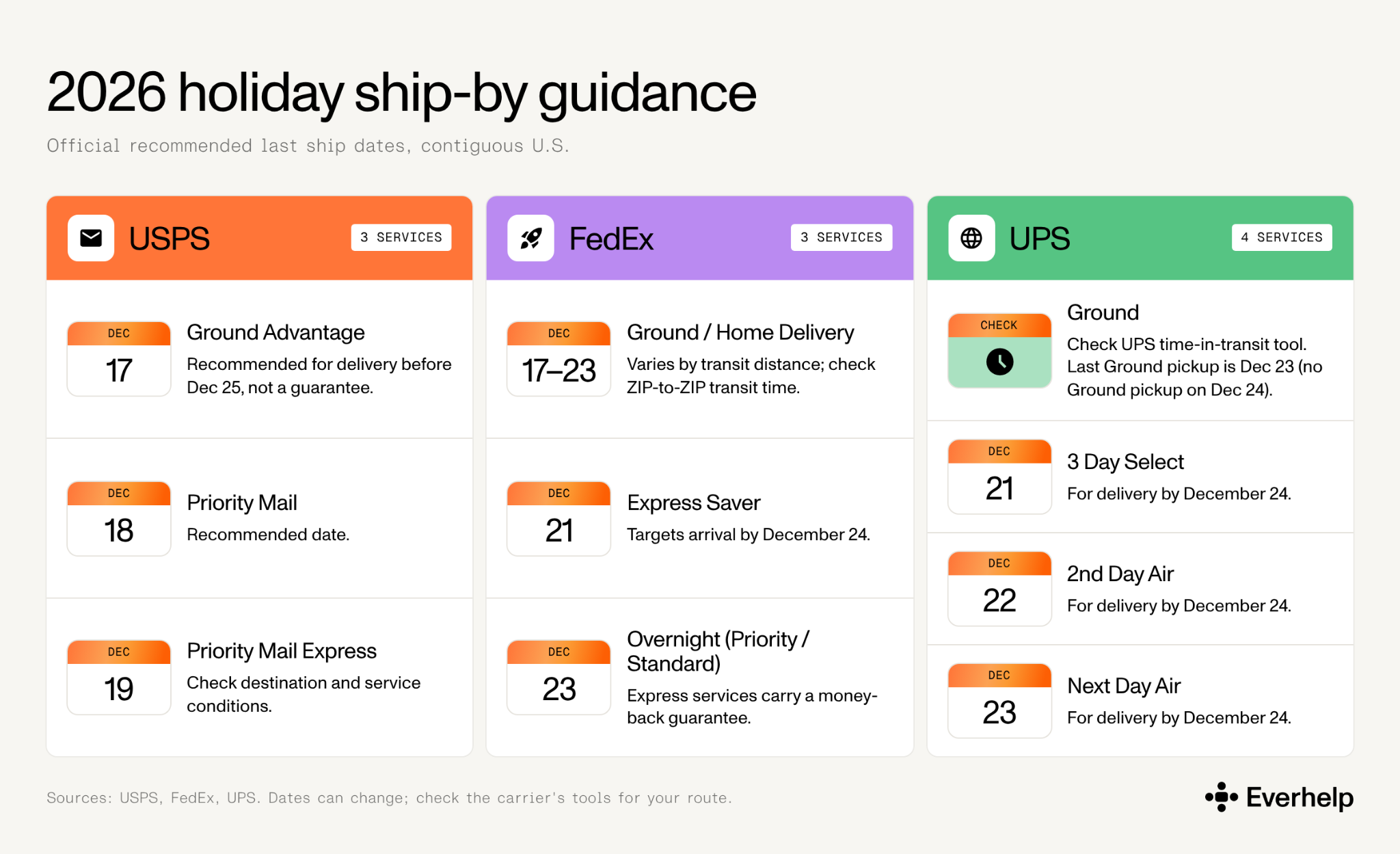
Your order cutoff must always be earlier than the carrier's ship-by date, because you still need time to pick, pack, and hand off the parcel. So work backward from the carrier deadline and subtract your own steps:
Good eCommerce shipping software can do the carrier-transit math for you, so you’re left adding only your own pick-and-pack time.
Whatever date that gives you, put it on a banner that leaves nothing to guess: the time zone, the shipping method it applies to, and any destination limits or exclusions. And label it carefully, because "order by," "ships by," and "estimated delivery by" are three different promises
Example: Order by [date/time/time zone] with [service] for estimated delivery by December 24 to eligible addresses.
Peak surcharges are the cost most teams forget to model, and they hit residential parcels during the exact weeks you ship the most. For 2026:
Your final price can climb higher once account terms, service, size, weight, and fuel are factored in, so budget against your own rate sheet rather than the headline figure.
Pickup capacity is the other piece, which tends to break without much warning. Before the rush, we'd confirm:
That last point can quickly turn into one of those supply chain challenges that lands in your inbox as a wave of WISMO.
A short, honest heads-up before the customer notices saves you a wave of follow-up tickets. So when something slips, tell the people it affects, and only them, because a delay email blasted to your whole list creates more questions than it answers. Tailor it to what went wrong, too: a processing delay, a carrier delay, and a failed delivery each need a different note.
Every notice should:
There's also a legal line to know. Under the FTC's Mail, Internet, or Telephone Order Merchandise Rule, if you can't ship within the time you promised, you have to tell the customer, give them a revised date, and let them cancel for a refund. A generic "sorry, it's delayed" email doesn't automatically satisfy that, and a delay in dispatch is treated differently from a delay in carrier transit. We're not lawyers, so run your own policies, past counsel.
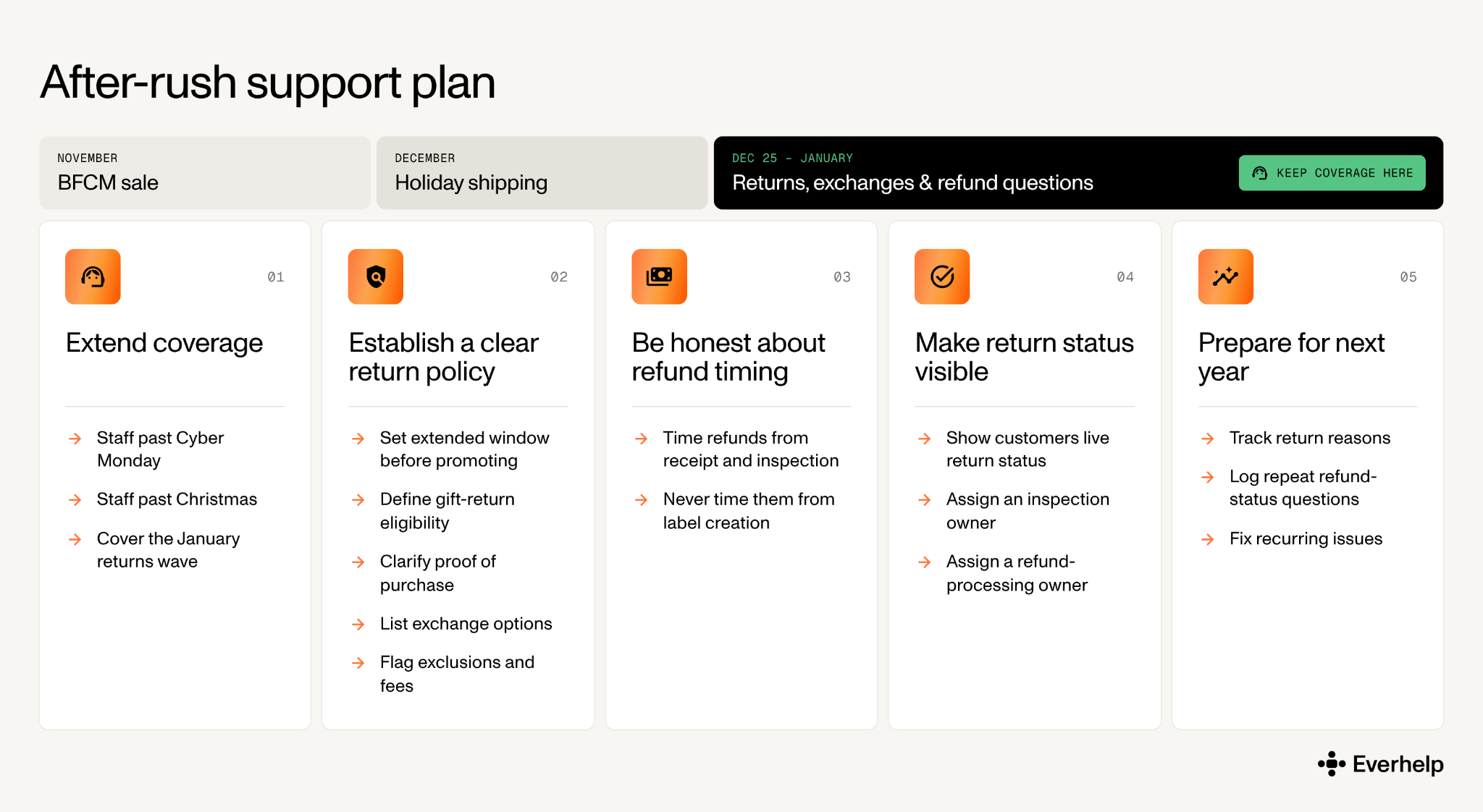
The eCommerce peak season does not end on December 25. Returns, exchanges, and refund-status questions run well into January, and a team that stood down after Cyber Monday feels the second wave hard. In 2025, for instance, the National Retail Federation and Happy Returns projected that 19.3% of online sales would be returned in 2025, with roughly 17% of holiday sales expected to come back. In view of this upcoming issue, 43% of retailers planned to hire seasonal staff for returns, and 37% planned to extend return windows.
Though these are just projections, there’s enough ground to believe that the pattern will repeat in 2026 as well. So, here are a few peak season eCommerce tips for the January stretch:
Watching the right numbers here helps. A short set of customer satisfaction metrics tells you whether your returns experience holds up when volume is high.
By now the pattern in this checklist is clear: a lean team can't carry a BFCM surge on its own, and capacity bolted on at the last minute rarely works. This is the work we do, and our Black Friday eCommerce strategy comes down to putting people and AI each on what they handle best:
None of that works if the setup is rushed. The model still needs system access, approved policies, trained agents, and a clear escalation path, and we put those in during onboarding. So if you'd rather plan coverage before the surge than during it, our eCommerce customer service outsourcing team can map a setup to your forecast and current tools.
{{cta}}
Prepare operations in order of impact. Make order status self-serve so customers stop asking where things are, staff from last year's actual contact volume rather than a guess, give one person ownership of policy across every channel, and set order cutoffs that sit a day or two inside the carrier deadlines.
Four weeks out is a sensible floor, which puts the first deadline near October 30 for a late-November sale. Push it earlier if you're hiring, onboarding outsourced agents, or integrating an AI tool, since those take weeks to do properly. Starting later isn't fatal, but do the staffing and integration tasks first.
There's no universal multiplier, so size it from your own data. Forecast orders × contacts per order gives your expected contacts; convert that to hours using your handling time, then divide by the hours one agent genuinely works across the peak. Build a normal case and a disruption case, and line up overflow coverage for the gap between them.
For delivery before December 25 in the contiguous U.S., the recommended last ship dates are December 17 for USPS Ground Advantage, December 17 to 23 for FedEx Ground depending on distance, and December 23 for UPS Next Day Air. The table above has the full list. Whatever you ship, set your own order cutoff a step earlier than the carrier's date.
The single biggest lever is closing the silent window right after checkout: show a clear "processing" status before a tracking number exists, and link the status page in every order email. Those two remove most of the volume on their own. Afterward, send delay notices to the affected orders, route the rest to a connected AI, and watch WISMO per 100 orders to confirm it's dropping.
Help someone else stay in the know. Hit that share button!