Customer Experience
Customer Support
Support Ops & Teams
Published on
23.09.2026
Last updated on
23.09.2026
The support team’s guide to customer lifecycle stages

Valentyna
VP of Customer Support

Valentyna
VP of Customer Support
.png)
Think about any account your team has held for more than a year. Someone signed up, struggled through onboarding, went quiet, possibly came back with a support ticket, hopefully got it fixed, and went back to quietly using your service. Maybe, if they were happy with the ticket resolution, or didn’t mind your overall offering, they recommended you to someone else.
If you were wondering what is customer lifecycle, that sequence is it. It’s the full arc of a customer's relationship with a business, from first awareness through purchase, retention, and advocacy. Unlike a funnel, it has no endpoint — customers loop back through it.
Despite most writing on the customer life cycle being aimed at marketers, we believe that support teams need to know the differences of each stage no less. After all, this is a single team that touches customers at every stage and collects enormous amounts of data about them. That’s why they can be the first ones to notice early churn and expansion signals of a business, given, of course, they know what to look for depending on the customer life cycle stage.
Support teams also have little room to treat every customer interaction the same. Qualtrics found that 53% of bad customer experiences caused consumers to reduce or stop their spending with the company. Service-delivery and communication problems were the two most frequently reported causes, showing how closely support execution is connected to retention and customer value.
To address this gap in support teams’ knowledge, we’ll discuss what support should do at each stage. We will cover:
The classic model dictates that the customer lifecycle runs through the following 5 stages:
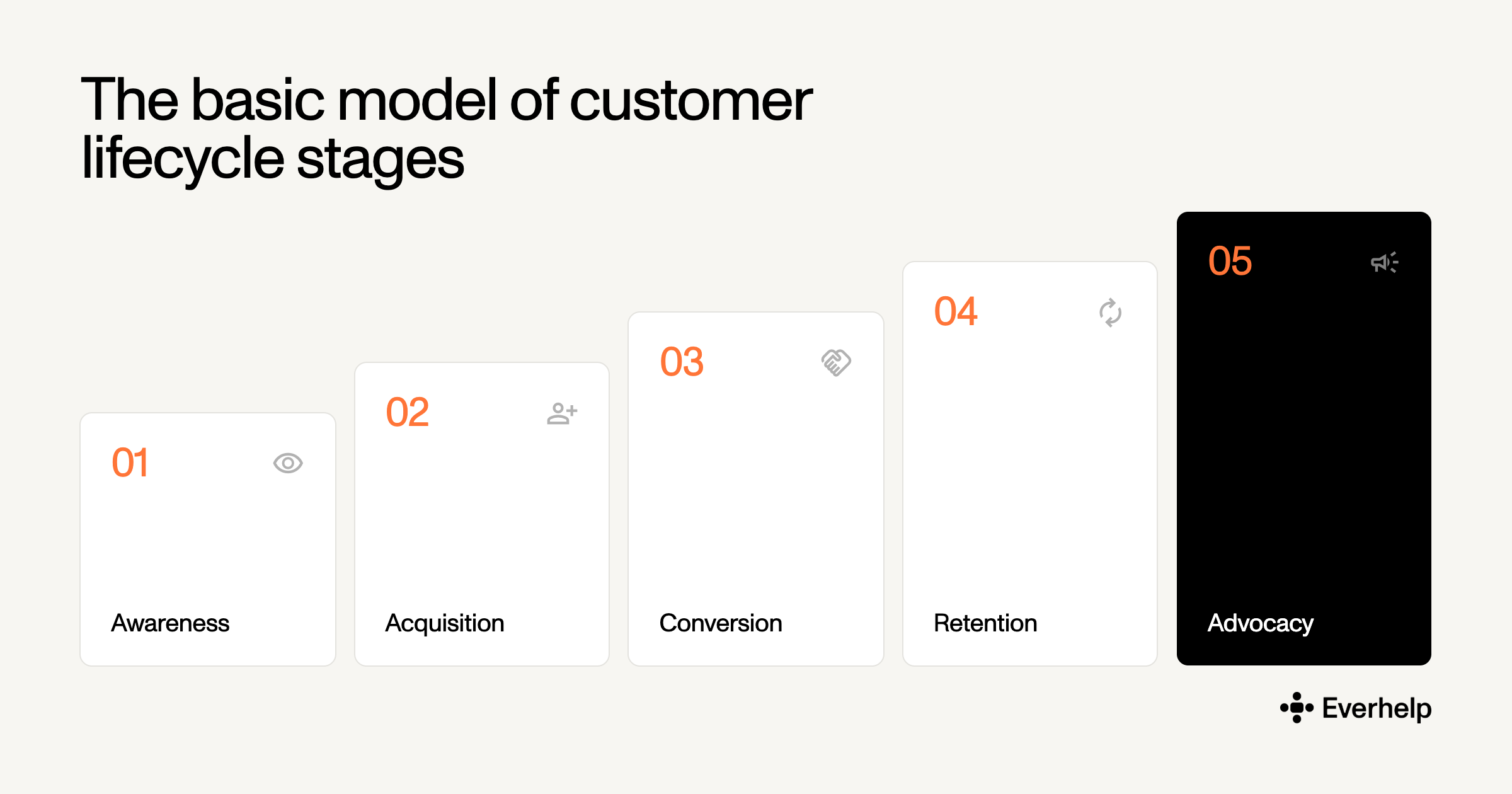
However, this split is more of a suggestion, as some models have only 3 customer lifecycle stages and others have 7. This variability is unsurprising: for example, a subscription business with annual contracts has a renewal event that an e-commerce brand simply doesn't. So, to accommodate different company structures, the number of stages may vary.
Customer lifecycle management (CLM) is the practice of tracking, analyzing, and optimizing interactions across those stages to grow customer lifetime value. The process is rather operational, where you:
Now, many people confuse CLM with customer lifecycle marketing, which your marketing team should own. It entails creating the campaign strategy for each mapped stage of the journey. Needless to say, marketing can only happen after mapping, and it should run in parallel (not instead of) your customer lifecycle management efforts.
And who should own those efforts? In our view, since most support teams own the retention, advocacy, and win-back stages, as well as a fair share of behavioral data that can help other teams guide their business decisions, they simply can’t be left out of this conversation. And as such, they need to be directly involved in your customer lifecycle management to help you drive revenue and decrease churn.
{{cta}}
Customer lifecycle vs customer journey are very often used interchangeably, yet these terms cover different questions.
The key difference: The customer lifecycle is the company-side framework for managing all customers across defined stages. It's ongoing and has no endpoint. The customer journey is the customer-side path through specific touchpoints toward a single goal, with a clear beginning and end.
There are also more practical distinctions worth noting
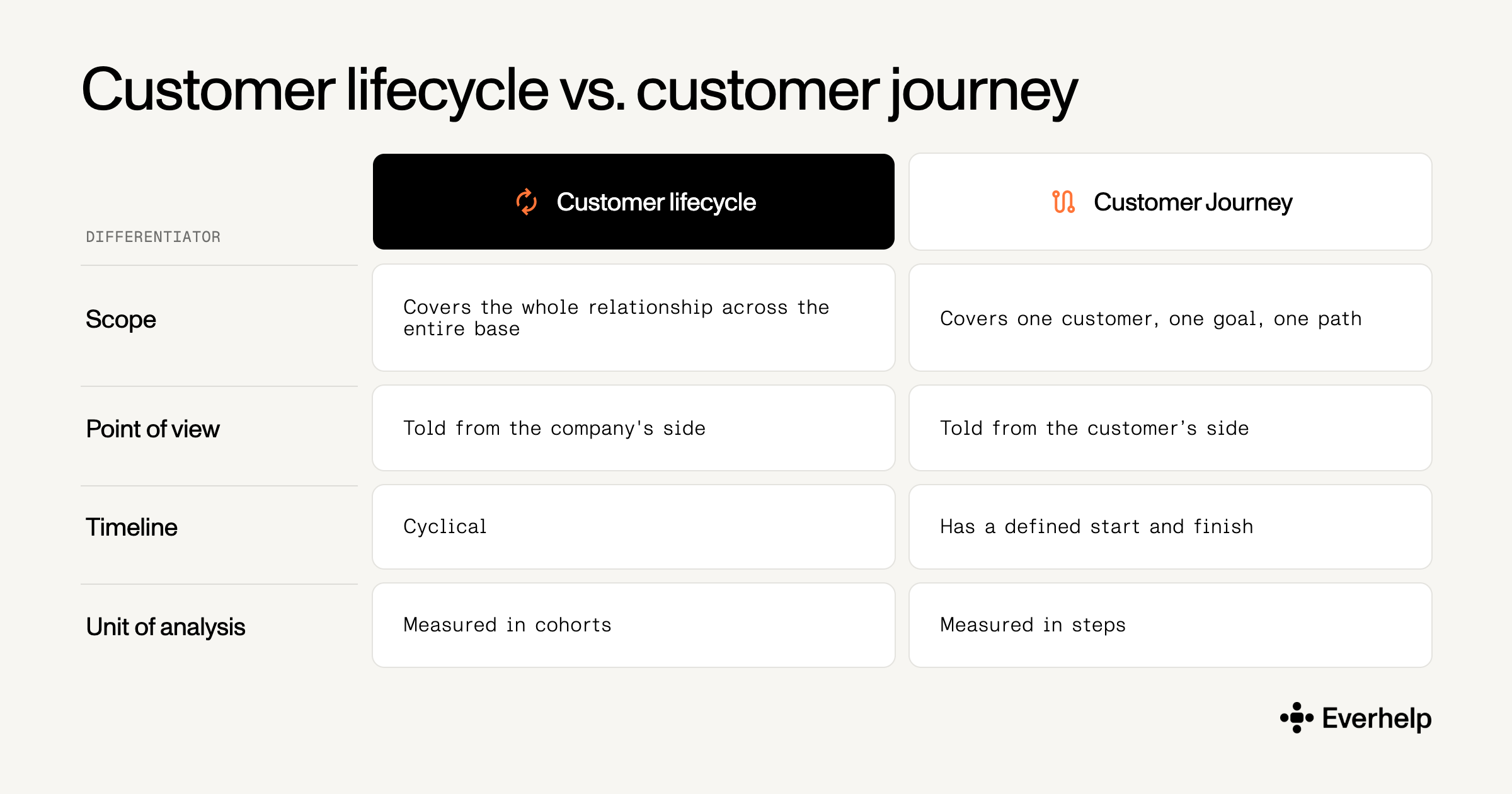
Support needs both, for different goals. Journey maps show where friction hides inside a single interaction: an onboarding sequence, a refund flow, a password reset that takes four screens. The customer lifecycle tells support ops where to put people and budget across the base to protect revenue.
Read more on how to build your operation in our customer service vs. customer experience comparison.
Support data serves both views. One ticket shows where a customer got stuck in a single interaction, which you fix in a workflow. The same tickets grouped by account age or cohort show which segments hit trouble at 30 days and which go silent before they cancel. Based on this, you can make better operational decisions about when to deploy agents to re-engage your audience, for instance.
Support's job changes shape at each point of the customer lifecycle journey. To accommodate most businesses, we’ve broken down responsibilities by the more typical 5-stage model. The table below shows what the team owns, the proactive play that influences key metrics, and the signal that tells you to act at each stage.
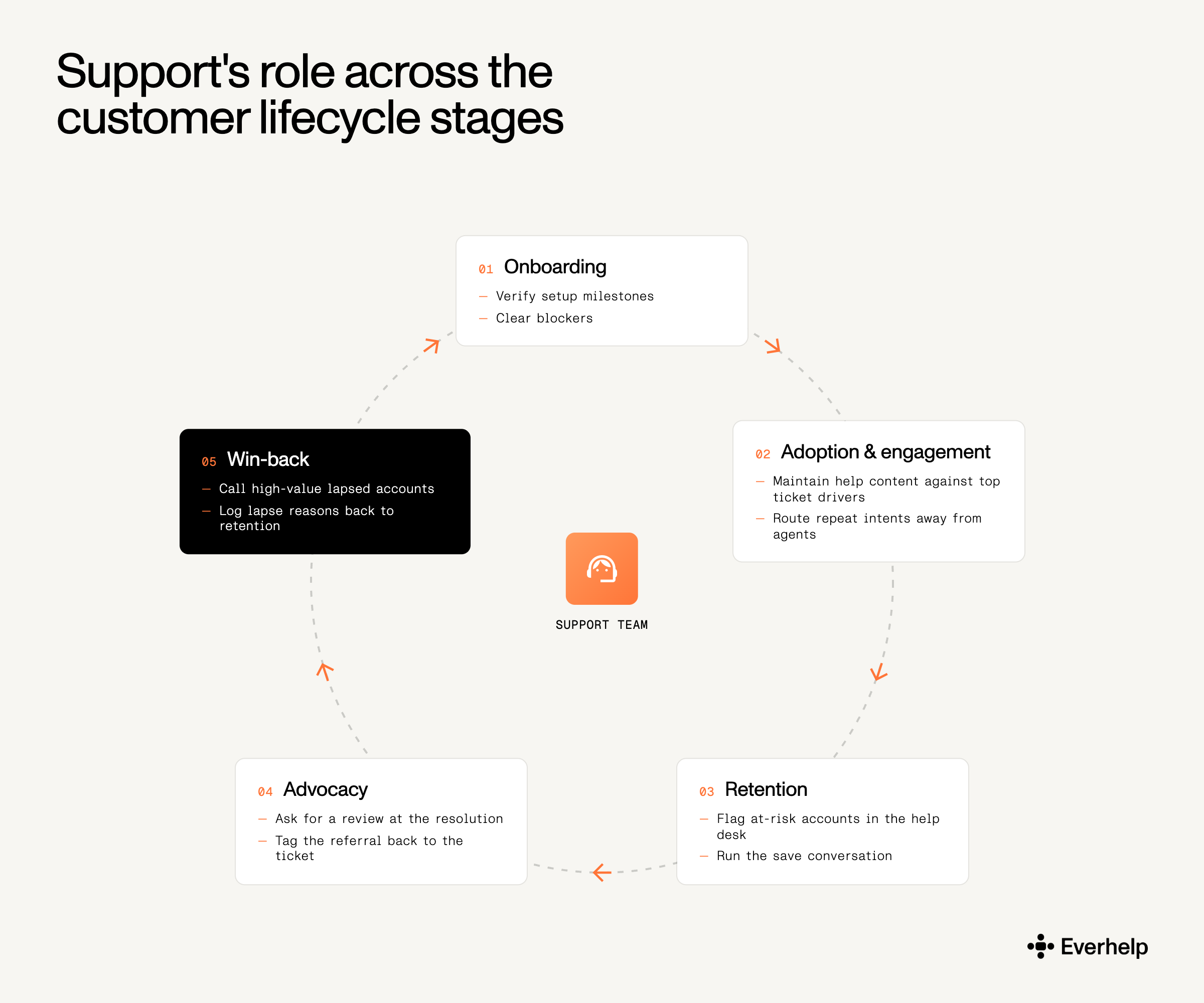
Quiet new customers are usually confused customers, and that’s why they rarely file a ticket.
And that's why inbound volume doesn’t actually say anything about actual business health. The 2025 National Customer Rage Survey from Customer Care Measurement & Consulting and Arizona State University found that 77% of US consumers hit a product or service problem in the past 12 months, with more than $596 billion in future revenue at risk because of how badly those problems get handled.
For this reason, the 30–90 day window after acquisition determines most long-term retention. In that window, the support-ops job is outbound:
Oftentimes, businesses ignore the last point. But understanding customer needs at each stage of the support journey starts with someone holding the context. So it’s important to ensure new customers have a stable point of contact with your business during this first sensitivity period.
Once customers are up and running, the main question becomes which requests go to an agent and which go to a help article. You don’t want to be paying agents to answer password reset issues, right? Gartner puts the median cost per contact at $1.84 for self-service against $13.50 for assisted channels — roughly 7x, and the gap holds across phone, chat, and email. So, every password reset that reaches an agent costs roughly $12 more than it needs to.
Moreover, if your agents do most of the routine work manually, customers with real problems will be left clicking through articles that don't cover their case.
Yet deflection targets are all fantasy. Gartner's research found only 14% reported resolving their issue completely through self-service, despite 73% starting there. The usual cause is poorly written help content that, despite including product teams' knowledge, doesn’t necessarily cover issues that interest users.
What to do about it:
Keep in mind: a rising self-service ratio with flat CSAT means healthy deflection. A rising ratio with falling CSAT means the help center has become an obstacle. Track CSAT continuously to stop deflection from turning into churn.
Executing customer retention strategy has already become one of the support teams’ most prominent duties. Agents are the first to see the behavioral signals that usually precede churn, so they should be the first to act on them.
The early warnings your help desk should pay attention to:
To address these in time, build the at-risk flag around behavior, set the alert, and hand the account to a human before the renewal date, not after. Shape your staffing so agents can respond in a timely way at all times. And map recurring customer pain points back to product so your support doesn’t only react but also prevents your customers from facing the same issues.
A resolved ticket is largely an underused asset in most support operations. At that moment, the customer is better disposed toward the brand than at any other point in the lifecycle. This makes it a perfect time to ask to promote your business.
Referrals carry weight that paid channels can't buy. Nielsen's global study found 88% of respondents trust recommendations from people they know above any other channel. However, it's important that the ask for a referral is justified in the situation. Here are the three instances when it is:
A light-touch script does the job. Something like: "Glad that's sorted. If it was useful, a quick review helps other people find us — no pressure either way." One line, no follow-up, no incentive.
For support ops, the work is in the tagging:
Once that number exists, the debate over whether support drives customer loyalty ends. Referrals lower effective acquisition cost, making them one of the 4 levers behind customer lifecycle value.
Win-back gets treated as a marketing email blast. It shouldn't be—the lapsed customer already knows the product, already has a reason for leaving, and a generic discount usually won’t change their mind. This is the stage where personalized customer service earns the most.
So, start by defining "lapsed" for your business model:
Then trigger at 1.5–2x the normal purchase or usage cycle, while product memory is still fresh. A workable structure:
Note, though, that every win-back conversation tells you why that customer left, which means you can’t just ignore that information. Log those reasons, group them, and send them to whoever owns onboarding and retention. If 6 of your last 20 lapsed accounts dropped off during setup, that's an onboarding issue, and fixing it shrinks next quarter's win-back list.
{{cta}}
The typical model we were talking about this whole time, however, is designed primarily for transactional consumer businesses. So if your business is B2B, using our support model likely won’t produce the results you’d expect.
The lifecycle of B2B vs. B2C customers differs significantly. The customer lifecycle b2b version adds necessary extra stages: activation, adoption, renewal, and expansion, each followed by defined exit criteria. These structural differences drive the support design.
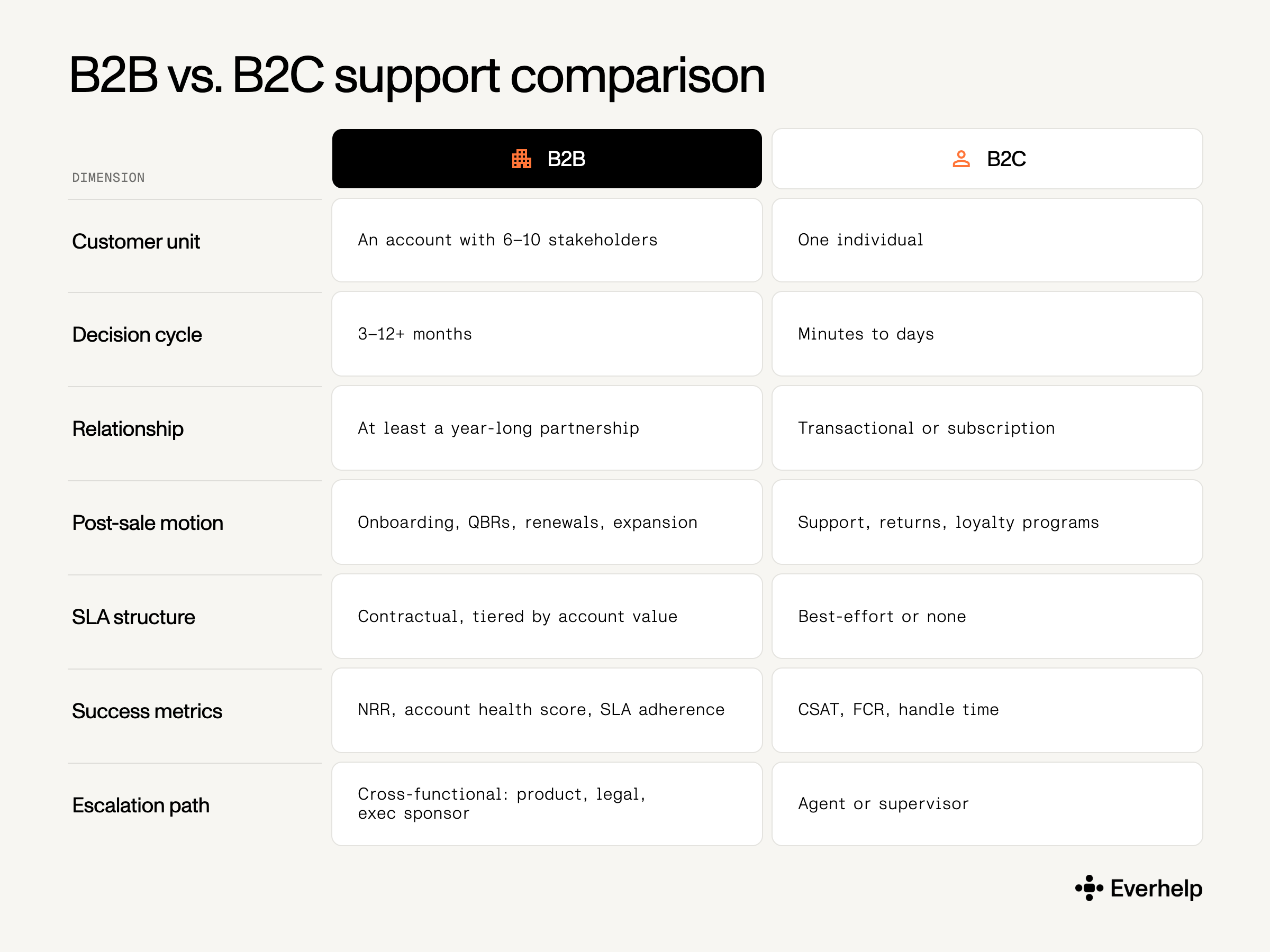
Forrester’s 2024 survey of more than 16,000 global business buyers found that an average buying decision involved 13 people within the buyer’s organization, while 89% of purchases involved at least two departments. That has a direct operational consequence: a perfectly resolved tier-1 ticket can still lose the account if the executive sponsor never heard about it. As such, B2B support success is measured at the account level, not the ticket level.
Renewal is the culminating lifecycle event in B2B, and support usually has the evidence that decides it — SLA adherence, escalation history, time-to-resolution on business-critical issues. Surfacing that evidence 60 days before the contract date should be a support job, even when someone else owns the renewal conversation.
B2C is the opposite: high volume, low touch, with a digital customer experience strategy that leans on automation, replenishment flows, and propensity models. The mistake is applying B2C staffing logic to a B2B book of accounts, or B2B white-glove economics to a base of 200,000 consumers.
The honest 2026 position is that neither AI-only nor human-only survives contact with a real customer base. Gartner predicts agentic AI will autonomously resolve 80% of common customer service issues by 2029, cutting operational costs by 30%. In the same period, Gartner's survey of 3,566 customers found that 87% say companies using generative AI must keep a route to a human agent, even though 50% find AI-assisted interactions easier.
Service leaders are reading it the same way. In the April 2026 Gartner survey, 85% said they're expanding human agent responsibilities as AI absorbs volume, while only 31% have planned frontline reductions. So, AI is redistributing the work rather than eliminating it.
If we map these structural support changes onto the lifecycle, we will receive a new workforce division:
This split is only possible if you have a context-aware escalation process. A handoff must carry the AI summary, the full conversation history, a sentiment flag, and a stated reason for escalating.
We recommend configuring the escalation triggers on:
With this article, we’ve basically established that customer support is needed all the time. But there are only so many agents and hours in the day. That’s why we strongly advocate for a human + AI support model, where AI handles the repetitive volume, freeing up agent hours for onboarding calls and customer retention conversations.
We heavily utilize this model with our clients, for example, Relatio. They came to us wanting to automate 75% of tickets. However, when we looked at their set of tickets, we found that their refund and billing disputes ran through too many steps and touched customers at their most sensitive. Handing those to AI would have cost them the trust the product is built on.
So we started Evly on 3 request types, set a rule that anything it hadn't been trained on goes straight to a person, and widened the scope as it proved itself. That got us to:
We believe this example proves that a hybrid support model is an efficient way to go. What we recommend is starting the automation process with the requests your product can safely hand to AI, then putting the recovered hours into onboarding check-ins, churn-signal monitoring, and win-back calls.
Support already holds the information that predicts churn and expansion: which accounts went quiet, which ones never finished setup, which customer just thanked an agent for saving their week. What's usually missing is the capacity to act on any of it before the renewal date or the refund request.
And that’s what Everhelp is built for. If your team is stuck answering tickets when it should be preventing them, talk to us about what a blended human+AI setup would look like for your ticket mix and how it can be designed to maximize the CLV of your customers.
{{cta}}
Help someone else stay in the know. Hit that share button!
.webp)

.avif)
.avif)
.webp)
.webp)