Growth & Metrics
Published on
24.08.2026
Last updated on
17.09.2026
Average handle time: Why lower isn't always better?

Victoria
QC Team Lead

Victoria
QC Team Lead
.webp)
For most support teams, cutting average handle time (AHT) seems like a very clear path towards higher CSAT (and lower operational costs). Fewer minutes per call means more calls per agent and a lower cost per contact, and the leadership tends to ikes that quick math a lot. Unsurprisingly, businesses chase that: they set low targets, coach to the clock, and celebrate when the number drops.
More often than not, though, they get an unexpected rise in repeat contacts. Tickets that used to close on the first try start bouncing back a day later, customer satisfaction metrics slip, and all the potential savings evaporate. The problem here is that AHT measures how quickly an interaction ends, which tells you nothing about whether the customer’s issue was resolved. The cross-industry benchmark for AHT sits at roughly 6 minutes, but a fast call that leaves the problem unsolved just postpones the work to tomorrow, and usually to a second agent.
In this guide, we look at the average handle time in more detail, as we want you to understand clearly:
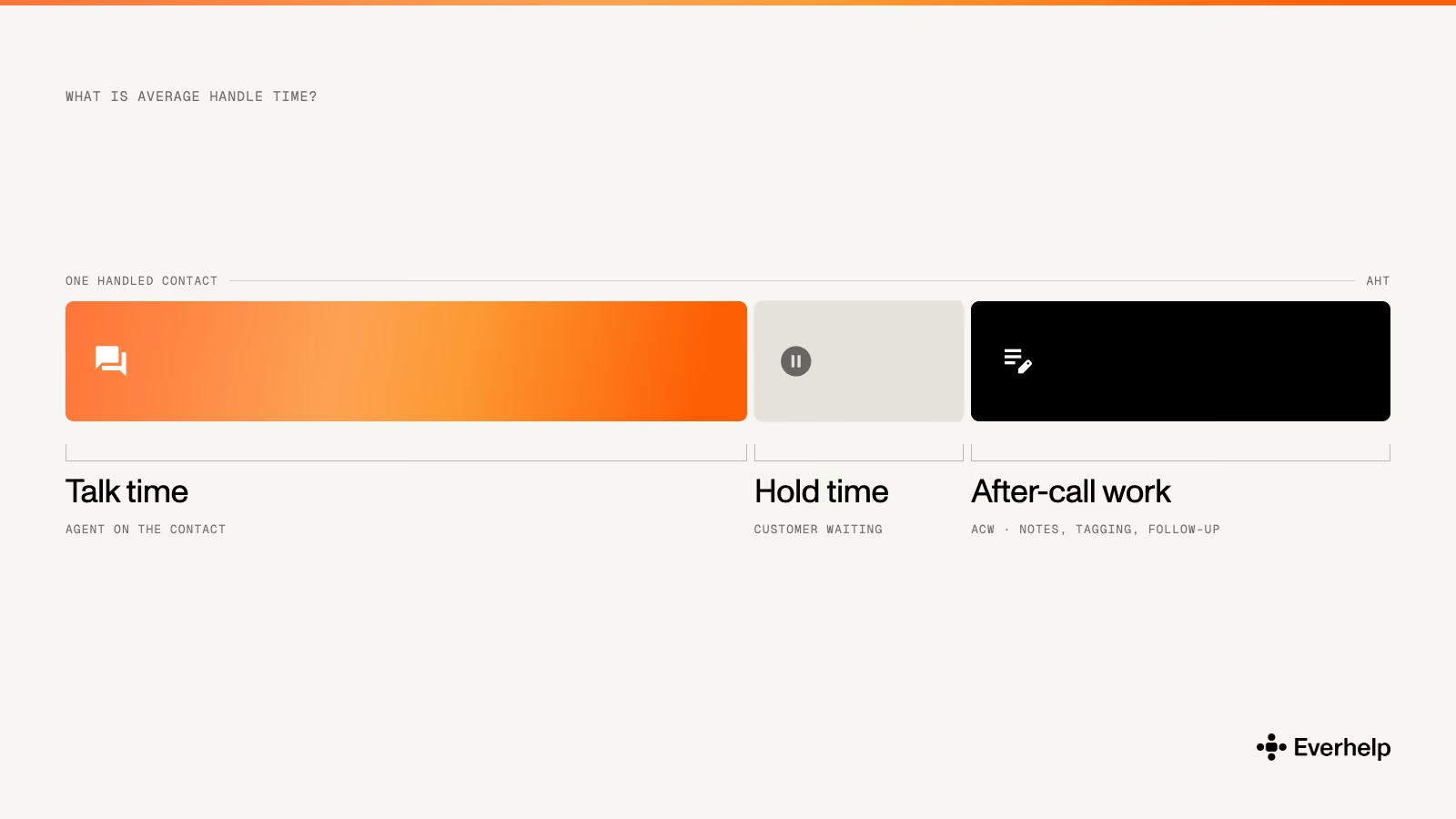
Average handle time (AHT) is the average total time an agent spends on a single customer interaction, from start to finish. It has three components:
People often shorten AHT to mean talk time, but the two aren't the same. Talk time counts only the live conversation, while AHT also includes hold time and the wrap-up work that happens after the customer is gone:
Talk time usually accounts for 60–70% of AHT, and hold time plus ACW fill the rest. Because these numbers come straight from your ACD or contact-center platform (or at least they should), AHT is measured, not estimated, which is why workforce planning leans on it so heavily. Yet, to get a full picture of how your operation runs, you have to analyze AHT alongside other customer service analytics that show where your agents’ time and effort actually go.
Before you start tracking AHT, define exactly what goes into the calculation. Some teams might want AHT to include transfer time; others might exclude after-call work altogether.
The standard AHT formula, though, goes the following way:
AHT = (total talk time + total hold time + total after-call work) / total number of interactions
This is the standard version used by vendors like NICE and Talkdesk, so a team that adopts it can compare its numbers against published benchmarks without adjusting for definitions.
Say a center logs 10,000 minutes of talk time, 2,000 minutes of hold, and 3,000 minutes of ACW across 1,500 calls in a week.
Add them all (15,000 minutes) and divide by 1,500 calls, and AHT lands at 10 minutes. But if you look closer at each of the components, you will learn even more.
Two-thirds of every call is talk time. The rest splits between hold and after-call work, meaning your agents spend 3,000 minutes a week logging notes and updating records. Trim it with automation, for example, and agents can work faster without the customer noticing.
Though focusing on lowering average handle time as much as possible isn’t the best tactic, it doesn’t hurt to measure it and know where you land compared to other industries.
But we can’t average AHT across every communication channel as they have structural differences. A phone call involves hold time and identity verification that email doesn't. And a chat agent often handles three or four conversations at once.
That’s why we’ve decided to collect the different benchmarks by channel so you can use them as guidance to measure your work against.
Note: The benchmarks were taken from Kayako and Supp Support.
The phone is the most closely monitored channel, and call center average handle time varies sharply by industry. There are two key reasons behind it:
Financial services often come in lower, around 4–6, because the requests stay simple even when identity checks are strict. Healthcare sits near 6–7. Technical and SaaS support is the slowest, at 7–10 minutes, since the agents usually work through an active problem rather than simply confirming account details. That complexity is also why many companies move these queues to a dedicated technical support outsourcing team that's staffed and trained for harder cases.
Note: Routing and the call center phone systems underneath the queue affect the number as much as the agent's approach to the call and issue resolution.
In live chat, a single support session might run 6–8 minutes, but agents rarely handle one chat at a time. Most handle 2–4 at once, so the time an agent actually spends on any single chat is far less than the full session length. That’s why we can’t really compare a chat team's AHT to a phone team's without it looking like chat agents work slower. What limits a chat agent is how many conversations they can handle at once before quality drops.
For email, the actual handling time is usually short. It takes just 4-6 minutes for an agent to read the ticket, do the necessary knowledge base research, and write a response. Sometimes this time can rise to 15-30 minutes if we count the cumulative work across multiple touches for more complex cases. But a ticket can still take hours to reach a final resolution, largely because email is an asynchronous channel.
That waiting time isn’t part of AHT, even though some reports include it. There’s also no hold time to factor in, as there would be with a phone call. In practice, email AHT mostly depends on how much research a ticket requires and how quickly an agent can find the information they need with the tools available.
{{cta}}
If you don’t go too deep into support data analytics, a lower AHT may look like clear progress. But speed doesn’t always go hand in hand with service quality, so if you unthinkingly follow the typical “cut your AHT” advice, it might cost you CSAT.
Whenever companies put agents under a stopwatch, they need to understand that something will give. Usually it's the careful work that actually helps fix the customer’s issue:
If you rush agents, the call will end sooner, but it won’t guarantee first call resolution and might actually contribute to a drop in CSAT.
The key issue: If the customer’s problem isn’t fully resolved after the first call, they'll call the next day again (maybe even deliberately try reaching another agent). This increases repeat contacts, which means your company pays twice to resolve the same issue.
As Kayako put it, a 14-minute call that resolves 78% of the time beats a 5-minute call that resolves 42%. So, if you want to improve your call center services and make them more effective, it’s better to analyze AHT alongside FCR and customer feedback survey results.
Sometimes a rising AHT is good news:
The same goes for the new agents. As they learn to meet their customer service SLAs, their personal AHT metrics may run 20–50% higher than experienced staff for their first few months on the job. In both cases, the number went up for a healthy reason, so if that’s your case, you should try to fix what’s not broken.
If your team wants to reduce average handle time, focus more on workflow and tooling than on dissecting agent effort.
High AHT is usually a systems problem rather than a training gap. Because it indicates that agents are probably wasting their time searching across tabs, re-verifying customers, and typing the same notes.
We’ve collected a few tactics you can follow to improve AHT. Note, though, that each of these has a guardrail because cutting a few seconds off AHT means nothing if it also drops your FCR and CSAT.
This is the highest-return, lowest-risk practice on the list. Customer service AI agents are used to write the call summary and log it to the help desk software for you, cutting wrap time by 40–70% depending on how well the tools connect to your systems. It never touches the live call, so there's nothing to trade off against quality. The agent just checks a drafted summary instead of typing one from scratch.
The biggest time sink inside a call is the agent putting someone on hold to go find an answer. Thanks to agent-assist features in some modern AI customer service chatbots, agents can pull up the right answer on screen while the conversation continues.
In a study of more than 5,000 support agents, this kind of AI support raised resolved contacts per hour by about 14%, and about 34% for the newest agents, with no drop in CSAT.
That’s why we strongly believe that companies need well-structured AI customer experience strategies. Not only do they help offload repetitive work and cut response times, but they also become a powerful tool for improving agent productivity.
Predictive routing reads intent and history to send the caller to the right agent the first time, instead of just grabbing the next free person. That removes the transfers that push AHT up and drag FCR down at the same time.
Use AHT as a diagnostic tool and set separate targets by contact type instead of applying one number to every call. A billing dispute and a password reset take different amounts of time, so they shouldn't share the same benchmark. When you talk to agents about why a call ran long instead of penalizing them for the length itself, they end up fixing the underlying problem instead of just rushing the next customer.
And solid workforce optimization and planning tools let you turn those insights into permanent staffing decisions
{{cta}}
Every tactic above makes the human agent faster. None of them reduces how many tickets a human has to handle. That's the limit of a software-only approach. You can use special tools to speed up the workflow, but every routine ticket still lands in the queue.
For us, lowering AHT to an acceptable level requires better staffing decisions. That’s why:
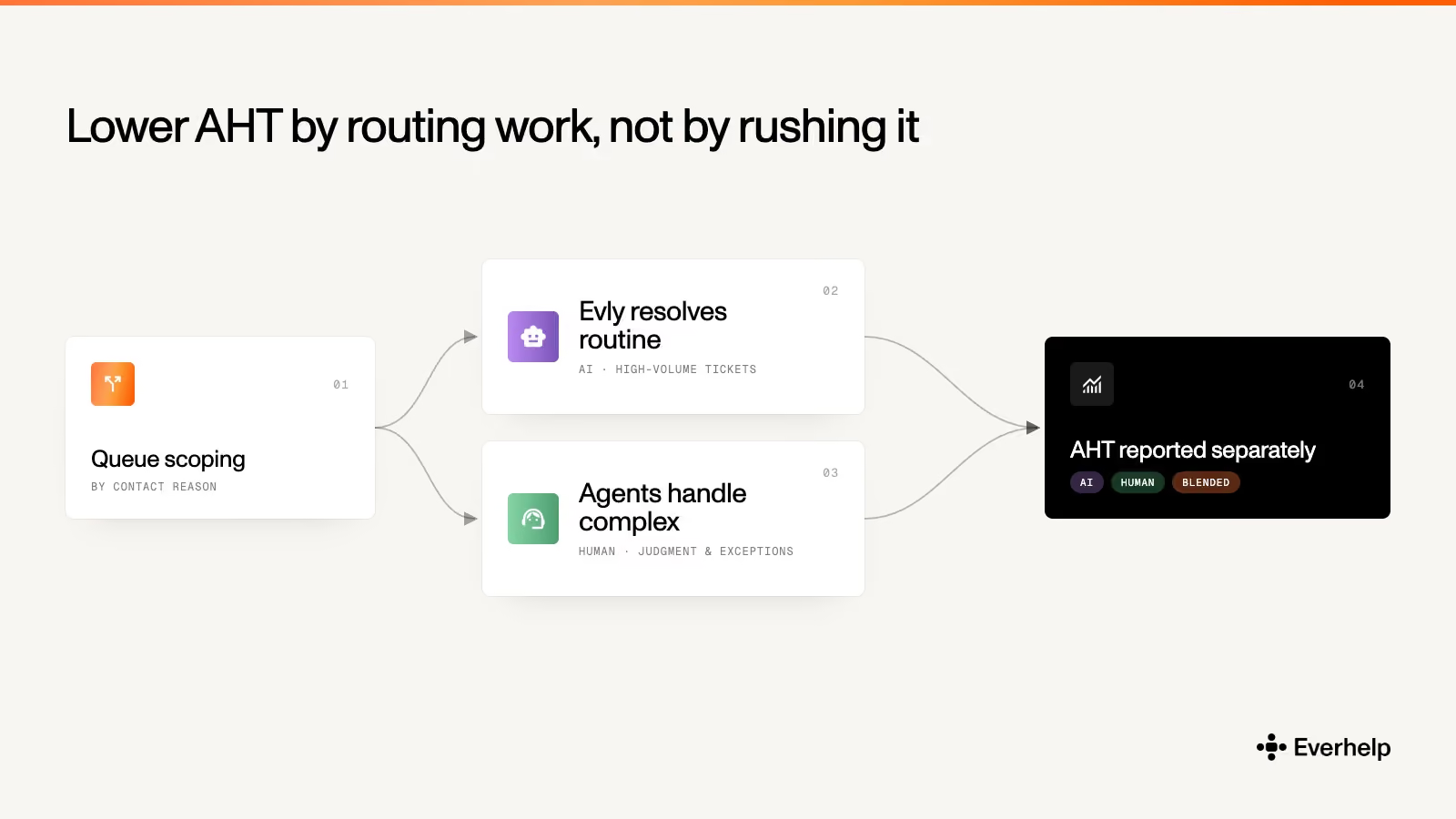
So the AHT on your human agents represents their work on complex cases, because the routine ones never enter their queue. Blended AHT drops too, since AI now clears a large share of the volume.
Teams that put AI at the front of live chat report 33–45% lower AHT (Kayako) because the routine contacts get resolved instead of being routed to a person. And since the savings come from removing volume, many companies opt for AI-powered customer service outsourcing services like Everhelp. These services take on volume end-to-end, with AI clearing routine tickets and a trained team handling complex, emotionally charged cases.
To see how our approach worked for a real client, read our Relatio case study. To scope this against your own volume, see our call center outsourcing offering.
AHT is only useful when you look at it alongside other metrics. By itself, it rewards speed, but paired with FCR and CSAT, you can tell whether that speed helps or harms your customer experience.
The biggest gains come from removing routine volume before it reaches an agent at all. If you want an AHT that reflects real, complex work and holds quality steady, maybe our EverHelp experience will come in handy. Book a meeting, tell us your current volume and targets, and we'll show you where AHT can realistically land.
Help someone else stay in the know. Hit that share button!



.webp)

.avif)
.avif)