AI & Automation
Process Efficiency
Published on
08.10.2026
Last updated on
08.10.2026
AI knowledge base: build one your AI can actually make useful

Valentyna
VP of Customer Support

Valentyna
VP of Customer Support
Nearly 1 in 5 people who used AI for customer service got no benefit from it at all. That's from Qualtrics' 2026 Consumer Experience Trends Report, which surveyed more than 20,000 consumers and found AI support failing at roughly 4 times the rate of AI in other settings. Most teams see a number like that and go shopping for a better bot. Yet, the software is rarely the weak link. We believe most issues come from an outdated knowledge base that doesn’t cover the information it needs to.
In this guide, we cover what an AI knowledge base is, how retrieval works, and how to build and maintain one that stays accurate as your product grows. First, a quick clarification of terms
An AI knowledge base (KB or AI KB) is a managed source of approved information plus a retrieval algorithm that lets an AI system find the right piece of that information and use it to answer a question. The knowledge base holds the content, the retrieval system finds what's relevant for a given question, and the model turns that into a reply.
In a support setup, a well-scoped AI knowledge base usually holds:
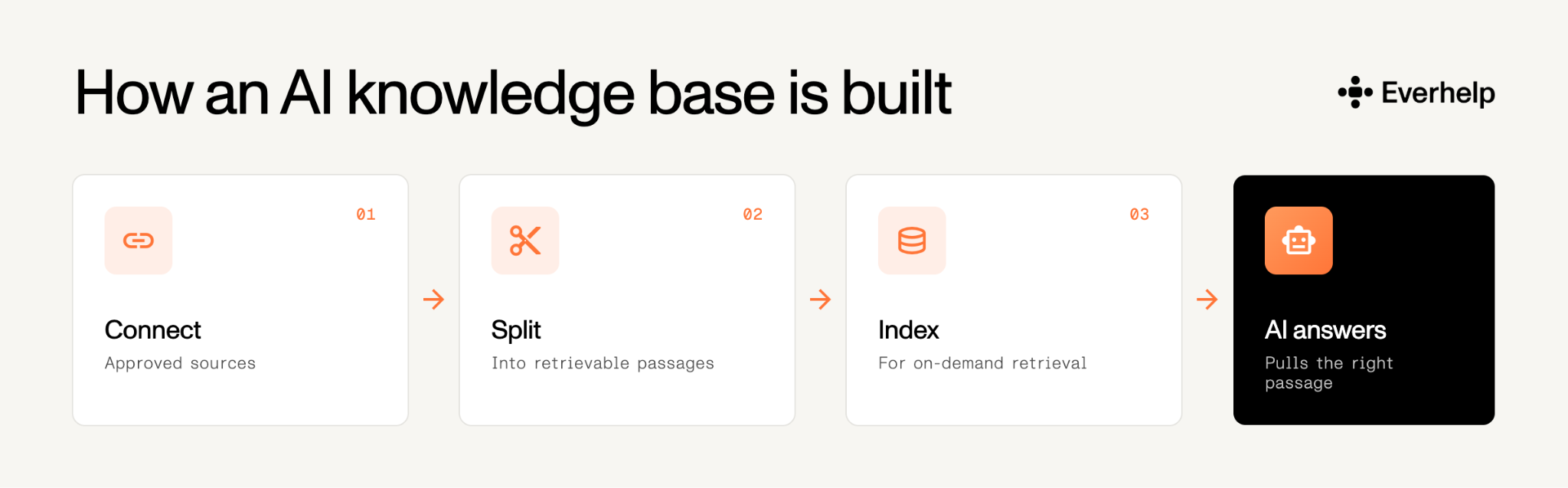
Building one is mostly assembly:
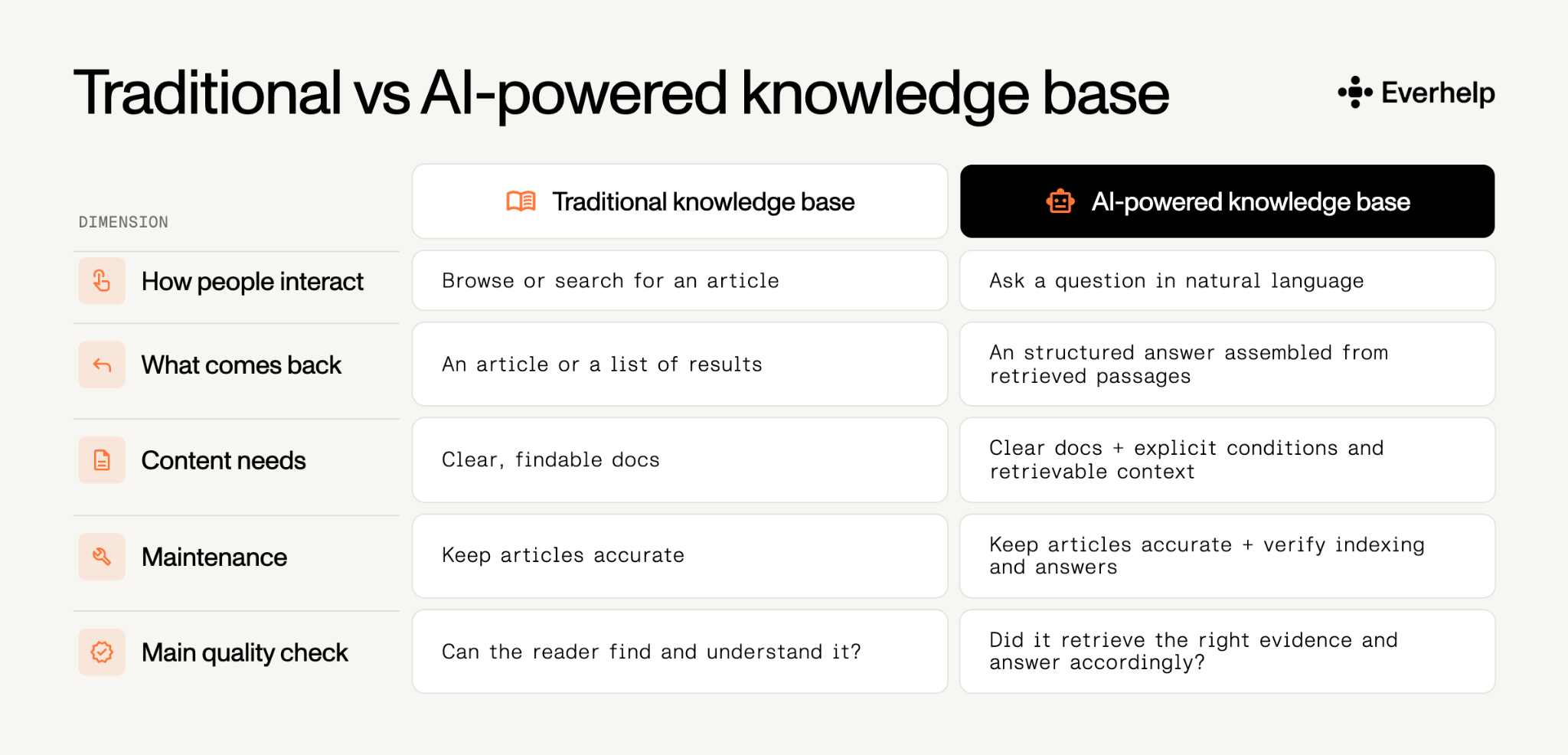
A traditional knowledge base for human support team is written for a person to skim through information, judge nuance, and decide what’s relevant. However, it can also include product/project information, technical guides, and general internal details employees need to know.
An AI knowledge base, by contrast, is designed purely for AI use. It means that this KB contains answers that your configured AI agents will use in customer-facing communication. That’s why it needs to be written in a specific tone, without jargon, and include thorough instructions if needed.
In classic expert systems, a knowledge base in AI stored domain facts and rules, and an inference engine applied those rules to reach a conclusion. That meaning hasn't disappeared, and it's still what "knowledge base in AI" refers to in some academic and engineering contexts.
However, when we use “AI knowledge base” in this article, we are referring to the selection of informative materials that AI can use to guide its “behavior” and help surface relevant answers.
Under the hood, most current systems run on retrieval-augmented generation, usually shortened to RAG. The idea behind an AI knowledge base is to keep the facts in a store you can update and audit, and let the model do the reading and phrasing.
The U.S. National Institute of Standards and Technology defines RAG as a system where a model is paired with a separate retrieval system, or an AI-powered knowledge base, that finds relevant information for a query and supplies it to the model in context. In NIST's words, its key property is that the model's knowledge can be modified without retraining.
In practice, building and running one looks like this:
The model's job is to read the retrieved passages and write a clear, conversational answer, sometimes combining a few sources. It doesn't decide which company policy is authoritative, and a confident tone tells you nothing about how right it is. Because, though grounding an answer in retrieved content reduces invention, it can't make bad content correct.
And that’s why a generative AI knowledge base needs proper attention, and specifically human attention. Your team surely knows more about the nuances of customer complaints than the machine does.
The failures we see rarely trace back to model quality. An AI driven knowledge base gets blamed for answers that really came from the content it was given and from no one owning the updates. Gartner's data backs it up. A Gartner survey of 321 customer service leaders found 58% plan to retrain agents into knowledge management specialists whose whole job is reviewing and curating what the AI says. Companies are putting real headcount against content quality, because that's where the failures live.
Our CEO, Nataliia Onyshkevych, has written about why these rollouts fail without human curation. Her thesis is that teams tend to pour more effort into choosing a tool and not enough into preparing it. These may lead to one of the following 3 most probable failures.
Learn more from our webinar on fixing AI support on the failure points we hit first on new rollouts.
Most of the knowledge bases we inherit have the same recurring problems:
The third one causes the most trouble. In our AI in customer service handbook, we describe the case where the AI offered a first-time shopper a 30% discount when it was reserved for other complaints.
The fix is simple, though:
A lot of what your customers need never makes it into the knowledge base at all. It is kept in PDFs, shared docs, resolved tickets, Slack threads, and the heads of senior agents who never had a reason to write it down. PDFs themselves aren't the problem, since document processing can read and structure them. What breaks retrieval is material that's:
The fix is to get that material in and keep it scoped:
Say your shipping eligibility changes on a Tuesday. On a lot of teams, nobody in particular owns what has to happen next:
So the bot keeps quoting the old rule until someone complains loudly enough to force the fix.
The fix is to assign that ownership before you need it:
Accurate AI support takes more than connected documents. It takes people who catch what the AI can't see and keep policies current as the business changes, which is the idea behind our human + AI support model.
Setting up the AI-driven knowledge base is quick. Most of the work goes into calibration and periodic updates of the system.
The teams that deploy AI most successfully start small. They:
From there, it's a steady routine, and the 4 habits below are what keep the content clean as you grow.
Before you connect anything to an AI knowledge base, look through the existing instructions and self-help materials. Pull a few hundred recently resolved tickets and check how often the answer came from your documentation versus someone pinging a senior agent.
Your autonomous agent can only be as correct and accurate as your knowledge base AI documentation.
For an effective audit, break down your tickets with tags:
Then run an acceptance test: put a fixed set of questions through the system to confirm it answers them correctly. Include all major categories:
Content that reads well to a person can still retrieve badly for a machine. There are some adjustments you can make to even out the phrasing:
To illustrate, here’s an approximate example of a vague policy and a retrievable rewrite of the same rule.
Before: Returns are generally available within 30 days. Some exclusions apply. See the attached policy or contact us.
After: Can I return an opened standard item? Standard items are eligible within 30 calendar days of delivery if unused and in original packaging. An opened but unused item may qualify. A used item does not. Damaged or faulty items follow the separate damaged-item process. Requests outside the 30-day window go to human review.
This rephrase anchors the time window, states the product scope, specifies both the conditions and where the exceptions should be routed.
Any customer service automation flow needs to incorporate a feedback loop to ensure its continuous improvement. For example, to keep your AI support knowledge base accurate, you would need to structure the flow like this:
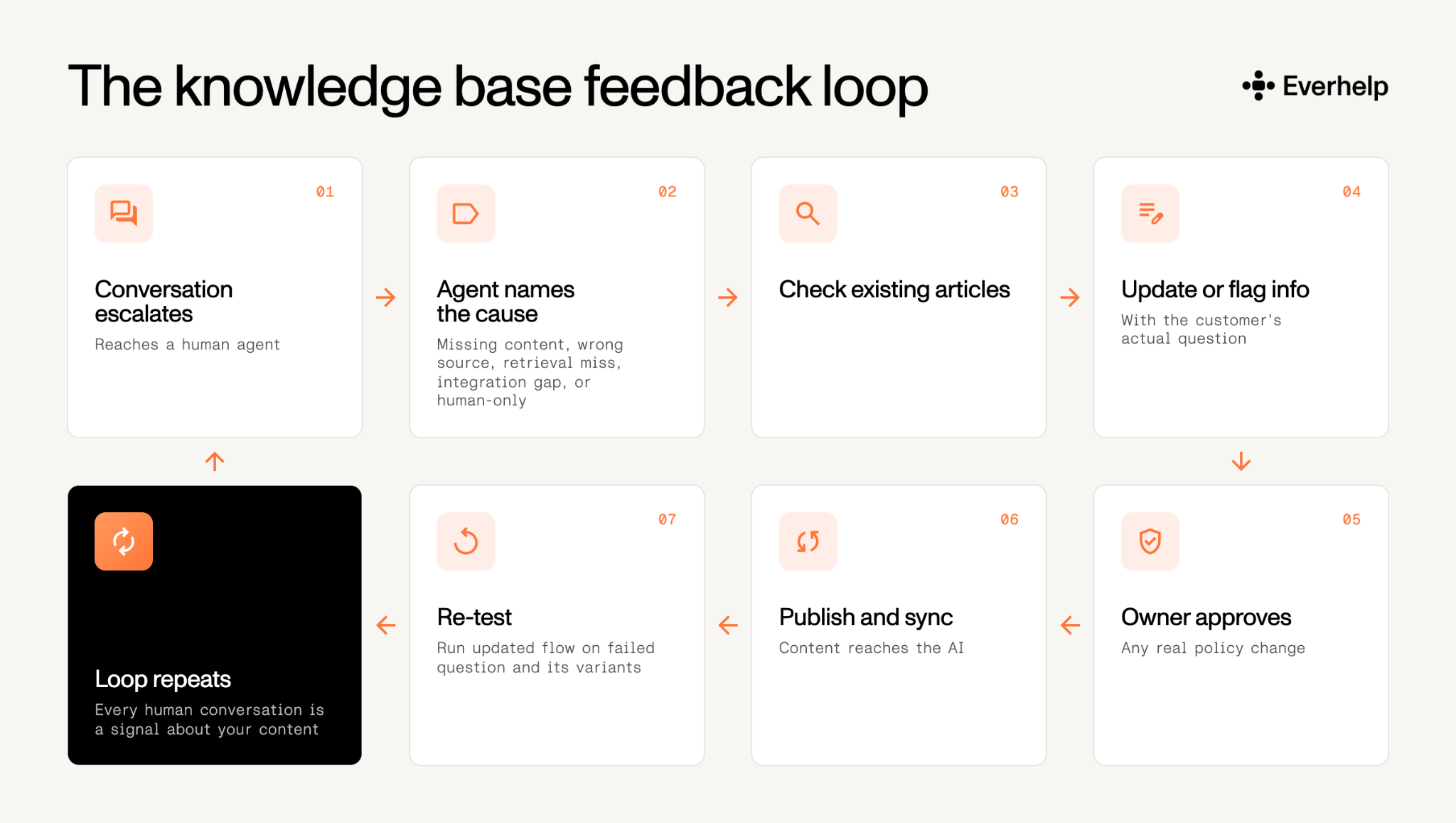
Some escalations, however, may point to broken processes or indicate that human agents need to process an issue. That’s why we advise analyzing past tickets and building a library of escalation triggers.
Learn more about the pros and cons of AI in customer service before you start implementing automation.
Depending on the topic, a department, team, or executive will eventually decide on policy-related claims. Make sure everybody knows who is responsible for which scope:
Small teams combine these roles, and that's fine. What isn't fine is leaving tasks unassigned so they eventually fade under the radar.
An AI support agent with a knowledge base changes the customer's first interaction with your business. Done well, it gives clients the answers they need within the first minute and immediately transfers sensitive cases to humans.
Below is a brief glimpse into how we set up our own AI platform for customer service.
The AI is best at questions that already have a correct, approved way of resolution. No matter whether it requires making a decision – if it’s between straightforward options, it will choose based on circumstantial requirements.
As experience shows, though, high-volume, low-risk tickets with nothing to interpret are the easiest to automate, and still help boost support speed without breaking consistency:
Most of these are also what customers would rather settle themselves at 2 a.m. than wait in a queue for, so a well-built AI customer support knowledge base doubles as self-service. Our customer self-service examples show the format that works.
Anything that needs judgment, influences finances, or regards emotional experiences should be processed by a person. The AI's job there is to collect the context and route cleanly, with the transcript and the reason for the handoff attached, not to improvise a resolution.
In practice, that scope usually includes:
It’s basically anything where the evidence conflicts or the customer has flat-out asked for a human.
Frustration by itself doesn't necessarily have to trigger a transfer. Real distress, 2 or 3 failed answers in a row, or a direct request for a person does. That balance is the point of a hybrid AI and human support setup: the AI absorbs volume, and a person handles the ones with real consequences.
The single biggest lever on AI support quality is the AI knowledge base behind it. Megan O'Donoghue, VP of Global Support at Bazaarvoice, found that response quality rose about 80% once her team pointed the bot at a knowledge base they'd spent a year organizing with Knowledge-Centered Service.
Yet, based on recent statistical data, we can say most teams don’t understand this yet:
If you are also still skeptical, here are just a couple of cases that show how dependent AI success is on the quality of its knowledge base.
Let’s start with Morgan Stanley's advisor assistant case. The firm rolled out the AI @ Morgan Stanley Assistant in late 2023 and by mid-2024 noted 98% adoption across its advisor teams, as reported by Investment News.

What makes it work is content discipline. Earlier, CNBC noted that the assistant answers the bank's roughly 16,000 advisors only from the 100,000 research documents Morgan Stanley vetted for it, not the open internet, which is the whole reason advisors trust it for high-stakes work.
On the customer support side, our own projects prove that the automation flow is only as good as the materials it's built on. Across deployments where we paired a curated, audited knowledge base with human oversight, we compared three setups and measured the difference in satisfaction.
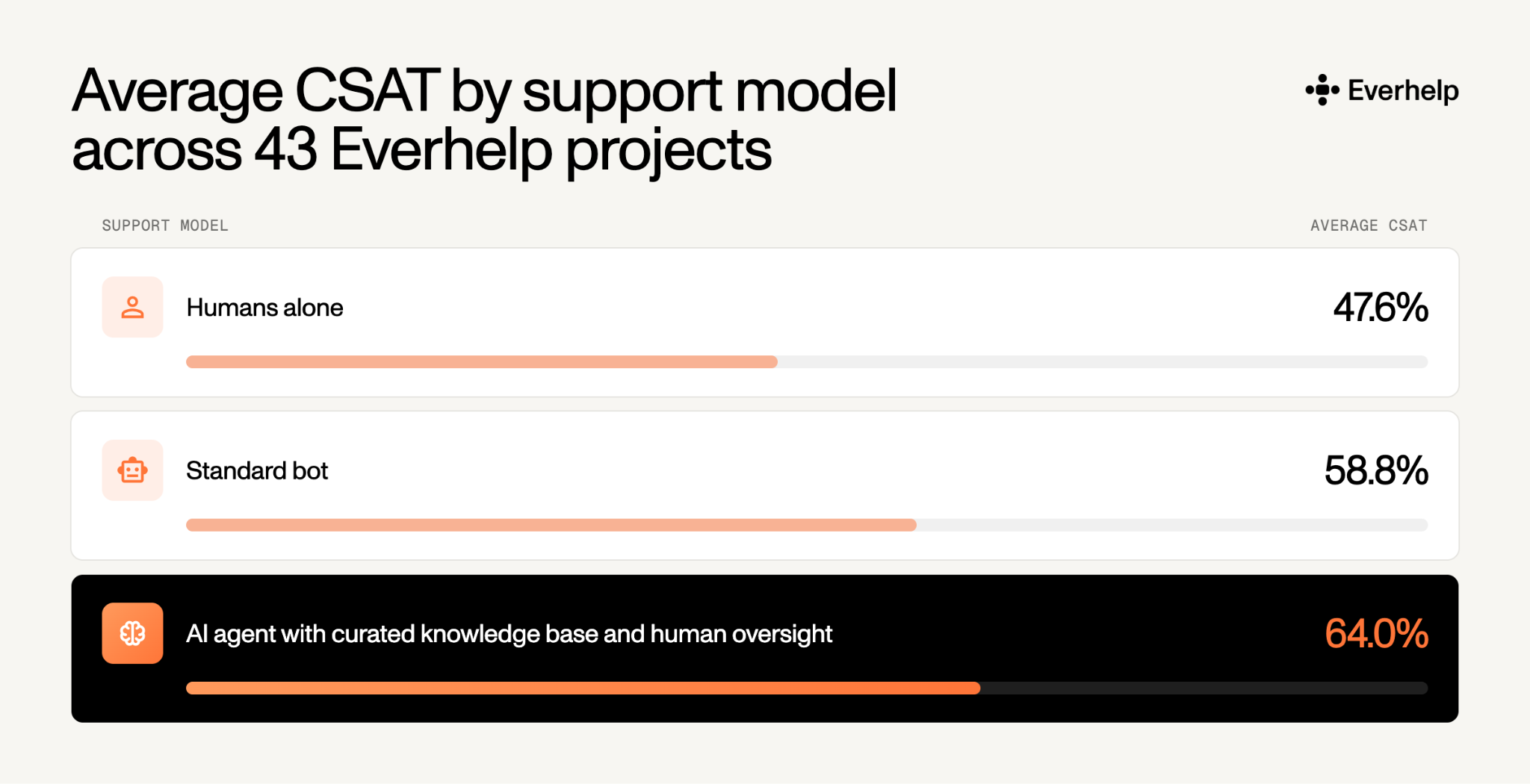
When we tested the AI agent’s quality-control score, it landed at 92%, matching our best human agents. One client saw ticket processing speed roughly triple. The lever in every case was the knowledge, and another proof point for that is the support operation we scaled from a 200-hour wait to 4 minutes once the content and routing were right.
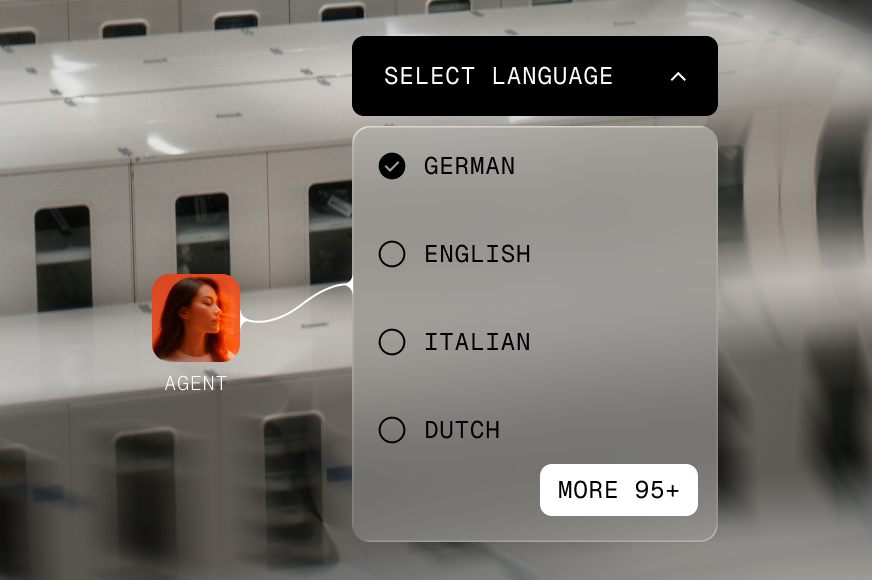
Though we bet you won’t find an “ideal” AI knowledge base software, you will find the one that ticks all the major boxes, like multilingual AI support service, for instance.
What exactly do you need to look for? Well, here’s a checklist of what you should examine before choosing software, as well as the red flags to beware of.
If you're weighing whole categories of tooling rather than a single product, our roundup of AI help desk platforms is a faster way to narrow the field than vendor sites.
Measurement is where optimistic dashboards about your AI knowledge base meet reality. Automation rate on its own tells you how often the AI answered, not how often it was right. And that’s why other metrics play an important role in AI success tracking. Still, pair every rate with an analysis of the conversations behind it.
The share of AI-handled conversations that never transfer to a human. But a conversation can end without a transfer because the AI solved it, or because the customer gave up and left. Read it alongside resolution and repeat-contact rates, never on its own.
This is the share of in-scope questions where the AI found no approved content to answer from. This is effectively a map of your knowledge base, where a rising rate points to real content gaps. Keep it separate from retrieval misses, where the answer does exist, but the system failed to surface it, because the two call for different fixes.
Escalations where a reviewer confirms the AI gave a materially incorrect answer. This is the metric that protects customers, so track both the count and the severity of the wrong answers. A handful of high-stakes wrong answers does more damage than a long tail of minor ones, and the rate alone won’t tell you that.
The share of active articles still inside their review interval. A recent timestamp isn't proof the content was validated, only that someone opened the file. So let somebody review the materials from time to time. Stale articles are the most common source of confident, outdated answers.
These are conversations backed by customer confirmation or outcome evidence, kept distinct from assumed resolution. An AI closing a chat doesn’t equate to a solved issue. Where you can, confirm the outcome instead of inferring it from the absence of a follow-up.
For the full set of definitions and targets worth tracking, our guide to KPIs for AI agents goes deeper, and AI customer experience breakdown ties the metrics back to what customers actually feel.
After all of this, the pattern is hard to miss. AI support rises or falls on the knowledge base behind it, and on whether real people keep that knowledge updated. Get the fundamentals right — a clean audit, retrieval-ready writing, a feedback loop from escalations, and a clear owner for every policy — and the AI stops guessing and starts resolving.
If you'd rather launch AI support on content that's genuinely ready, book a demo with our team and we will help you prepare it.
Not in the sense a support team means by an AI knowledge base. ChatGPT draws on information learned during training, which isn't a maintained, governed company knowledge base. Custom GPTs let you upload files as reference knowledge, and some configurations can retrieve from connected apps with citations and existing access permissions. Uploading files is reference material, not retraining. The model isn't relearning your policies, but simply reads what you give it.
It has two meanings. In classic expert systems, a knowledge base in AI is a store of domain facts and rules that an inference engine reasons over. In modern generative support systems, it's the managed collection of approved content plus the retrieval system that feeds relevant passages to a language model.
The AI knowledge base is the information resource and its retrieval system, basically the thing the bot reads from. AI knowledge management is the broader practice of capturing, validating, organizing, maintaining, and improving that knowledge over time. The AI knowledge base is the asset, and knowledge management is the ongoing work that keeps it worth reading.
There's no honest universal timeframe, because the timeline depends on the condition of your content. Connecting a clean source for a demo can take hours. Deploying a reliable, permission-aware support system takes weeks, since content quality, integrations, approval requirements, languages, and how much you test before launch all vary. The audit is usually what takes the most time to complete.
Help someone else stay in the know. Hit that share button!


.webp)

.avif)
.avif)
.webp)