Process Efficiency
AI & Automation
Customer Experience
Published on
12.11.2026
Last updated on
12.11.2026
What is WISMO, and how to cut "Where Is My Order" tickets?



WISMO stands for “where is my order?” It’s the calls, chats, emails, and social messages customers send to check an order’s status, location, or delivery date.
Though it may seem like a simple issue on the surface, reducing WISMO requests takes more than sending a tracking link. In Narvar’s 2025 research, 45% of U.S. online shoppers said they wanted real-time updates when issues occurred—before they had to ask.
That means support teams need to prevent uncertainty before it starts, answer routine status questions from live order data, and take ownership when a delivery actually goes wrong.
That’s why we dedicate the rest of this guide to a practical workflow for doing all of this — including the ecommerce support challenges that make WISMO harder than it looks, what data an agent checks, where AI should stop, and who owns the next action.
Though the phrasing of these types of requests may differ, the underlying WISMO meaning stays virtually the same. Customers’ true intent is to know what’s up with their order and when they can expect it. A customer emailing “tracking hasn’t moved in four days” and one phoning to ask “did my order ship?” are both WISMO, even though neither directly asked the “where” question.
That intent may be a result of 2 different situations that should be processed according to separate flows:
Only the second situation requires human investigation and decision-making. As such, we already have the first path to lowering the number of WISMO calls – removing the information-asking ones from the live agents’ queue. But we shall return to this topic later.
There’s another related question that requires human intervention: WISMR, or “where is my refund?” It’s the post-return, payment-status cousin of WISMO, that can get into the mix during ticket tracking.
Note: To eliminate WISMO and WISMR friction over time, we advise tracking them as two separate customer intents with two workflows, rather than a single “post-purchase stuff” case category.
Naturally, to reduce WISMO, you first need to measure how many requests of that type you get. To do that, you need a consistent definition of what gets tagged as WISMO. Only then will you be able to have a clear rate of those requests, as well as separately flagged delivery exceptions.
A workable approach: assign one primary reason tag, then add an exception tag when a status question turns into an investigation.
The tags you can see below are just a recommended taxonomy, so you are free (and actually expected) to adapt the names to your helpdesk.
Note: Split shipments catch a lot of teams off guard, as customers may receive their orders at different times. For this reason, many carriers (like Shopify) also document partial fulfillments and multiple tracking sections on their order status page, so the agents can see both tracking numbers at the same time and give customers relevant information for the specific part of the order.
Support volume rarely spikes without warning. It follows the things you already plan for, like your sales calendar and product launches. Thus, the main reference points are the same for virtually every store and any business:
However, some industries depend more on seasonality, while in others promotions remain the key volume driver. Below we break down which signals matter the most for the major industries.
Note: Despite minor differences, the forecasting move is the same across every industry:
→ take your status-contact rate from a normal month
→ apply it to the volume you expect for the period
→ then raise it up for known risks like carrier strain, a major release, or a new fulfillment center still ramping.
Your goal is to gain enough lead time to staff the queue and prime your proactive outreach before the surge, not after CSAT has already dropped.
eCommerce ticket volume is the most calendar-driven of the group, peaking hard around sales events like your eCommerce Black Friday rush. Volume climbs with:
Logistics sits closest to the physical delivery, so its WISMO load tracks network conditions more than promotions. Watch for:
SaaS has no parcels, but it has its own “where is my access, feature, or provisioning” contacts. Ticket spikes tend to follow:
In fintech, the WISMO equivalent is “where is my money” — payment, transfer, and payout status questions. So contacts spike around:
Travel volume is disruption-driven, and its “where is my booking or refund” contacts arrive in waves when plans change. Expect surges from:
{{cta}}
Most WISMO volume can be traced to one of 3 causes, and understanding which one you are dealing with will affect how you fix the surge on your end.
The first two you can engineer away with better communication. But the third brings ticket spikes, mostly because of supply chain delays, and that warehouse backlog can’t be solved by rewriting a support macro.
Note: Delivery problems are common enough to keep the queue full on their own. Ofcom’s 2026 research found that 71% of UK parcel recipients had experienced a delivery issue in the previous six months. The most common issues were delivery delays, parcels left in the wrong locations, and miscommunication with delivery drivers.
Volume compounds the effect. More orders can mean more contacts even when the contact rate stays steady, which is why WISMO reliably surges during peak season support crunches without anything actually breaking.
And though some of the issues during this time may not be on you, your support team will inevitably be the one to diffuse the situation.
To know this, look into your helpdesk dashboards:
The main problem with WISMO tickets is that they rarely take one reply to resolve. The agent verifies identity, switches between order and carrier systems, interprets an ambiguous scan, sometimes contacts the carrier, then only fields a follow-up two days later.
So, to see the strain these cases create on your team, you also need to separately measure active handling time (what the agent spends) and elapsed resolution time (how long the customer waits).
The two calculations you thus need to start with are:
WISMO handling hours = WISMO contacts × average active handling minutes / 60
WISMO handling cost = handling hours × fully loaded hourly support cost
Two things to note here:
The good news is that some of this volume is preventable. For instance, after rolling out Narvar’s tracking experience, Sonos reported 34% fewer WISMO contacts in North America and 43.5% fewer in EMEA.
Clear, accessible tracking is just one way to cut WISMOs; below, we discuss a few other tactics that can help.
Each of the strategies presented below basically contributes to building a single operating model to reduce WISMO calls, in which:
The table below is based on our assessment of each strategy, primarily the impact and effort required to execute them, based on our support experience.
The key here is to cover 4 stages that matter most:
Each message should explain what happened, what it means, and what comes next, and include an easy-to-find tracking link.
Example of a simple copy: “Your parcel is with the carrier. Estimated delivery: [date range]. Track its progress here: [link].
Don’t announce “shipped” when only a label exists – rushing things will create a WISMO wave of its own.
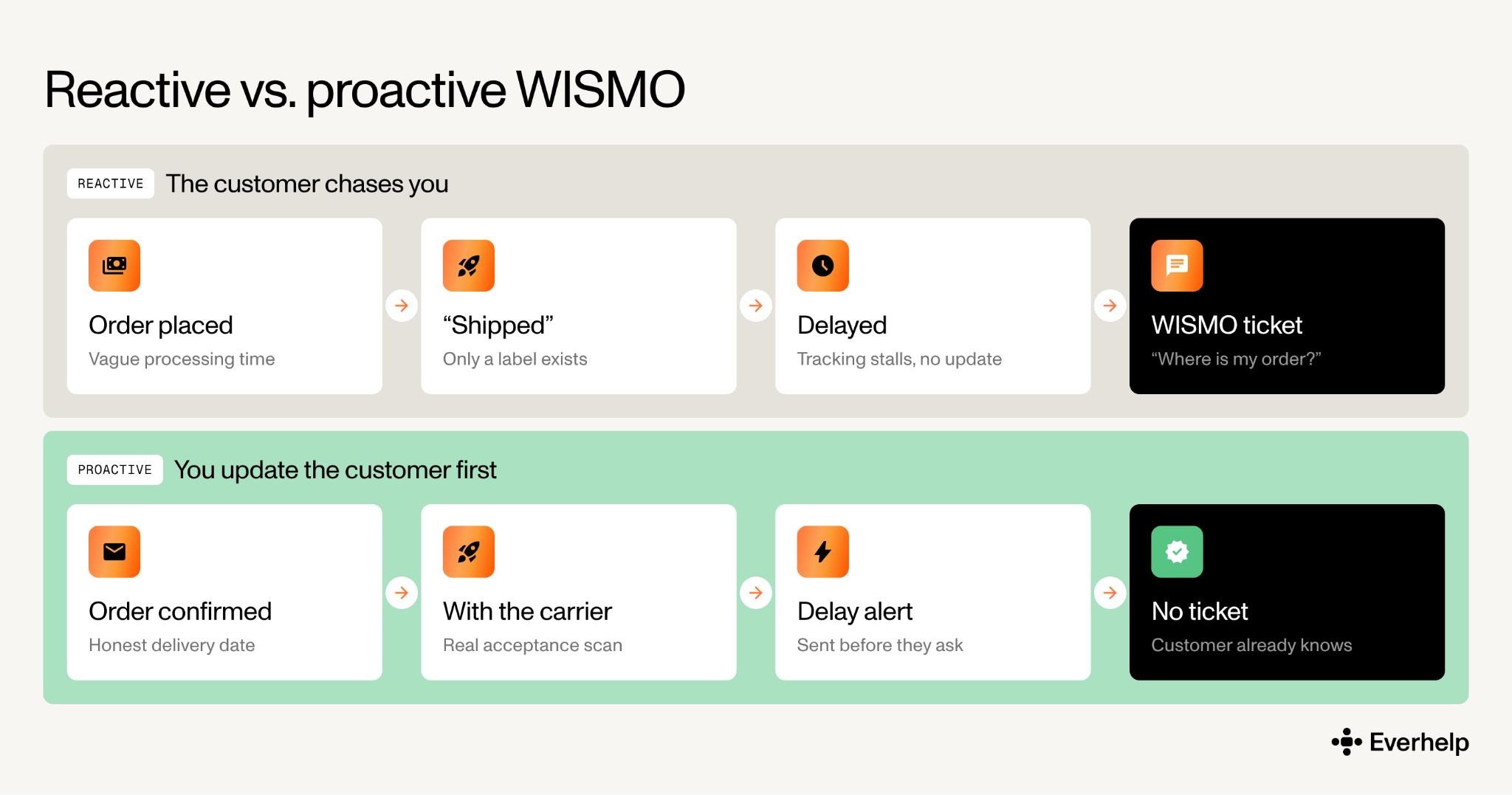
This is the core of good proactive customer service, and it compounds with the right ecommerce shipping software feeding accurate events.
As Davines proved, reporting a 22% WISMO reduction after improving order updates, delivery estimates, and delay notifications, this approach works.
Keep customers inside your brand instead of dropping them on a raw carrier page. Build a dedicated tracking page within their profiles and show:
Make sure that unfamiliar statuses are explained in plain language. Keep the problem-solving information more prominent than any cross-sell.
Example: Shopify’s native order status page already supports tracking, branding, and real-time location for supported carriers, so a separate app isn’t automatically required.
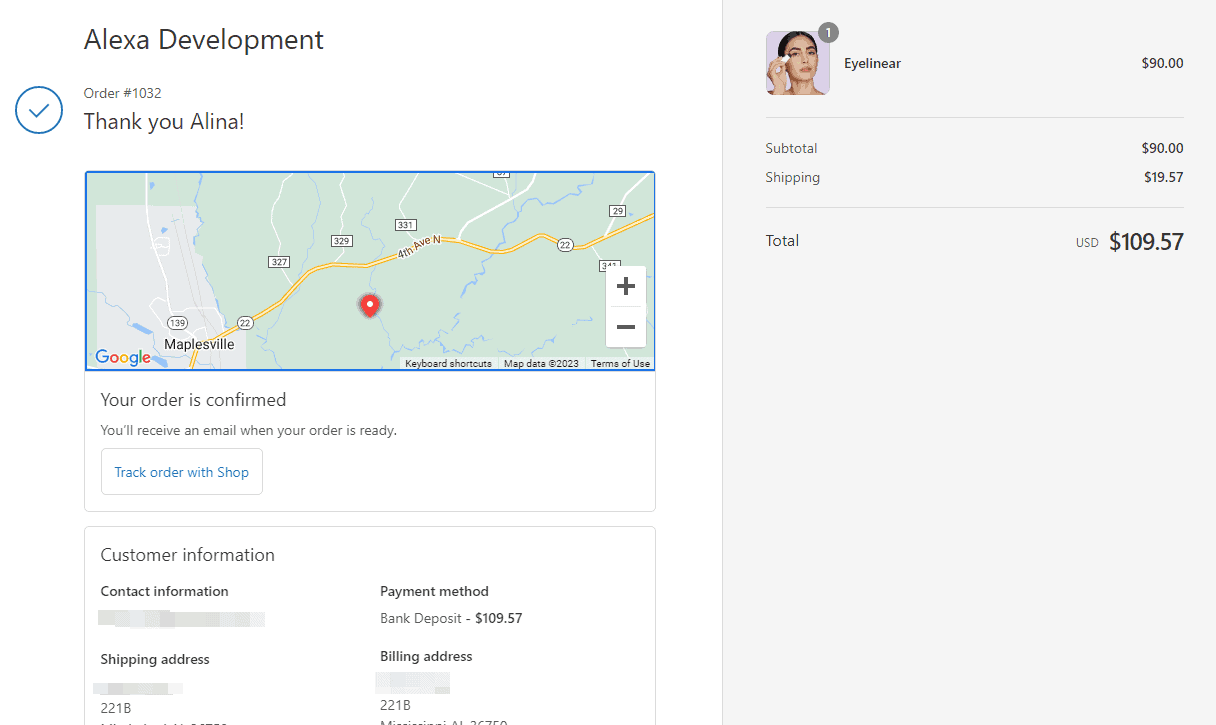
A well-built tracking page is one of the cleaner ways to cut “where is my order” tickets because it answers the question before the customer even thinks to message support.
Separate processing time from transit time, and clearly state cutoffs, business-day assumptions, and regional limits.
In Narvar’s holiday research, 37% of shoppers saw a delivery date change after purchase last peak, which, let’s just say, doesn’t influence your customers positively.
Our advice is always to state an honest delivery date, even if it is later than your customers would want it. This, along with a clear delivery breakdown in the confirmation email, sets realistic expectations for consumers from the start.
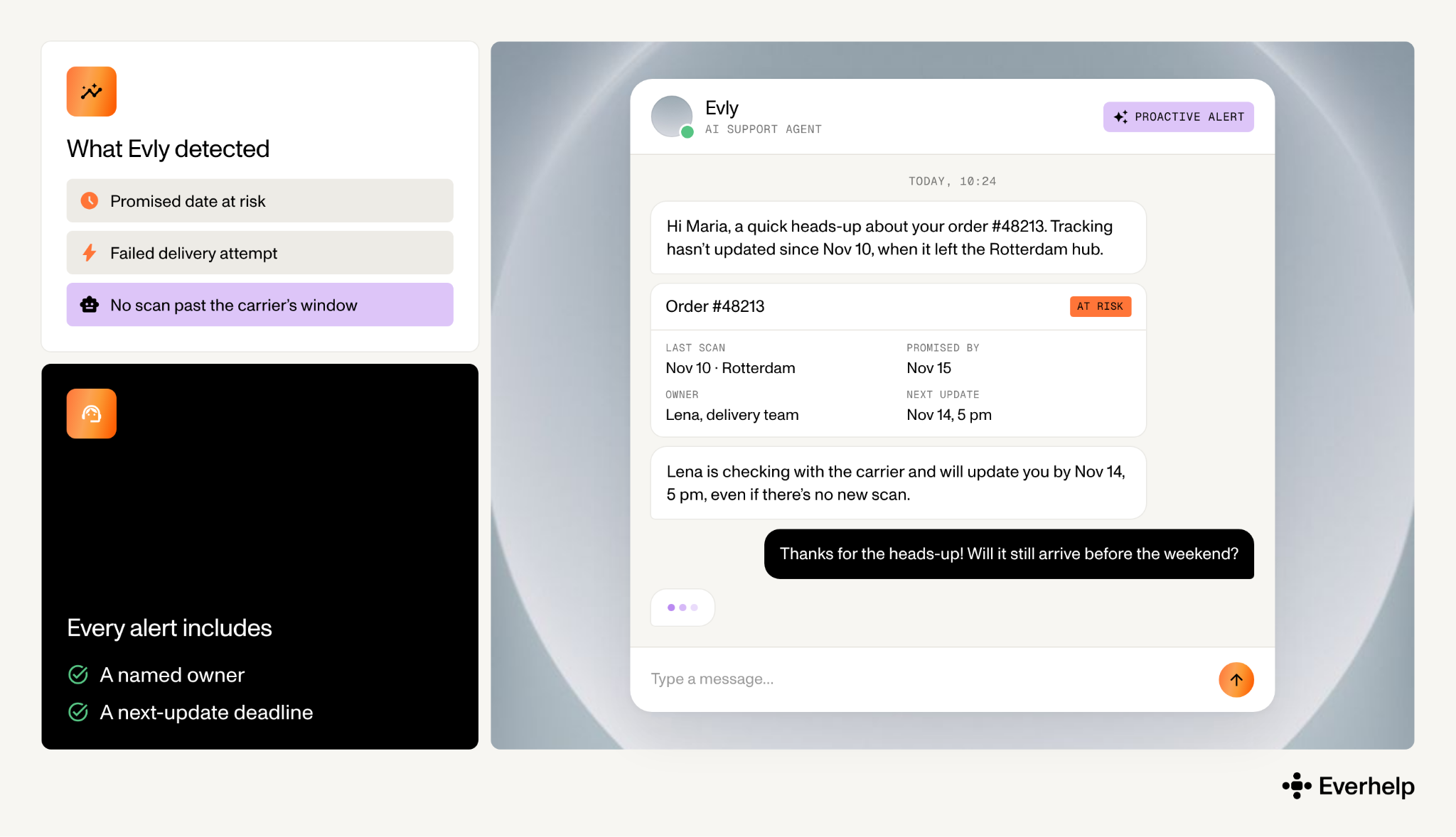
Trigger outreach when:
However, don’t set a blanket threshold – divide them by carrier, service, and route, since they all create different delivery conditions.
To make sure your agent’s outreach contributes to a positive experience, make sure your message:
Example of a simple copy: “Tracking hasn’t updated since [verified event/date]. Our [delivery agent X] is checking with the carrier and will update you by [time/date], even if there’s no new scan.”
This kind of monitoring is hard to run manually, so we incorporated our AI platform Evly into the process. It scans order and tracking data for these conditions and flags an at-risk delivery before the customer notices, so our team can start outreach. Additionally, Evly can be set up to send an automated alert when it receives that trigger.
Good self-service lets a customer find the answer without opening a ticket, but only if it’s easy to reach and safe to use. Put a “track my order” entry point in the 4 places customers already look:
Behind that entry point, verify identity with an order number plus email or phone, so you’re not exposing order details through a lookup anyone could guess. Show every shipment tied to the order, and keep a clear route to a human through an ecommerce live chat for the questions tracking can’t answer.
Building these flows from scratch is where most teams stall. That’s why when we built Evly, we made sure to include a workflow builder with ready-made templates for common cases like order lookup. With a tool like that, you can start building your self-service from a working template and adjust it to your setup instead of building the flow from scratch.
See more good customer self-service examples in our earlier article.
Most customer service chatbots are knowledge-base bots. They’re good at explaining your return policy, but they can’t help an individual customer with their specific order. That’s what a connected AI agent is for: it retrieves the customer’s actual case, reads the latest carrier event, and replies with a real ETA.
So, if you are looking for AI tools to reduce WISMO tickets, find the ones that offer:
Evly, our AI agent, works this way: it provides real-time order status, with a full-context handoff to a human when the data runs out.
If you’re still deciding how much to automate versus staff, our take on live chat vs chatbot is a useful starting point.
Use one parent intent with consistent reason tags to capture:
We also advise distinguishing AI-resolved, human-resolved, and escalated contacts so you can also review actual surge causes.
Example fields:
→ intent=wismo
→ reason=tracking_stalled
→ resolver=ai|human
→ escalation=missing_data|delivery_exception|repeat_contact
→ promise_breached=yes|no
Always define who within your team will be responsible for handling:
You still can use AI for these tickets, but only to gather evidence and summarize policy, not make the final call. And when your AI agent hands off, it should pass the order, last tracking event, customer history, actions already taken, and next-update commitment information.
Note: A case has to stay open until it meets your resolution standard. Because sending a tracking link can’t be called a resolution when the customer has already checked it and is asking you to investigate.
We’ve already dabbled in automation, so let’s dive a little deeper to see how to automate your queue successfully.
First, we need a tool. To figure out “which AI can handle WISMO tickets?” you need to outline the necessary capabilities, not just look at vendor names.
Eligible AI for WISMO needs live order and tracking access, identity verification, policy constraints, and a clean escalation path. “Can’t handle” should mean “shouldn’t independently close under this workflow,” not that software can never assist.
The dividing line is money, liability, and uncertain facts. Retrieving a verified status is safe to automate. Deciding a remedy for a lost parcel is not.
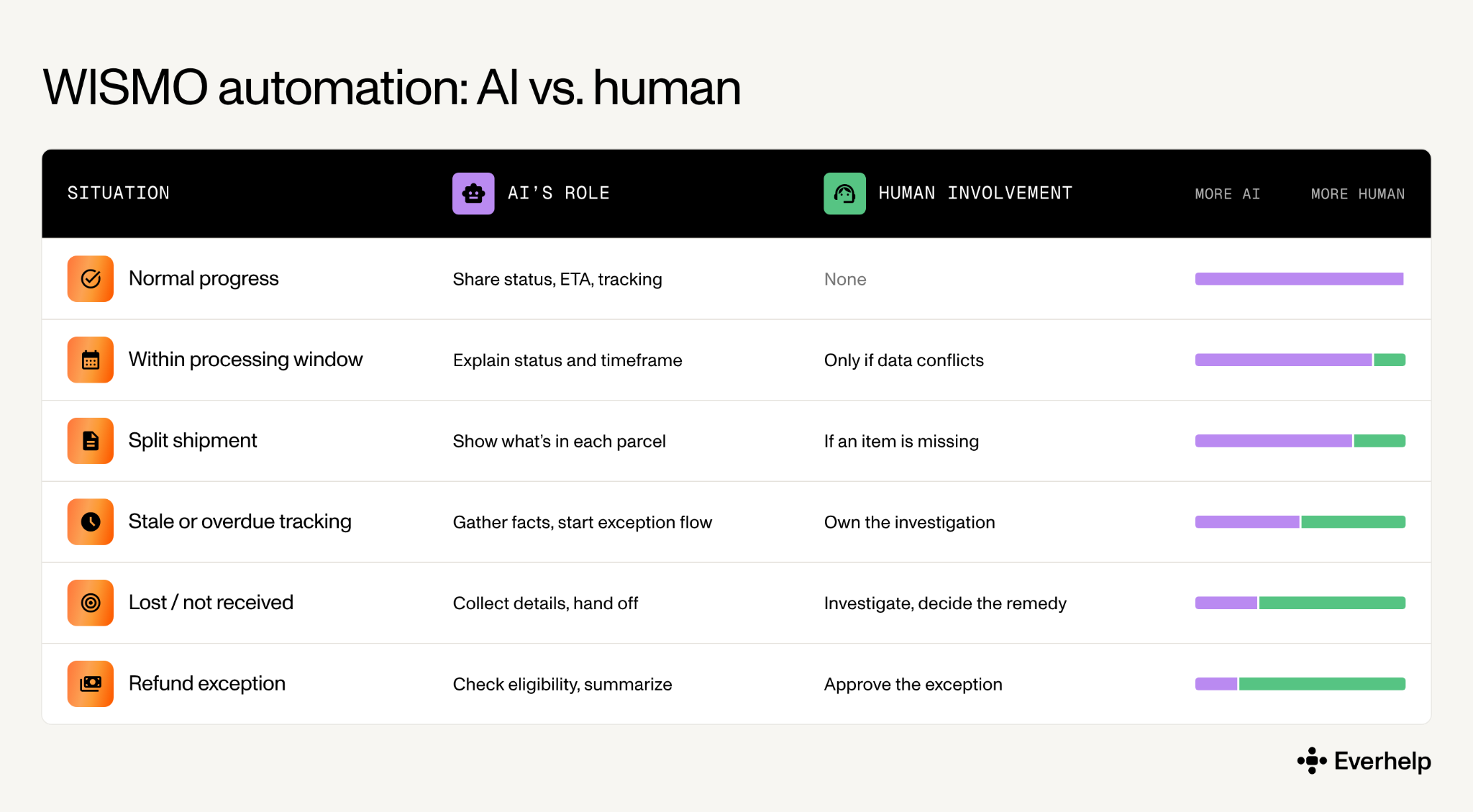
Keep in mind that this is our proposed operating model, which isn’t guaranteed to fit every live support flow. However, this divide has held up in practice.
In our personalized wellness app case, Evly resolves nearly 70% of tickets (68–70%), with humans handling the sensitive and complex exceptions. Of course, this isn't proof it will work the same way on the eCommerce WISMO workload, but it does show there's a good chance it will.
{{cta}}
After you introduce any of the tactics, it’s important to see whether they affect your WISMO volume. To do that, pick a few categories to track and do so regularly.
Here’s what’s worth tracking:
Two cautions. Define the recontact window and dedup rules before you compare anything. And expect the remaining human queue to get harder as routine contacts disappear, so handle time may rise even while total workload drops. That’s the automation working, not failing.
We don’t like to talk about something we haven’t tried. That’s exactly why we're proud to present you (and our clients) with our own model, which pairs the speed and knowledge of connected AI with human accountability and decision-making.
In our system, Evly, our automated AI agent, answers routine order-status questions from live data, while agents handle exceptions and escalations. Every resolution first runs through Evly’s built-in AI QC, which checks the answer against order data, policy, and escalation rules. Our QC specialist and Delivery Manager then review what the AI QC flags, so quality stays accountable to people.
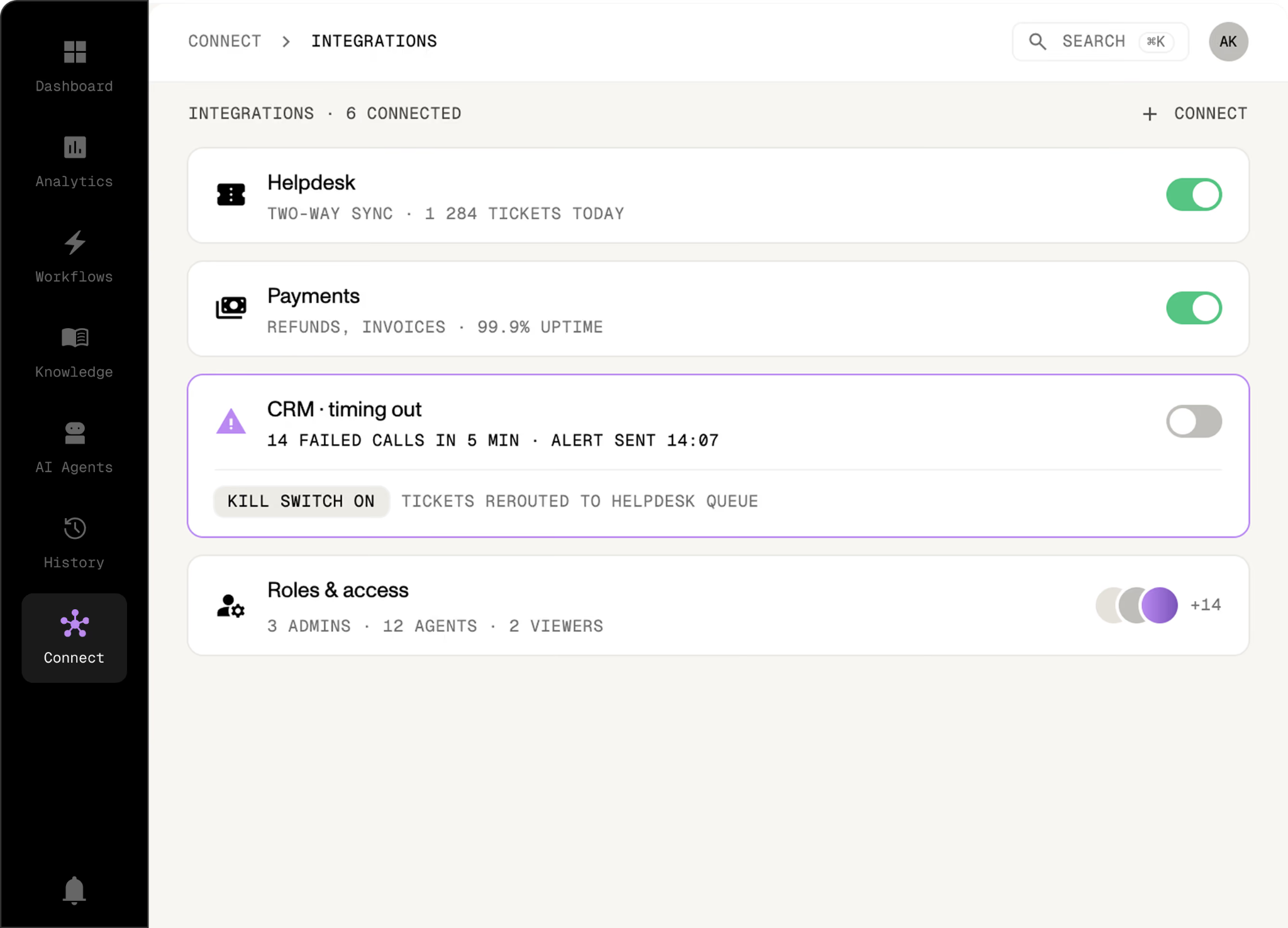
This structure has proven especially helpful for ecCommerce customer support outsourcing, as it helps control WISMO spikes by automating the most trivial tickets.
We have two particular cases that prove our point. One is our client’s Brava Fabrics case study.
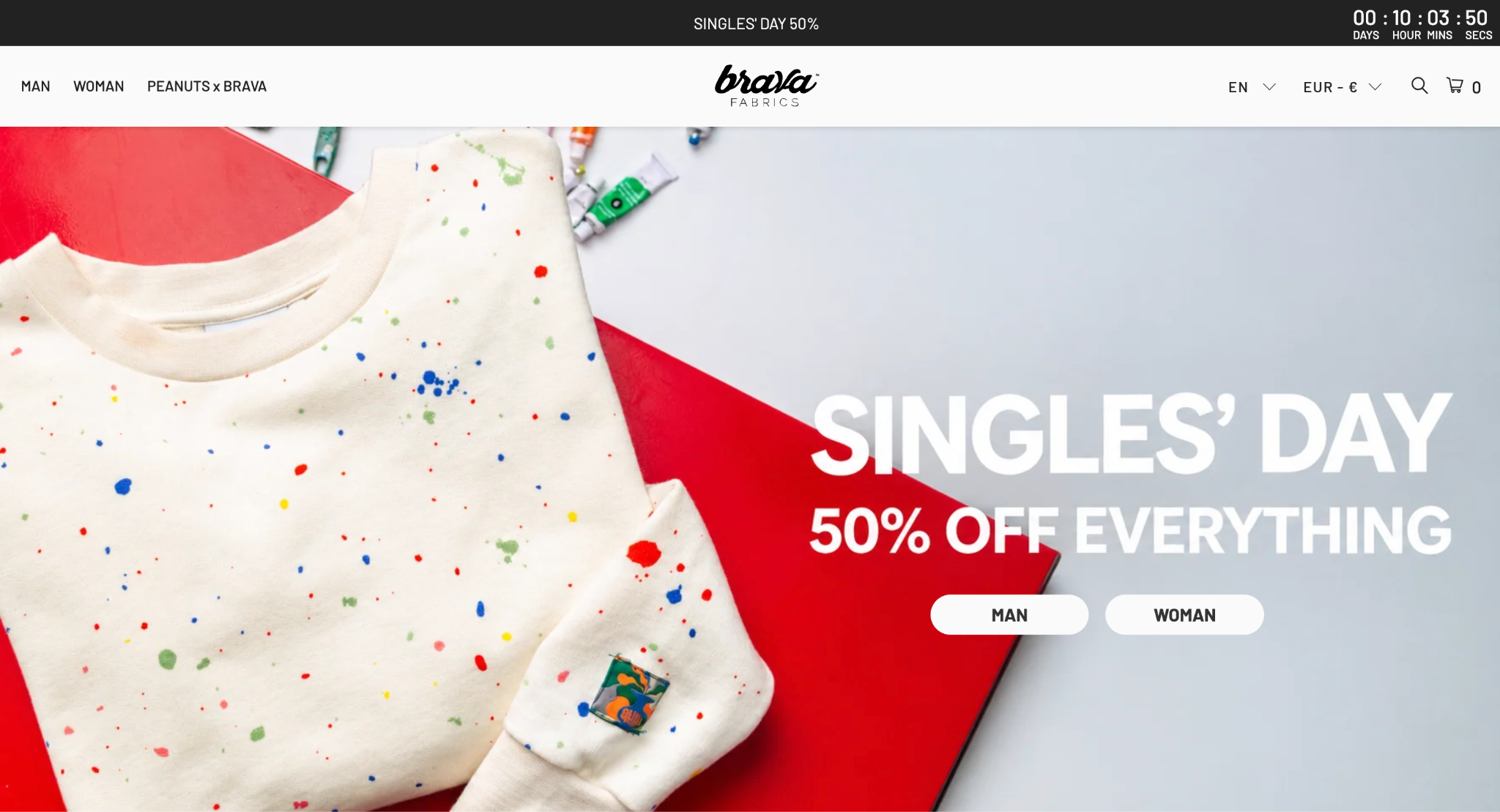
As they came in looking for peak-season capacity, we’ve added one dedicated agent to support their existing team across email, Facebook Messenger, and WhatsApp. As a result, the company could:
This case shows that even a single trained agent can reinforce the queue during holiday volume.
Another case is the wellness app we looked at earlier. There, we could establish a 70% AI resolution rate because of clearly defined exceptions for escalations and a review loop. Every week, a QC specialist and the Delivery Manager checked 30 randomly selected Evly-resolved tickets against an established quality score. That allowed us to automate more tickets as volume grew, as we became increasingly confident in the quality of service provided by our AI.
These are far from all the methods we use when dealing with WISMO spikes and peak-season support in general. You can read our logistics provider case study to see how we deal with them on the shipping end.
You’ve got the model now. The next step is running it on your own order data, channels, and volume.
If you want to make this process easier, we offer Evly to handle your routine questions and our expert agents to take care of the exceptions.
Just book a meeting with our team, tell us why WISMOs are an issue, and we will build our operation to make sure they aren’t anymore.
WISMO stands for “where is my order?” It covers order-status, delivery-date, and parcel-location questions across calls, chats, emails, and social messages.
A WISMO ticket is any customer contact asking about an order’s fulfillment or delivery status. A ticket that starts as a status question can become a delivery investigation, which is why we recommend tagging the exceptions separately.
WISMO asks where the order is. WISMR asks “where is my refund?” and tracks payment or return status. They need separate tags and workflows, so your post-purchase reporting reflects your actual situation.
Yes, for eligible status questions when the AI is connected to verified order and tracking data. Missing data, delivery disputes, and judgment-based cases should escalate to a human. Evly works this way, and it’s also how we prepare teams to automate where is my order (WISMO) tickets before peak demand stretches the queue.
Add accurate tracking numbers to fulfillments, make the order status page easy to find, and configure customer notifications. Set clear processing and delivery expectations, then add authenticated self-service lookup with a clear exception route.
Real-time native tracking depends on carrier support. For example, Shopify’s current docs say order updates aren’t sent by native SMS. So, we strongly advise confirming your app or integration setup before promising any delivery texts or updates. And if you’d rather not manage the queue in-house, you can outsource Shopify support to a team that handles tracking, notifications, and exceptions for you.
Help someone else stay in the know. Hit that share button!