Growth & Metrics
Support Ops & Teams
Process Efficiency
Published on
29.10.2026
Last updated on
29.10.2026

Peak season shipping: staffing customer support for Q4 volume

QC Team Lead

Victoria

QC Team Lead

Table of contents
Blog
/
Peak season shipping: staffing customer support for Q4 volume

Sendcloud’s 2025 data shows Black Friday-week shipments rose 32.8% over 2024, with Cyber Monday up 12.5% year over year. More parcels in transit mean more questions from the customers leading to support contact. Molin’s review of 2025 chats found that a typical store handled 1.6–1.8 times its usual weekly chats from Black Friday through mid-December.

‍

As we are nearing this hottest sales period, we’ve decided to dedicate this to how to better prepare for this year’s peak season shipping. But before we dig into the technicalities, let us ask you one question:

What do you start your peak-season planning with?

If you answer with inventory, warehouse capacity, and carrier cutoffs, you are off to a good start. But every parcel that misses a scan or a delivery window becomes a customer-support ticket, so Q4 preparation needs a queue plan as much as a freight plan.

‍

You might ask:

Well, how can I plan support processes if I don’t know when volume will hit?

Though the real peak timing might not be predictable, you can still have a ready-made plan for when you see a familiar queue pattern emerging:

More orders coming in → more parcels entering carrier networks → a higher chance of late or unclear scans, or past-deadline shipping.

As a result, you'll likely see more tracking questions, address changes, delivery exceptions, or returns and refund claims.

‍

In this guide, we'll cover:

‍

  • How to forecast such demand.
  • Which peak season logistics staffing model fits your queue.
  • What AI can and can't absorb.

Our main goal, however, is to outline a four-week countdown plan for your peak season staffing that will get your people, automation, and escalation ready before the first carrier disruption.

Why does peak-season shipping cause issues for your support queue?

More orders don't tell you how many support agents you'll need. Even if a warehouse ships on time, customers may file tickets when tracking is unclear, a delivery date slips, or no one is responsible for the carrier escalation. So, a better way to forecast support demand is to base it on shipping events and staff accordingly.

From orders to tickets: the chain that creates Q4 demand

As we established in the beginning:

More orders = more parcels = more chances for a late scan, a missed delivery window, a wrong address, or a damaged box. 

Each of those gives a customer a reason to write in, and the hardest cases (e.g., lost parcels, customs holds, claims) take the most time to clear. As such, order volume and ticket volume rise together, even if not at the same rate.

‍

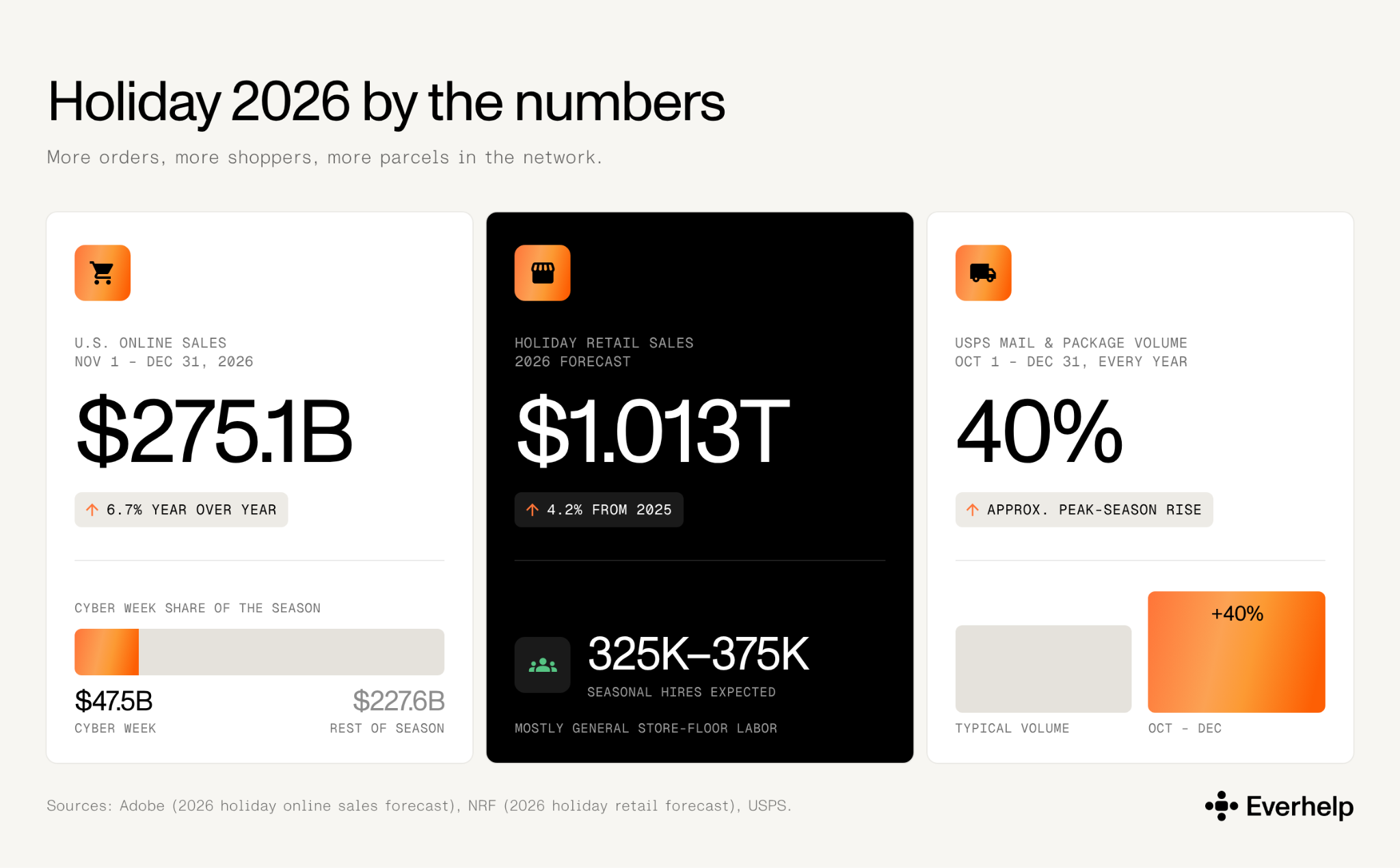
Though we believe big forecasts alone are not enough for a good staffing plan, they are good indicators of what to expect. This year, for example:
‍

  • Adobe expects $275.1 billion in U.S. online sales between November 1 and December 31, 2026, up 6.7% year over year, with Cyber Week alone at $47.5 billion.

  • The NRF forecasts $1.013 trillion in holiday retail sales, up 4.2% from 2025. It also expects retailers to add 325,000–375,000 seasonal workers, though that's in general store-floor labor.

  • And, according to USPS, its mail and package volume rises about 40% between October 1 and December 31 each year.
Holiday sales Q4 demand

Forecasting from your own data: step-by-step breakdown

Market numbers help predict upcoming pressure, but they won’t tell you how to staff your business. To size the team and schedule hours properly, analyze your own history. 

‍

Here’s how you can do proper forecasting in just 5 steps:

‍

  1. Find your contact rate.
    Take last peak's support contacts and divide them by the orders you shipped in the same window. Break it out by channel and by contact reason where you can, since WISMO behaves differently from claims.

  2. Apply it to this year's orders.
    Multiply your forecast orders by that contact rate to get expected contacts:
    forecast orders × contact rate = expected contacts.

  3. Adjust for what's changed.
    Layer in this year's promotion dates, carrier mix, destinations, and the delivery windows you're promising. Tighter promises push up WISMO and exceptions.

  4. Spread it across the weeks.
    Weight the total toward promotion spikes, order-by dates, and the exception wave that follows the cutoffs.

  5. Turn contacts into agents.
    Divide the expected contacts in each window by what one agent clears in that window, at your target occupancy and handle time. Staff to the peak days, not the monthly average.

And the fun thing is, you already have most of the inputs. The call center metrics you track for occupancy and handle time year-round are the same ones you need for this forecast.

{{cta}}

What happens to your queue when shipments slip

Holiday shipping delays create support demand because customers lose confidence in the delivery promise. 

‍

The first wave is status-seeking. Unresolved shipments then fan out into address changes, failed-delivery questions, lost or damaged parcels, customs holds, refunds, replacements, and carrier claims.

WISMO: "Where is my order?"

WISMO — short for "where is my order" — is a customer asking for the current location, status, or expected arrival of an order. Sorting each request according to the time and effort it requires keeps the queue manageable:

‍

  • Tracking-status WISMO: current scan, estimated delivery, in-transit delay, out-for-delivery, or failed-delivery status
  • Change request: address correction or rerouting, subject to carrier and fulfillment rules
  • Delivery exception: lost, damaged, misdelivered, returned, or held at customs
  • Resolution case: replacement, refund, insurance evidence, customs documentation, or carrier claim

When live data is available, most tracking-status WISMO can be deflected to self-service or AI. 

‍

That’s what shipping software and branded tracking pages, and proactive delay messages are for. Anything past a simple status check still needs a person.

Why the volume arrives in waves

Demand doesn't rise on a smooth curve. It stacks:

‍

  • You start a promotion campaign and orders surge.
  • As those orders ship and scan, customers start checking status.
  • When promised dates slip, or a carrier runs late, status checks turn into exceptions.
  • Urgency spikes right before each order-by cutoff.
  • Christmas closures and reduced pickups push unresolved cases into the next working day.
  • After the holidays, returns and exchanges come in a second wave.

However, treat this as just a hypothesis and always check against your own ticket timestamps on tickets. Overlay ticket arrivals, carrier alerts, scan gaps, and promised-date misses by day to see your real peak curve.

2026 carrier cutoff dates (checked October 26, 2026)

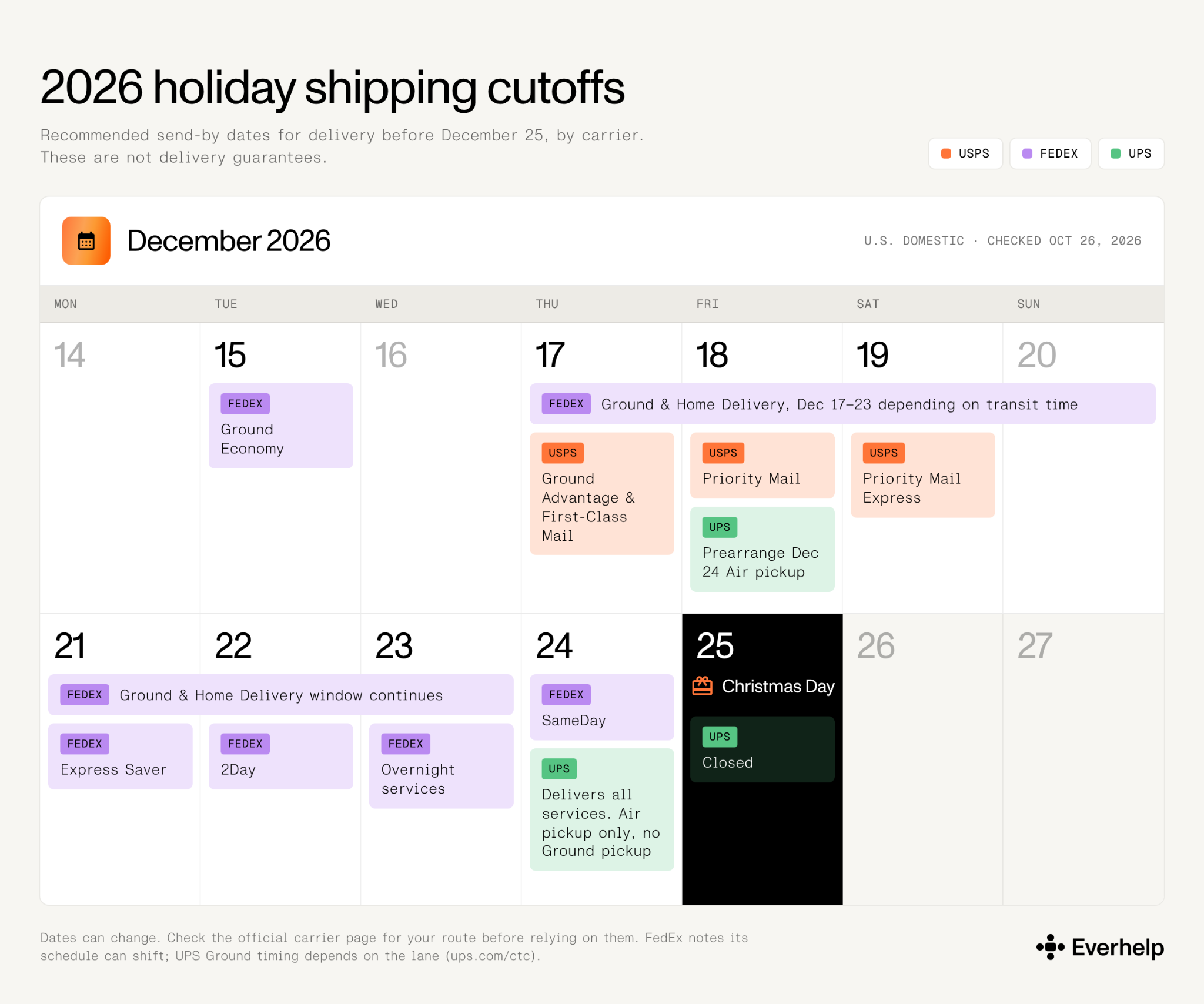
Here are the primary carriers' recommended send-by dates (NOT delivery guarantees), and they can change. Check the official carrier page for your route before relying on them — FedEx notes its schedule can shift, and UPS Ground timing depends on the lane.
‍

  • USPS, contiguous U.S.: Ground Advantage and First-Class Mail by December 17, Priority Mail by December 18, and Priority Mail Express by December 19 for expected delivery before December 25.

  • FedEx, U.S. domestic: Ground Economy by December 15; Ground and Home Delivery December 17–23 depending on transit time; Express Saver by December 21; 2Day by December 22; overnight services by December 23; SameDay by December 24.

  • UPS: closed December 25, with December 24 delivery running for all services but pickup limited to Air and international Air prearranged by December 18 and no Ground pickup. For lane-specific Ground timing, use UPS Calculate Time and Cost (ups.com/ctc).
2026 carrier cutoff dates (checked October 26, 2026)

Peak season staffing options for Q4 volume

When considering the right peak season staffing model, think bout 4 things: 

‍

  • How early you start.
  • How volatile the queue is.
  • How much product and logistics judgment the cases need.
  • And whether the demand outlasts Q4. 

Here's how the common peak season staffing options compare.

The different support staffing models for peak season

Staffing model Ramp profile Cost when volume drops Best fit Main risk
In-house seasonal hires
  • Heaviest internal lift
  • Recruiting, training, scheduling, and QA stay with you
  • Payroll ends with the contracts
  • Hiring and idle-shift costs already spent
  • Strong internal trainers
  • Mature SOPs
  • Predictable schedules
  • Late hiring, uneven quality
  • Thin logistics judgment
  • Knowledge lost after peak
Shared support team
  • Faster when a trained pool and workflows already exist
  • Steps down without keeping a full team
  • Steady coverage
  • Volume below dedicated-team level
  • Agents split across projects
  • Access, routing, and knowledge freshness must be explicit
Dedicated support team
  • Needs lead time: selection, integration, training, and a parallel run
  • Least flexible if kept after volume falls
  • Contract sets the step-down
  • High, sustained volume
  • Complex tools
  • Strict brand, language, or SLA rules
  • Overcapacity after peak
  • Undertrained launch if started too late
AI-first triage with human escalation
  • Quick only when the knowledge base, live order/carrier data, and escalation rules are ready
  • Automation cost tracks volume
  • You still fund a human exception team
  • Status WISMO, FAQs
  • Classification, prioritization, routing
  • False resolution, stale data
  • Poor handoffs
  • Unsafe automation of claims

A shared team is specifically suited to a peak season logistics operation that needs steady, trained coverage but doesn't have enough volume for a full-time dedicated team. Agents work across several clients, so you pay only for the capacity you use. For short or spiky surges, on-demand customer support covers overflow without a permanent hire. The same model works beyond logistics, too — hospitality teams use peak season outsourcing for the same reason.

‍

How to choose:

‍

  • In-house seasonal hires when internal control matters most, and you can start the process early.
  • Shared coverage when demand is meaningful but uneven, or below dedicated-team needs.
  • A dedicated team when volume and complexity persist past Q4.
  • AI-first triage only when live data feeds it and a named human owns every exception.

{{cta}}

What to have in place before peak: the ShipGerman setup

Our client ShipGerman is actually a logistics company that serves as a proof of concept for pre-Q4 support readiness. For this project, we built the support foundation before peak, which enabled successful business scaling later on. 

‍

When Everhelp took on the ShipGerman case study, there was no support team. The CEO handled customer requests himself. And most operating knowledge lived only in his head. Few teams start from zero like that. But the same weak spots — undocumented knowledge, no clear escalation path or processes, no quality checks — are what peak volume tends to expose.

‍

Before you add headcount, put the scaffolding in:

‍

  • Document existing logistics processes and internal-tool instructions.
  • Build a usable knowledge base for parcel tracking, address changes, forwarding, and shipping questions.
  • Set up a multi-tier escalation system so general requests stay at the frontline and complex cases reach the right owner.
  • Separate different channel service targets instead of reporting one blended FRT for all.
  • Add priority rules, SLAs, CSAT surveys, ticket evaluation, training, and quality control.

Once that foundation was in place for ShipGerman, our specialists delivered:

‍

  • 94% CSAT
  • 1-minute first response on chat, 10 minutes on email
  • 24-minute average chat resolution time
  • Escalation rate below 1%

These are our results from one logistics customer support outsourcing case study, not peak-season figures or a guaranteed outcome. However, taking these steps will prepare your business for high ticket volume. 
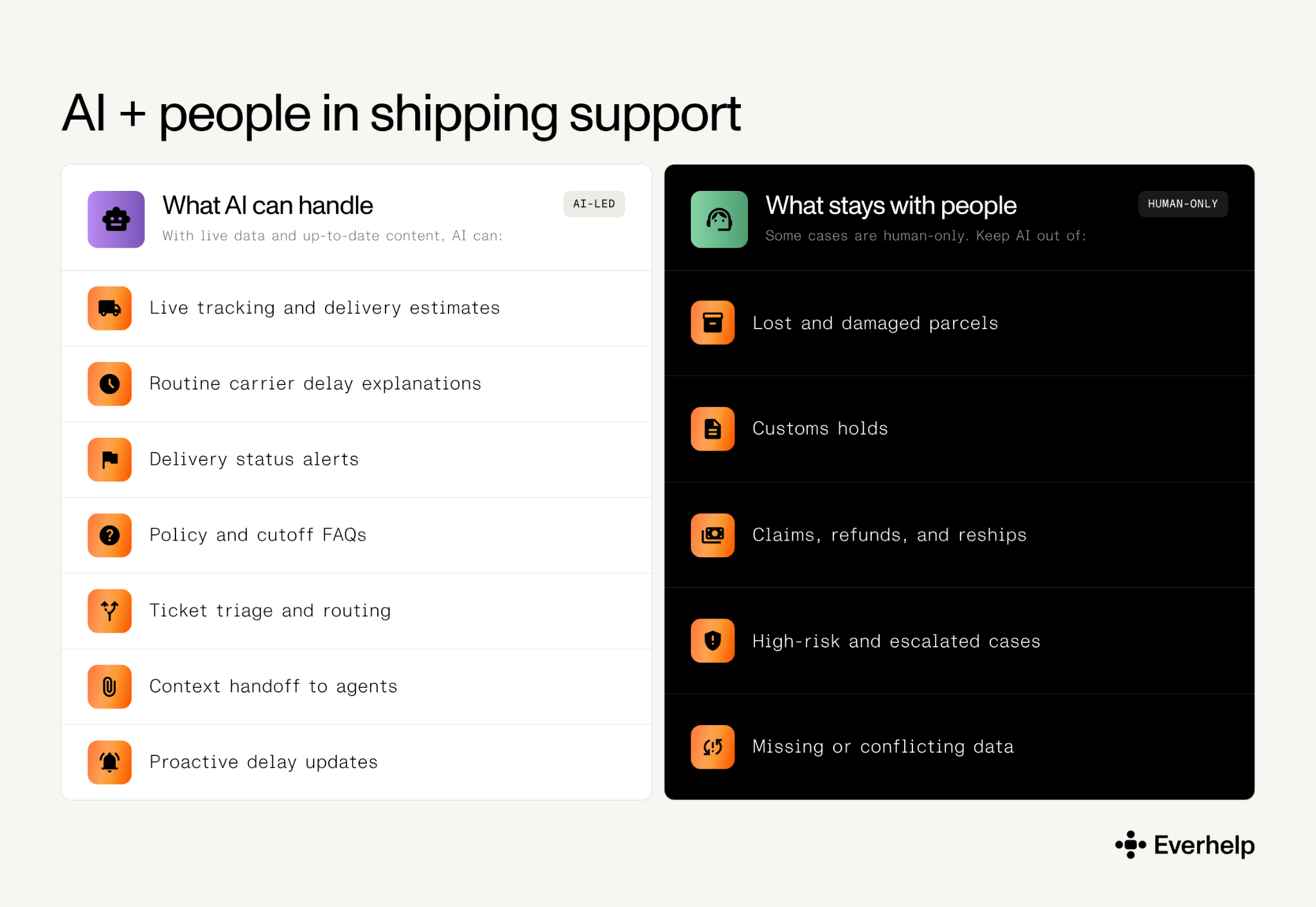
What AI can and cannot handle, even during peak

What AI can and cannot handle, even during peak

‍

AI can clear repetitive, low-stakes contacts off the queue, along with straightforward cases that follow a clear resolution path. It speeds up triage, too. But it only works when it has authoritative data and a controlled path to a human. Evly, our AI platform, connects to order-management systems and carrier APIs to pull live shipment status instead of guessing from a static knowledge-base answer. 

What AI can handle

With live data and up-to-date content, AI can:

‍

  • Pull a current tracking status and estimated delivery window.
  • Explain an ordinary carrier delay from live shipment data.
  • Flag out-for-delivery or failed-delivery status.
  • Answer standard policy and cutoff questions.
  • Classify, prioritize, and route incoming tickets.
  • Attach order and tracking context before a human picks up.
  • Trigger proactive delay messaging where the data and business rules support it.

What stays with people

Some cases are human-only. Keep AI out of the final decision on:

‍

  • Lost or damaged parcel investigations.
  • Customs-held shipments needing documents, duties, or case-specific judgment.
  • Claims, insurance evidence, reimbursements, reships, and refunds.
  • High-value, fraud-sensitive, legal, or emotionally escalated cases.
  • Anything where carrier or TMS data is missing, contradictory, or stale.

That’s why we recommend a human + AI customer support setup as a control model. In it, AI can assist with parts of a claim, but the final call on loss, damage, customs, and claims needs approved rules and the responsible human agent.

Deflection vs resolution

When analyzing your first AI resolution rates, beware to not mix up deflection and actual ticket resolution. Deflection counts the contacts that never reached a human. It says nothing about whether the problem got solved — that's resolution. 

‍

Gartner’s 2024 study shows the difference: self-service (a deflection tool) resolved only 14% of customer service issues, while the resolution rate for simple cases reached 36%. And a contact you deflect but don't resolve comes back, often as yet another ticket.

‍

So judge peak AI capacity on durable, zero-touch resolution and escalation accuracy, not deflection alone. We have found that:

‍

  • Realistic day-one resolution is between 0–40%;
  • Which can rise to 60–70% after 6–12 months of tuning;
  • And become 75–90% for the best ecommerce setups handling returns and WISMO.

‍

{{cta}}

Preparing your support for peak season in 4 weeks

Four weeks is enough to get an already-documented operation ready for peak season shipping. It's not enough to recruit, train, and calibrate a brand-new outsourcing support team from scratch — that takes longer.

‍

So, treat the breakdown below as our own minimum ramp-up schedule. Our experience shows it’s possible to complete selection and training in weeks 2–3, move to a parallel run and QA in weeks 3–4, and achieve full handover in a little over 4 weeks.

A 4-week peak support countdown

Timing Workstream Required actions Exit check
4 weeks out Forecast, cutoffs, knowledge
  • Forecast contacts (shipped orders × historical rate)
  • Map promotions, promised dates, cutoffs & closures
  • Audit top intents; update delay, address, customs, loss, damage, claim & refund SOPs
  • Build approved macros & validate integrations
  • Publish order-by dates
  • Every common intent has an owner, answer, data source & escalation trigger
  • Cutoffs link to current carrier sources
2 weeks out Staffing live, training, escalation
  • Put the chosen model into production
  • Run agents on shoulder-period tickets; calibrate QA
  • Test permissions & handoffs
  • Assign carrier, customs, claims & refund owners
  • Test proactive delay messaging
  • Agents pass scenario checks
  • Owners acknowledge SLAs
  • A failed tracking lookup reaches a human with full context
Peak week Daily queue control
  • Review backlog, oldest ticket, FRT, reopen rate, carrier incidents & promised-date misses daily
  • Route status-only WISMO to AI where live data exists
  • Prioritize address & delivery changes
  • Split out loss, damage, customs & claim cases
  • No exception queue hides in the general inbox
  • Routing uses current signals, not weekly averages
Post-peak Returns wave & debrief
  • Hold capacity for returns, refunds & claims
  • Reconcile open carrier cases
  • Compare forecast with actuals by intent & carrier; calculate contacts per order
  • Log knowledge gaps
  • Decide what to keep for Q1
  • Every open claim has an owner & deadline
  • Next year's forecast inputs are written down

Run peak season logistics reviews daily

During peak week, review the queue every day. Problems cluster — a carrier delay, a cutoff, a promo spike — and weekly averages smooth those days out of view.

‍

That’s why we advise establishing two safeguards from the get-go:

‍

  • Keep a kill switch on proactive messaging — turn it off the moment carrier data goes stale or a message stops being accurate.

  • Track returns as a separate workstream — they peak after Christmas, and eCommerce returns management needs a staffing plan of its own.

And let’s not forget that what makes a “peak season” isn’t just deliveries. Flash sales and BFCM traffic create a separate storefront queue that needs its own Black Friday customer service prep.

Interested in more proof that our model holds up under real holiday load? Read our peak season eCommerce case study about the Brava Fabrics retailer. 

Set yourself up for a realistic & successful sale launch

Timing decides what's possible. At Everehelp, it takes us about 28 days to train and launch a live support team, and we start Black Friday prep with clients back in September. So if you're reading this mid-season, a brand-new team won't be ready for this year's BFCM. But it can still cover December's delivery exceptions, the post-holiday returns wave, and your Q1 volume. For the gap right now, we’d recommend looking into adding on-demand capacity to absorb overflow without a long ramp.

‍

Book a meeting, tell us where your peak lands, and we'll map the earliest realistic start date and the setup that fits — shared, dedicated, or human-plus-AI.

FAQ

What is peak season shipping?

Peak season shipping is the stretch when order and parcel activity climbs around major shopping events and year-end holidays. It affects fulfillment, carrier capacity, delivery promises, support volume, and returns.

When should peak season staffing begin?

Ideally months ahead — we start Black Friday prep with clients in September and launch new operations in about 28 days. But if you're starting now, there's still time to tighten your setup. Work through this guide's steps — forecasting, SOPs, escalation, macros — and your existing team can be ready for the surge. For overflow, book a meeting with our team to discuss on-demand help.

How do holiday shipping delays affect customer support?

Uncertain or missed delivery promises result in:

  • WISMO
  • Address changes
  • Failed-delivery questions
  • Loss and damage reports
  • Customs cases
  • Refunds
  • Replacements
  • Claims

Holiday shipping delays tend to cluster after promotions, scan gaps, carrier incidents, and order-by dates rather than rising evenly, so staff for waves, not a flat line.

What is WISMO in logistics?

WISMO stands for "where is my order" — a customer asking for the current location, status, or expected arrival of an order. A routine status lookup differs from a delivery exception, which needs investigation and may require a carrier, warehouse, customs, claims, or refund owner.

Can AI answer "where is my order?" tickets?

Yes, when it can pull current order and carrier data. Evly connects to an OMS and carriers by API for live tracking. Cases with missing or contradictory data — or loss, damage, customs, claims, or high-stakes judgment — should be handed off to a human support agent.

Help someone else stay in the know. Hit that share button!
Get your support ready for peak season
Outsourced customer service

Relevant Articles

Process Efficiency
Support Ops & Teams
How-to Guides
17.10.2026

Zendesk Salesforce integration: Setup guide, key challenges & solutions

The Zendesk Salesforce integration isn't just a two-way sync. See what syncs, how to set it up, which problems to expect, and how to deal with them.
read article
AI & Automation
Process Efficiency
How-to Guides
08.10.2026

AI knowledge base: build one your AI can actually make useful

Learn what an AI knowledge base is, how it works, and why stale content fails most of them. Get actionable tips on keeping your KB accurate.
read article
Valentyna
VP of Customer Support
Technical Support
Customer Experience
Industry-specific
Tech Stack &Reviews
01.10.2026

The best multilingual SaaS support providers that hold up at Tier 2

Most multilingual SaaS support providers stay fluent until Tier 2. See which ones hold up on complex tickets, and how to pick the right fit.
read article
Daryna Severenchuk Delivery Manager
Daryna
Delivery Manager
Customer Experience
Customer Support
Support Ops & Teams
How-to Guides
23.09.2026

The support team’s guide to customer lifecycle stages

See what the 5 stages of the customer lifecycle are and exactly what your support team should be doing at each one to reduce churn.
read article
Valentyna
VP of Customer Support
AI & Automation
Process Efficiency
How-to Guides
Free Calculators
18.09.2026

Customer service escalation process: How to design a chatbot-to-human handoff that works

Design a customer service escalation process that protects CSAT. Learn about 5 handoff signals, a 3-tier matrix, and get a free template now.
read article
AI Integrations Lead Oleksandr Levchenko
Oleksandr
AI Integrations Lead
Customer Experience
Strategy & Trends
10.09.2026

Gen Z customer service expectations vs. every generation

See how support expectations shift across generations - from Gen Z's self-service habits to Boomers' preference for the phone.
read article
Valentyna
VP of Customer Support