AI & Automation
Process Efficiency
Published on
18.09.2026
Last updated on
18.09.2026
Customer service escalation process: How to design a chatbot-to-human handoff that works

Oleksandr
AI Integrations Lead

Oleksandr
AI Integrations Lead
.webp)
Most customers don't mind being passed from a bot to a person. What they mind is a) not being given that option at all, b) explaining the context over again. Pushbacks and re-explanations are where customer service escalation processes usually break down.
Zendesk's 2026 CX Trends report found that 74% of customers are frustrated when they have to repeat information they've already given, and 81% want the next rep to continue exactly where the last one left off. Of course, escalations don’t really help meet expectations. SQM Group's benchmarking shows first-contact resolution runs about 19% lower for customers transferred into an escalation queue than for those who aren't.
Despite escalations carrying a bad reputation, the handoff itself isn’t the problem. The damage comes from pushing back on AI interactions and losing the customer’s context, forcing them to repeat themselves. When conversations are properly escalated, they recover to healthy satisfaction scores.
Below we will get into more detail on what “properly” means, including the 5 signals that should trigger a handoff, a 3-tier escalation matrix you can map to your own operation, and a free template to build from.
An escalation process for customer service is the set of rules that decide when an issue moves to someone (or something) with more authority, context, or expertise to resolve it. In a human+AI support model, the AI handles the first line of support and a human agent is the next step up.
Traditional support routes calls through static menus and keywords: press 2 for billing, or a rule that flags the word refund. AI-agent escalation routes on two things instead:
However, a model's self-reported confidence isn't a trusted source on its own. The ICLR 2024 study by Xiong and colleagues found that LLMs tend to be overconfident when they verbalize their confidence, with accuracy inside each confidence band landing well below the number the model reported.
Note: A bot claiming 90% certainty can be closer to 75% right. Build your whole handoff logic on that one number and you'll under-escalate exactly when the stakes are highest.
A better approach pairs the grounding and confidence check with signals from the customer's behavior and situation: frustration, a high-value account, or a request you're not allowed to automate. That’s when the escalation should start. And because even well-tuned automation still sends plenty of conversations to a human, your escalation design decides what happens to every ticket the bot can't close.
Read more: If you're still deciding where automation fits, check our customer support automation guide, and there's a wider view in our take on AI customer experience.
Here’s how the AI-escalation process usually goes.
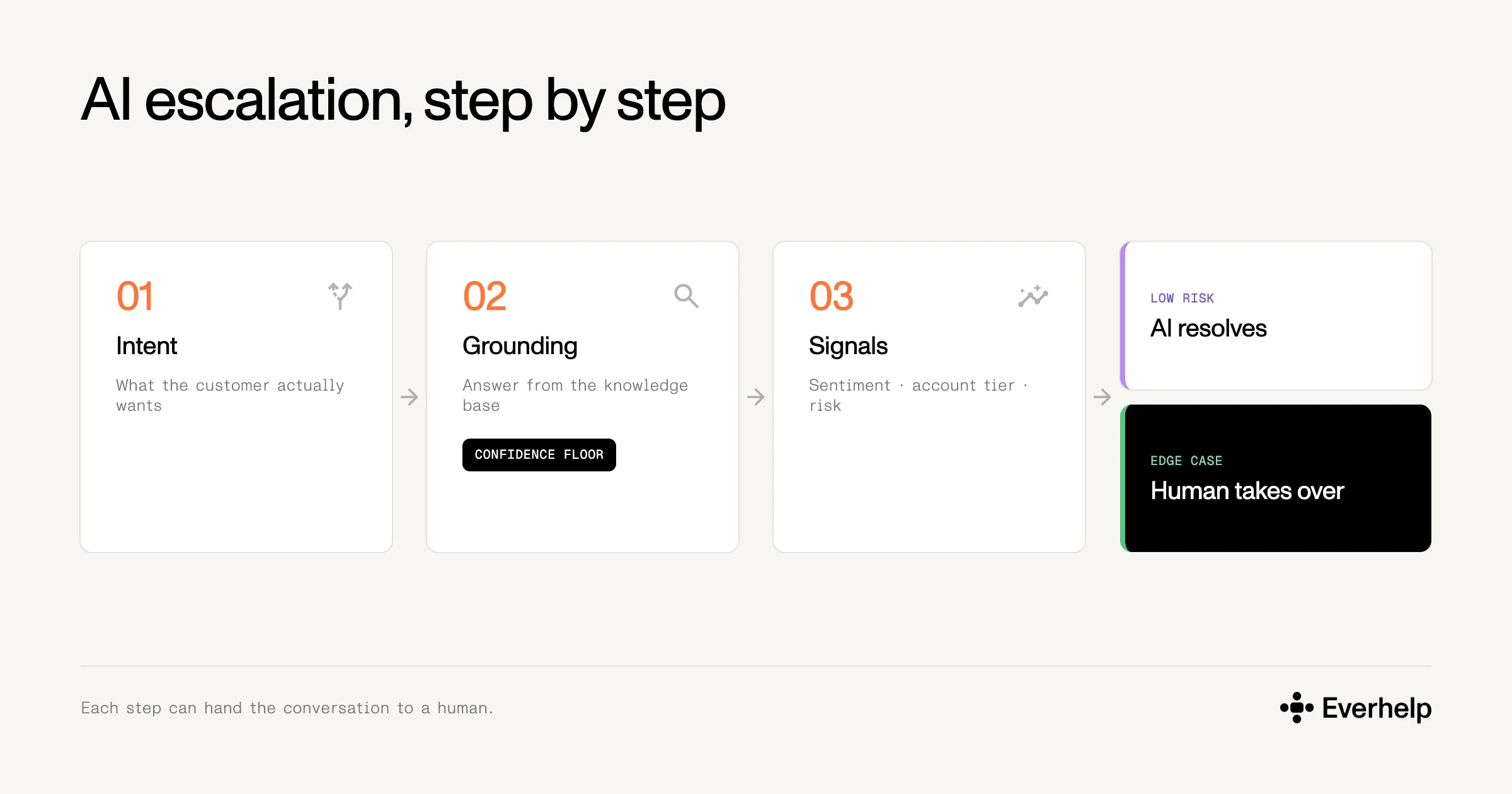
Begin by working out what the customer actually wants. Your customers’ intent should drive the triaging:
If you misread the intent, the whole ticket will be routed the wrong way and the customer will leave dissatisfied.
This is the grounding stage, during which the AI agent sources the required answer based on your knowledge base. The confidence floor — the minimum score the AI must clear to answer on its own — is a second gate applied after grounding, and is raised for riskier topics.
The process then reads the signals around the conversation:
In detected special/edge cases, transfer to a human should override the info-sourcing path to improve CSAT after resolution. If the case is solvable with AI by providing instructions without risk, the path follows the established AI flow.
{{cta}}
When we talk about the pros and cons of AI in customer service, the question of when an AI agent should escalate to a human agent is the one that comes up most. It rarely has a direct answer, as the signals may differ from business to business and customer to customer. Yet, the following 5 triggers can help you calibrate the thresholds, even against your own transcripts.
This is when the AI can't actually source a reply from your knowledge base but produces one anyway. This can leave customers walking away misinformed, which is worse than if the bot had just passed them to a person.
To avoid confident wrong answers, check grounding first: can the AI trace its answer to the information in the knowledge base? If it can't, escalate.
We advise:
→ Treat any numeric confidence threshold as a second gate on top of that.
→ Set higher for riskier topics
→ Calibrate it against your own transcripts rather than a vendor's default.
A frustrated customer rarely calms down while a bot keeps missing the point, and at that stage feeling heard matters more than resolution speed. Still, it’s better to escalate on sustained negativity than on a single sharp message.
We advise:
Waiting for two negative turns in a row before you escalate keeps the system from overreacting to sarcasm or a single vented complaint. It also holds the volume of sentiment-based escalations down, so your human agents don't get buried.
Every failed loop teaches the customer that the bot can't help them, and each retry tests their patience. By the third attempt, most will have given up on automation entirely.
We advise:
Following the two-strike rule:
→ if the AI fails or gets marked unhelpful twice in a row on the same task, hand off.
→ Send the failed attempts along with the handoff so the agent picks up where the bot stalled.
That’s why it’s also necessary to track KPIs for customer service AI agents. They show performance and let you adjust workflows where needed.
Some accounts you just can't afford to lose. When one of them is on the line, the cost of a bad interaction is higher, and treating a key account like general traffic leaves it exposed. So move these customers to a human sooner, ideally through a warm, human-assisted path. Yes, escalating earlier costs a little more. Think of it as insurance on the relationships that matter most.
We advise:
→ Escalate these customers earlier than you would for standard traffic, after the first strike (the first failed attempt).
→ Raise the confidence bar so borderline answers route to a person instead of getting attempted.
→ Tighten the first-response target for the priority tier — set it from your SLA template
→ Make sure the AI briefs the human agent, passing confirmed identity, an intent summary, and any steps already tried, so the agent opens with the full context.
Some topics carry legal, financial, or security consequences that can’t be subjected to automated workflows.
We advise:
→ Hard-route billing disputes, refunds and cancellations, security, legal, and regulated requests straight to a person.
→ Skip the confidence check entirely.
→ Always prioritize an explicit talk to a human request the moment it's made, with no pushback.
An escalation matrix maps each support tier to the conditions that move a ticket up, who owns it, and the target response time. Most operations structure support tiers. The tiers run from the AI agent (Tier 0/1), to a Tier 1 human, to a Tier 2 specialist or supervisor.
Whenever you structure the escalation, organize a warm handoff. As we mentioned earlier, it’s a transfer that also includes information on the customer’s identity, intent, and the actions already taken on their case.
Cold transfers (when the customer explains the case over) are fine for simple overflow routing and almost nowhere else. This is because the AI-to-human transition is already the most fragile point in the journey. COPC's 2025 research across six markets has confirmed this, finding that:
Thus, for the escalation to be successful, it needs to include the following information:
Our escalation matrix template is a simple grid: roles by trigger conditions by target response time per tier, plus the context-payload checklist above. Fill in your own confidence thresholds and intent categories after reviewing a few weeks of real escalation transcripts.
{{cta}}
Most CSAT damage in the AI chatbot to human handoff can be narrowed down to a short list of repeatable mistakes.
The single biggest CSAT killer. Re-explanation is what customers hate most about handoffs, and dropping context makes it unavoidable — 74% report frustration at repeating information (Zendesk, 2026).
Bouncing a customer through automation before they reach a person, then bouncing them back, compounds the failure. COPC found that after a failed AI interaction in the US, full resolution happened only about half the time (COPC, 2025).
Pushing a customer through a 4th or 5th round of clarifying questions erodes trust well before the bot gives up. The same goes for pushing back when someone asks for a human.
In our AI webinar with Tidio, their deployment data showed 60% of customers who ask to be transferred then follow up with something routine the AI could have handled, so the request usually comes from frustration or habit rather than real complexity. Read those frustration signals and offer the handoff before the customer has to demand it.
Over-escalation spends the higher cost of a human ticket on problems the bot could have closed, especially as the cost of generative AI is projected to rise. But even more than that, it undercuts the customers who are happiest self-serving.
COPC found 74% of customers were satisfied with their most recent AI interaction, and that number rises to 90% when the AI fully resolves the issue without any further steps (COPC, 2025).
Some requests carry serious consequences, so the AI shouldn't own their processing: billing disputes, account security, and anything legal or regulated. On these, a leaked account detail or bad guidance on a regulated product creates real financial or legal exposure, not just a dented CSAT score.
So hard-route them to a person, no matter how confident the AI looks. This is the one signal where the confidence floor doesn't apply and the routing rule is unconditional.
There's a real temptation to keep it quiet. In a field experiment with over 6,200 customers, undisclosed chatbots sold about as effectively as proficient human agents, but revealing the bot's identity up front cut purchase rates by 79.7%, because customers judged the disclosed bot as less knowledgeable and less empathetic.
That bias is exactly why hiding it only works until the customer finds out, and someone who feels tricked trusts you much less. In support, where people mostly want a fast fix, disclosure doesn't carry that sales-context penalty, and it's now a legal requirement. From 2 August 2026, the EU AI Act's Article 50 requires you to inform people they're interacting with AI at the first interaction, with fines up to €15 million or 3% of global turnover.
Our AI agent model treats the AI as a relay, not a replacement. Our tool Evly:
Still, Everhelp’s human agents remain part of the equation, focusing on complex escalations or cases that need human judgment from the start. When confidence is low, or intent is ambiguous, Evly escalates rather than guessing.
In our view, this hybrid support model beats both human-only and AI-only setups. Across our deployments, average CSAT ran at 47.6% with human-only, 58.8% with a standard bot, and 64% with the AI Copilot setup.
None of this is extraordinary. Teams that keep escalated CSAT healthy have usually defined, ahead of time, the point where the AI should stop and exactly what it owes the person who takes over (and who that person should be).
Of course, you can only set eligible confidence floors when you draw from your own data: ticket processing costs, call center metrics that matter in your case, the most popular escalation signals you face, and the context that needs to be transferred from the bot to the agent.
So, if you want to start reviewing your escalations, we recommend pulling last month's escalation transcripts and reading the handoffs that went wrong. Your real matrix is hiding in there. And if building it from scratch isn't how you want to spend the quarter, book a meeting with our team so we can review your Human+AI setup and suggest better ways to structure it.
{{cta}}
The customer service escalation process is the set of rules that decide when an issue moves to someone with more authority, context, or expertise to resolve it, and how that handoff happens. A traditional setup routes on menus and keywords. With an AI agent, it routes on intent and confidence. As such, the AI resolves routine tickets and escalates the rest to a human with full context.
We can say that a working escalation runs through 7 stages:
A handoff is when an AI agent transfers a conversation to a human. What protects satisfaction is a warm handoff: the AI passes full case context before connecting the customer, so the human picks up mid-stride instead of asking them to explain everything again. A cold handoff drops that context and forces a customer to repeat themselves, which is why a warm handoff is the default worth building toward.
Help someone else stay in the know. Hit that share button!
%20(1).webp)






.avif)