Technical Support
Industry-specific
Support Ops & Teams
Growth & Metrics
Published on
24.11.2026
Last updated on
24.11.2026
Involuntary churn: How to calculate the cost & recover payments

Hlib
Delivery Manager

Hlib
Delivery Manager

Some of your churned customers never decided to leave. Their card expired, a renewal got flagged, or a payment failed in the background, and the first time they heard about it was when they saw their account locked.
That’s what we call involuntary churn in support. According to Recurly's July 2026 benchmarks, involuntary churn runs at 1.25% across all industries, and for SaaS businesses, that rate sits at 1.06%.
This raises the question: how many of your "churned" customers never meant to go? In this guide, we will not only explain the involuntary churn phenomenon, but also show how to calculate it and how to implement the right SaaS customer support to decrease it.
Short on time? Here’re a couple of things you should definitely know about involuntary churn:
In the guide below, you will also find 2 tools: the involuntary churn calculator to size the revenue at risk, and 5 failed-payment scripts that cover chat, phone, and email customer recovery.
Involuntary churn is when a subscriber loses access to their account because a subscription payment failed (as per Recurly). The causes of this are usually mundane:
Some accounts are more exposed to involuntary churn than the others. They concentrate at the low end of your pricing. In the same Recurly 2026 benchmarks study, it fell 87% from the lowest revenue tier to the highest, from 1.30% of subscribers at $10–25 ARPC to 0.18% at $250 and above.
The takeaway: Budget and consumer plans fail far more often. High-value accounts rarely fail, but each loss costs you more.
For the fuller picture, these rates sit inside wider SaaS retention benchmarks.
Though both rates show the number of lost customers, the difference between voluntary vs. involuntary churn is the cause:
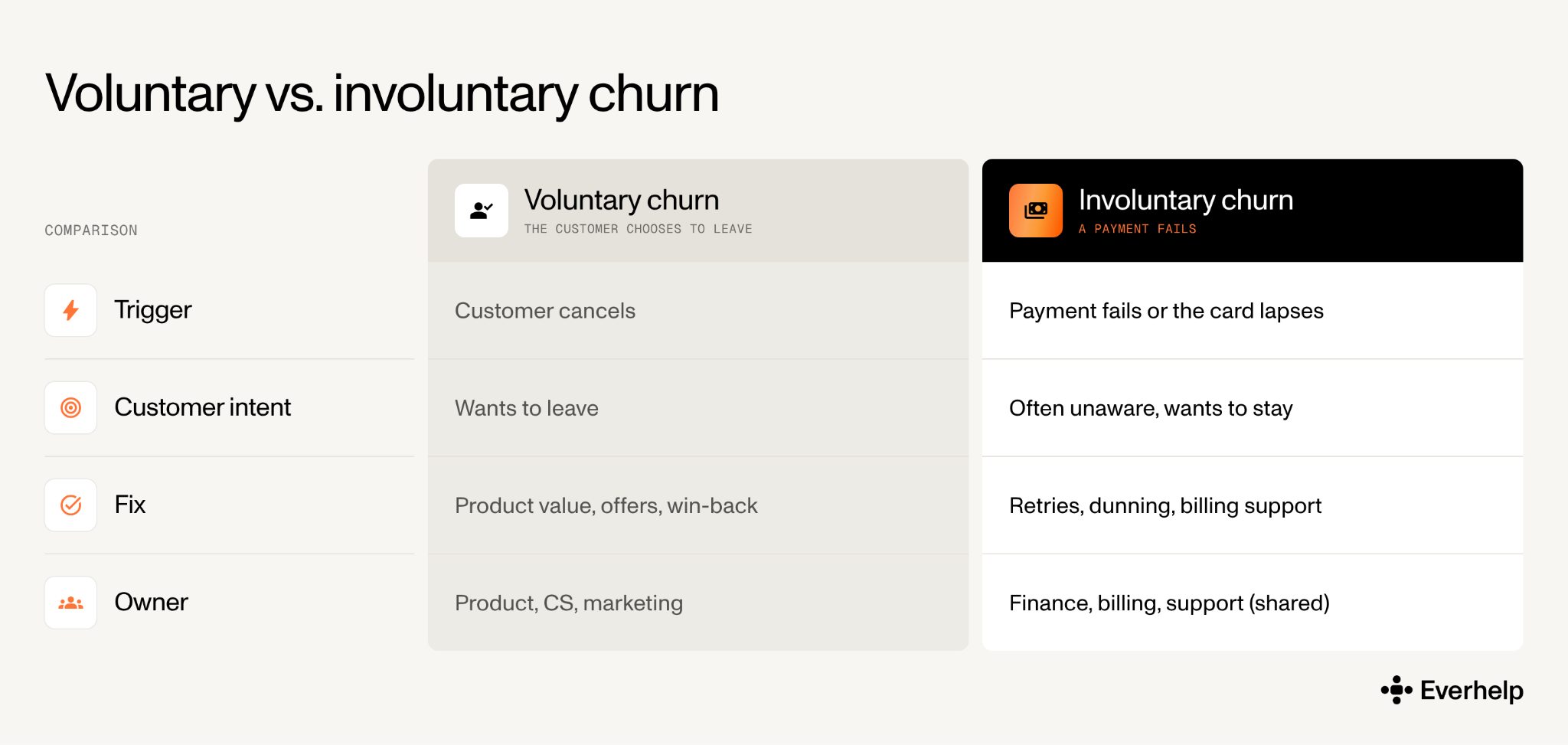
Left unresolved, involuntary churn can turn into voluntary churn. A customer who keeps getting dunning emails they don't understand will decide the charge is a mistake and eventually cancel on purpose.
See how churn fits across the customer lifecycle stages.
About 30% of card accounts in an issuer's portfolio change number, change expiration, or close each year, from Visa's own VAU FAQ. And though these are some of the primary payment failures, they aren’t the only ones. The differences among these reasons will help you decide whether you can automate processing and try to recover those customers.
The card declines that cause subscription failures can be split into 2 groups:
A soft decline means the payment could work on a later attempt. This can happen due to insufficient funds, an issuer timeout, or a hit limit. A hard decline means the issuer won't approve this card at all. This can happen if a card is stolen, closed, or has an invalid number. They are harder to automate. Stripe, for instance, won't retry hard decline codes because retrying a closed card just fails again.
{{cta}}
To calculate involuntary churn, start with the revenue exposed to failed payments each month, and then see which part you can recover:
→ Monthly revenue at risk = active subscribers × ARPA × monthly failure rate
→ Monthly revenue lost = revenue at risk × (1 − current recovery rate)
→ Recoverable gap = revenue at risk × (target recovery rate − current recovery rate)
For the annual calculations, simply multiply your figures by 12.
Example: Just for practice, let’s say you have:
→ 10,000 subscribers at $40 ARPA
→ and 6% of renewals fail each month
→ $24,000 of MRR is at risk.
Recover half, and you still lose $12,000 a month, close to $144,000 a year. Lift recovery from 50% to 70%, and you keep an extra $4,800 a month, about $57,600 a year.
To go easy on you with the math, we’ve created a calculator that takes into account 7 inputs, including the numbers from the support side:
The calculator will show you three outputs, each shown monthly and annually:
Most subscription payment recovery starts with automation, and it should. Retries and dunning can be enough to handle simple, soft failures. However, there should be a hard line where the automation stops.
Stripe's Smart Retries use machine learning to pick retry times instead of a fixed schedule, and new accounts default to up to 8 retries across 2 weeks. The customer does nothing, and most of these recoveries need no contact at all.
A card updater fixes stale cards before they fail. When a card is reissued, it automatically pulls the new number and expiry date from the card network, so a replaced card still charges on renewal.
Note: Both are built for card payments only. Stripe's AI retries don't cover Direct Debit, which falls back to rule-based attempts. Within that scope, keeping retries and your card updater running clears most soft declines before the customer notices.
The dunning process is the sequence of automated messages that asks a customer to fix a failed payment. Usually, it:
To keep this email sequence working, follow two rules:
Still, dunning emails share the same weakness as other customer service emails: the customer can ignore every message in the sequence. That's why dunning alone recovers only so much.
One of our earlier clients, Skyfluence, came to us with no billing flow. When customers disputed a charge or flagged a transaction they didn't recognize, those tickets went unanswered. To keep customers, we introduced a billing dispute support flow. The agents’ primary function was to deal with a customer who:
As a result, we dropped the refund rate below 4% while maintaining 84.1% CSAT.
Why is providing access to real agents one of Saas customer support best practices? Because billing support is the last line before involuntary churn becomes voluntary churn, and your last chance to keep customers.
{{cta}}
Retries and dunning eventually stop working, leaving a failed payment and a frustrated customer who experienced it. Clearing those accounts is the job of billing support, which should:
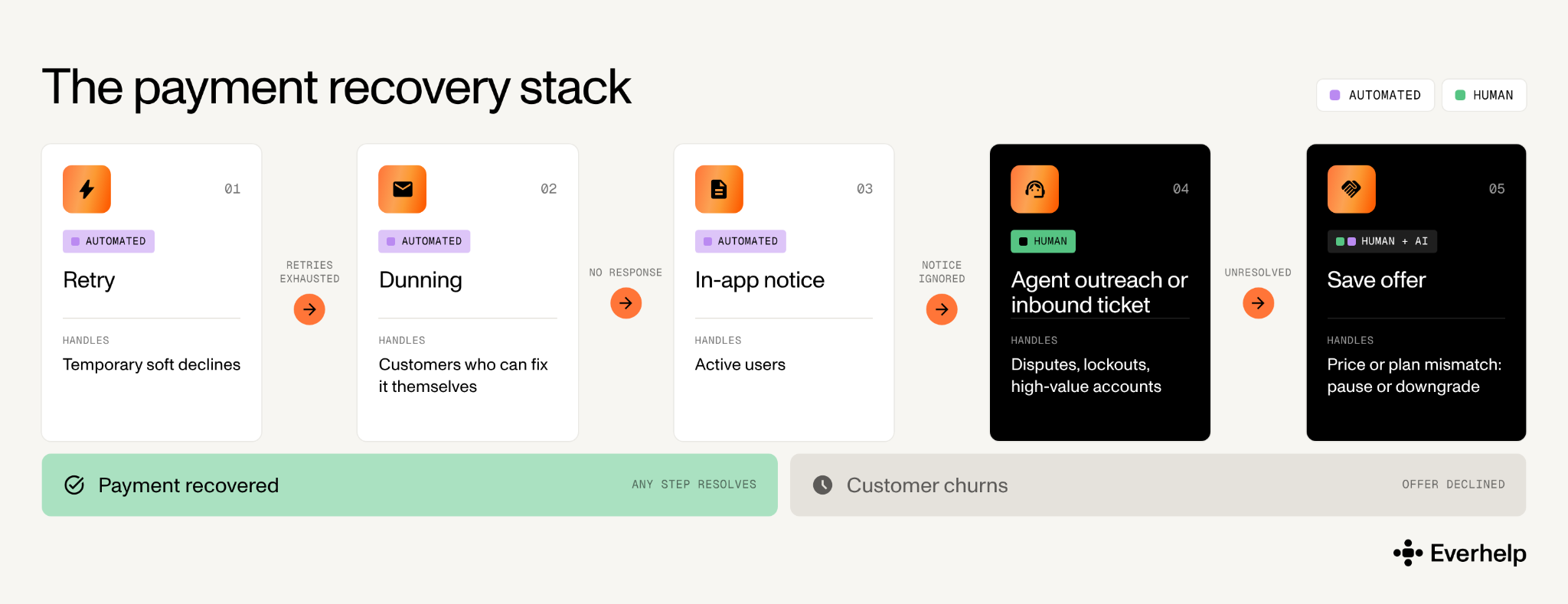
See how billing recovery becomes one part of the back-office support that keeps revenue operations running.
Your team needs to be ready to handle 5 types of conversations. Below, we provide a copy-ready script for each, so your agents can adapt it to the situation.
Here’s what you’ll get:
Reducing involuntary churn must be part of your broader SaaS customer retention strategy. It’s mostly about closing gaps before they reach a customer. There are 6 ways to do that:
Done together, these prevent involuntary churn from compounding. Each failure you catch earlier is one your team doesn't have to recover later.
At Everhelp, billing support runs as a hybrid system of automation plus people:
We saw how important it is to keep that human side when working with Keiki.

By routing its more complex billing tickets straight to the agents who could settle a dispute or issue a refund, we achieved a 10% lower refund rate. In other cases, we’ve also incorporated Evly to handle routine tickets, so agents' time stays dedicated to what really needs judgment.
Handling payments always means handling regulated data. See how we approach fintech customer service.
Involuntary churn is one of the few churn problems you can fix without changing your product. As you may have guessed, automation is a good way to cover the softer issues. The rest of customer recovery depends on whether someone reaches them before the customer gives up on the account.
At Everhelp, we understand that divide-and-conquer approach. So, if the numbers you see in our calculator aren’t satisfying enough, book a meeting with us. Our team will discuss how to organize your support efficiently enough to lower the revenue-at-risk rate.
It depends on volume, dispute complexity, and PCI scope. Low volume with simple disputes can stay in-house. High volume or heavy payment-provider disputes often go to a customer support outsourcing partner with billing-trained agents. A hybrid setup is also common: you keep policy in-house and outsource the more technical conversations.
To find providers that can improve your billing flows, look for those that offer billing-trained agents, PCI-compliant workflows, and real SaaS experience. A few worth shortlisting:
For a wider comparison, see our rundown of the best multilingual SaaS support providers that cover Tier 2 support.
Not by taking full card numbers. According to PCI DSS, you have to keep raw card data out of chat, email, and call recordings. Agents need to send a secure, PCI-compliant support update link for the customer to complete the process themselves, so no one on the team ever sees or stores the card. That’s why, as an outsourcing provider, Everhelp maintains PCI DSS compliance and implements other safety measures to secure customer data. Check our trust center for more detail.
Contact them promptly, before access lapses. The faster a customer acts on a failed payment, the better your odds of recovering it, so send the first message as soon as the payment fails rather than on a set delay. There’s no universal number of hours to wait, so track your own recovery-window data and adjust to what works for your customers.
Both, with a clear handoff. Finance has to own the billing system, the retry rules, and the policy. Support owns the customer conversations: disputes, lockouts, and save offers. The key is the handoff, so a stuck payment doesn’t sit untouched while each side assumes the other is handling it.
There’s no reliable benchmark to aim at. The numbers you’ll find online come from vendors measuring it differently, so they usually conflict. Your best move is to measure your own recovery rate, then work to beat it. The calculator above gives you that starting number.
Help someone else stay in the know. Hit that share button!